

 EFForg
Reorganize Options UI "General Settings" and "Advanced Settings"
Type: feature request
This is a proposal to reorganize the Options UI of the extension, the provided images are just rough sketches of the logical structure and not style (I changed only HTML, but left CSS the same).
Current UI
The UI height changes based on the tab (and for "General Settings", even the number of disabled domains in the list). this causes UI to jump whenever a tab is hanged or domain is deleted from "disabled" list. I propose that the UI occupies the same amount of vertical space for all tabs.
General Settings
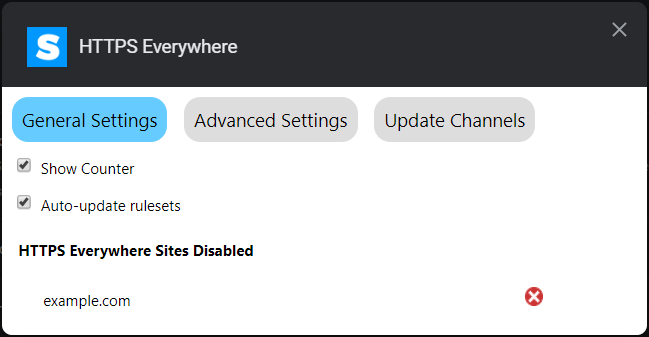
Issues:
- The distinction between "General" and "Advanced" settings is unclear.
- "Show counter" might be unnecessary as noted here
- If the "sites disabled" and "custom rules" lists are long, they get hard to navigate.
- In Chrome, when page gets too long, the whole page becomes scroll-able, including the tab buttons, which seems unnatural (tab buttons should always stick to the top).
Advanced Settings
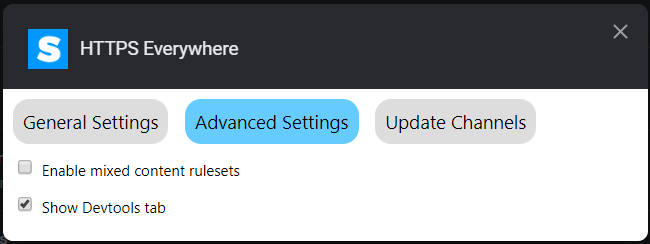
Issue:
- The distinction between "Advanced" and "General Settings" is unclear.
Proposal
- Make all tabs have the same height by making the UI fill all vertical space.
- Make the tab buttons smaller and fixed to the top of the page.
- Move "HTTPS Everywhere Sites Disabled" list and "User rules" form "General Settings" into separate tabs.
- Move all check boxes from "General Settings" and "Advanced Settings" onto the same tab called just "General Settings" or similar.
- For each checkbox item add a small explainer about what exactly it does (to clarify the impact of the setting and to fill up the extra vertical space).
Result (work in progress)
Edit: Please see pull request #17896 for up-to-date information. That PR also includes code necessary for a "Dark Mode".
I would like to hear you feedback and possible improvements. If this sounds like a reasonable idea, I can implement this change and create a pull request for review.

I wasn't even aware of this advanced settings. What "enable mixed content" do exactly? Should it be on or off?

@meelten
What "enable mixed content" do exactly?
It is a setting that is applicable only to the Tor Browser (not Firefox and Chrome). You can read up on it int the docs. You actually brought up a good point: since the setting does not do anything on Chrome and Firefox may be it should be removed from the UI altogether and the corresponding rulesets should not be loaded into the memory at all.
Mixed content rulesets actually refer to rulesets that, when enabled, might break part of the related website UI due to mixed content blocking. But some users might have other extensions to mitigate this issue and/or decide that the gain in security (more website are covered by HTTPS Everywhere) is worth the possible breakage and choose to enable these rulesets.
This setting is actually valid in any browser.

See also https://developer.mozilla.org/en-US/docs/Web/CSS/@media/prefers-color-scheme
