

 E2OpenPlugins
AutoTimer editors incorrectly handle "Only match between dates"
If an AutoTimer definition is date-restricted then it contains the 'after="date#1"' and 'before="date#2"' conditions. e.g.
root@beyonwizv2:~# grep Rosehaven /etc/enigma2/autotimer.xml
 <timer name="Rosehaven" match="Rosehaven" enabled="yes" id="82" after="1632931200" before="1633017600" avoidDuplicateDescription="2" searchType="exact" searchCase="sensitive" overrideAlternatives="1">
where the after condition value evaluates to (Perth) -
root@beyonwizv2:~# date --date=@1632931200    ## after
Thu Sep 30 00:00:00 AWST 2021
root@beyonwizv2:~# date --date=@1633017600    ## before
Fri Oct  1 00:00:00 AWST 2021
root@beyonwizv2:~#
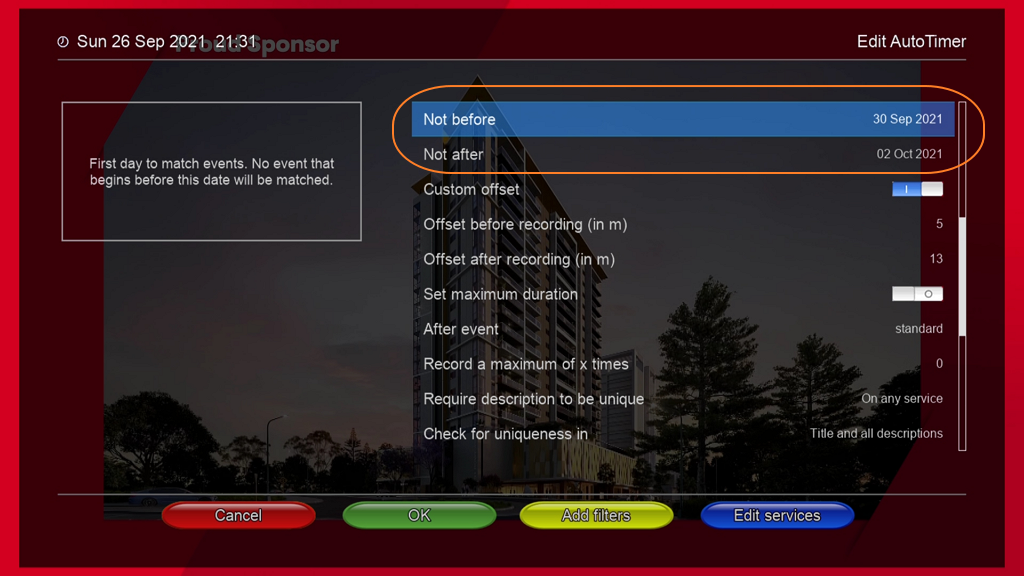
The AutoTimer GUI editor shows for that definition - "Not before - 30 Sep 2021 Not after - 01 Oct 2021"
With regard to the "after/before" (displayed - not before/not after) dates above, the OWIF Classic and Modern editors have different problems with the "Only match between dates" handling.
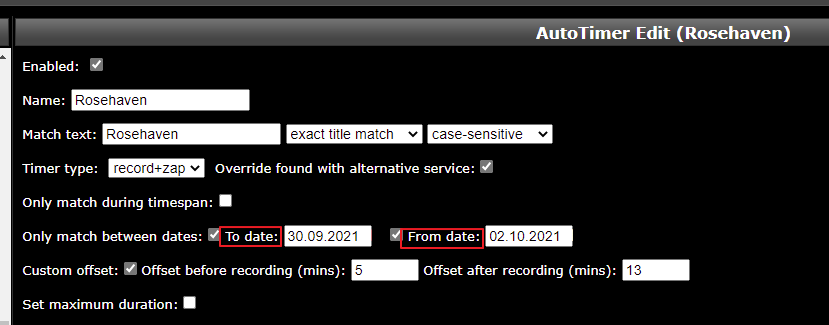
Classic editor: In the above case the Classic editor displays these dates incorrectly reversed as - "Only match between dates: To date: 30.09.2021 From date: 01.10.2021" If the date is changed, it will usually fail with an error as the OWIF editor treats them as labeled.
Modern editor: The modern editor handles this a bit better, but still incorrectly, as it displays the dates reduced by one day each - "From date: 29/09/2021 To date: 30/09/2021" But if a date is changed then we can see the time has actually been reduced by 16 hours (57,600 secs). e.g was - after="1632931200" before="1633017600" Then after extending the "To date" (only) by a day in the modern editor and saving, it reduces the dates/times by 16 hours -
<timer name="Rosehaven" match="Rosehaven" enabled="yes" id="82" after="1632873600" before="1633046400" offset="5,10" avoidDuplicateDescription="2" searchType="exact" searchCase="sensitive" overridternatives="1" always_zap="1">
root@beyonwizv2:~# date --date=@"1632873600"  ##after
Wed Sep 29 08:00:00 AWST 2021
root@beyonwizv2:~# date --date=@"1633046400"  ##before
Fri Oct  1 08:00:00 AWST 2021
root@beyonwizv2:~#

What I can see is that only new Modern view is completely wrong: wrong date as you describe (one day off), and meaning of "after" and "before" is reversed - but I think it's just the labels that are wrong, field name are correct.
IMO Classic view is correct; I have old autotimer entries, and everything is displayed as it should according to the entries in autotimer.xml. All entries were edited with OpenWebif's classic view

IMO Classic view is correct; I have old autotimer entries, and everything is displayed as it should according to the entries in autotimer.xml. All entries were edited with OpenWebif's classic view
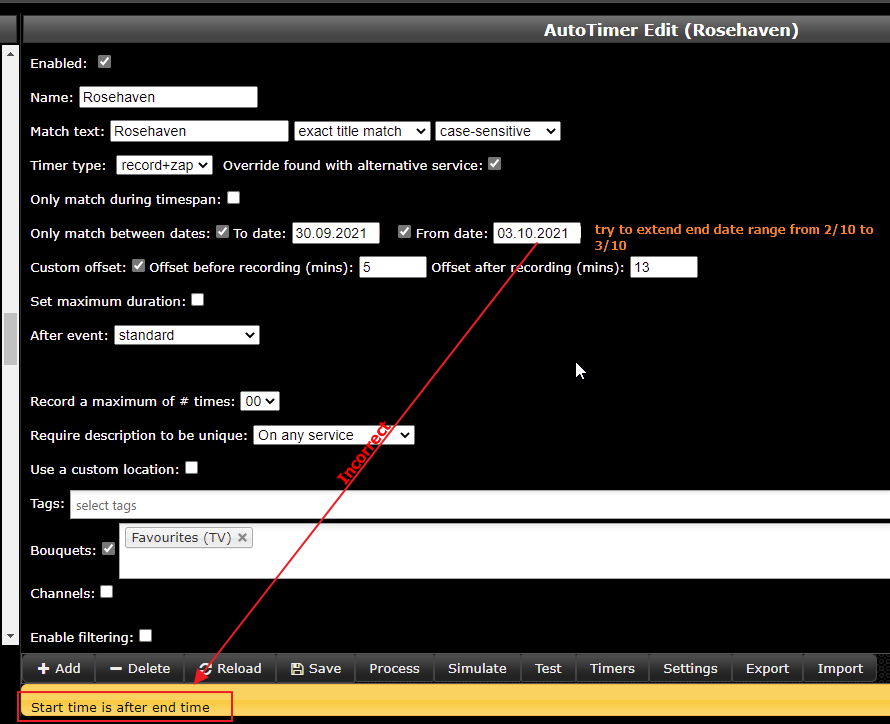
That's not what I see and experience. The classic view is also incorrect, both with its display labeling and with its editing validation. Open a definition and try and alter the "end" date (labeled as "From"). You'll receive a validation error, stating that it is before the start date.

Labels are incorrect -
Incorrect date error issued if end date is altered -
Yes, this throws a validation error, but the date is accepted and the autotimer is saved correctly. And the corresponding timers will also be created (that's why I mentioned my old autotimer entries - the timers were all created).
Nevertheless there are bugs here, be it wrong labelling or reversed evaluation of variables - shall the author of the the routines have a look at it.
Yes, this throws a validation error, but the date is accepted and the autotimer is saved correctly.
Oh yes you're correct, if I ignore the incorrect validation error and just save the edit then the changed date sticks. The editing still requires fixing as do the labels.
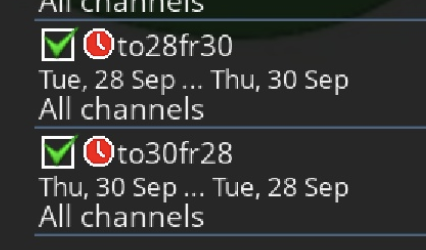
The AutoTimer labels in the box GUI are weird (not before, not after, wtf?? 🤔🤪)
(I also got a validation error when I switched the dates around in the classic interface, the error only appears when a field is touuched)
CLASSIC:

GUI:

MODERN:

RESULT IN GUI:
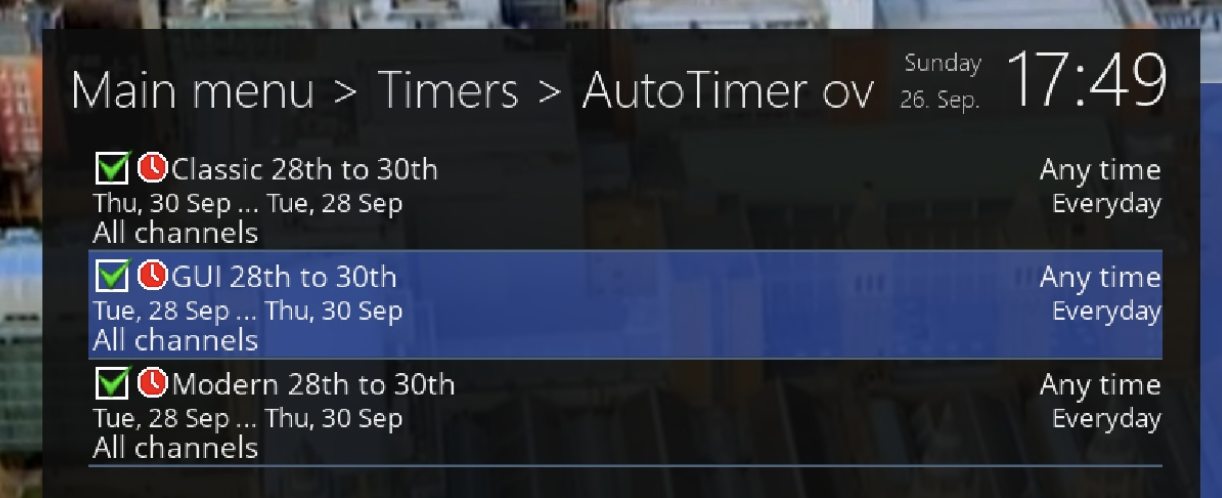
HOWEVER..., editing those entries in the modern interface shows incorrect values for the GUI-entered values:

The classic interface appears to correctly show all dates from all methods of entry.
My entries return the following xml:
<?xml version="1.0" ?>
<autotimer version="8" nextTimerId="4">
 <timer name="Modern 28th to 30th" match="hdfjkhdjfhjksdahfjkladshjkfla" enabled="yes" id="1" after="1632787200" before="1632960000" searchType="exact" always_zap="1">
 </timer>
 <timer name="Classic 28th to 30th" match="hdjsklhfjlhasdjklfhjaksdl" enabled="yes" id="2" after="1632787200" before="1632960000" searchType="exact" overrideAlternatives="1" always_zap="1">
 </timer>
 <timer name="GUI 28th to 30th" match="tjgpjmjaj" enabled="yes" id="3" after="1632783603" before="1632956403">
 </timer>
</autotimer>
/autotimer returns
<?xml version="1.0" ?>
<autotimer version="8" nextTimerId="5">
 <defaults id="-1" encoding="UTF-8">
 </defaults>
 <timer name="Modern 28th to 30th" match="hdfjkhdjfhjksdahfjkladshjkfla" enabled="yes" id="1" after="1632787200" before="1632960000" encoding="UTF-8" searchType="exact" always_zap="1">
 </timer>
 <timer name="Classic 28th to 30th" match="hdjsklhfjlhasdjklfhjaksdl" enabled="yes" id="2" after="1632787200" before="1632960000" encoding="UTF-8" searchType="exact" overrideAlternatives="1" always_zap="1">
 </timer>
 <timer name="GUI 28th to 30th" match="gmjmgtm" enabled="yes" id="4" after="1632783606" before="1632956406" encoding="UTF-8">
 </timer>
</autotimer>
The dates are inclusive, right? So 28th to 30th would match 3 days?
Do timezones affect inputting and/or saving dates?
I also wonder whether upcoming summertime changes will cause problems 🙈

The dates are inclusive, right? So 28th to 30th would match 3 days?
Yes.
Do timezones affect inputting and/or saving dates?
No, the timeframe is whole days, the plugin adds 24hrs to "end" date (midnight) when checking if EPG event is in range.
I also wonder whether upcoming summertime changes will cause problems 🙈
We don't have it in Perth ;)
I've never seen a report of issues regarding timeframe selection on the Beyonwiz forum during DST periods.
The dates are whole days so there's no impact.
<timer name="GUI 28th to 30th" match="tjgpjmjaj" enabled="yes" id="3" after="1632783603" before="1632956403">
From 1632783603 to 1632956403 How did you get the non-midnight times in there - did you fudge them?
<timer name="GUI 28th to 30th" match="tjgpjmjaj" enabled="yes" id="3" after="1632783603" before="1632956403">From 1632783603 to 1632956403 How did you get the non-midnight times in there - did you fudge them?
This is what's returned by the /autotimer API - originally entered by using the AutoTimer creator on the box's ui.
How did you get the non-midnight times in there - did you fudge them?
This is what's returned by the /autotimer API - originally entered by using the AutoTimer creator on the box's ui.
Weird. I just checked my file, and of the 13 definitions that have a date range specified, 3 don't have them as whole days. I just then created a test definition with a date range via the GUI from the EPG and I observe the same as you.
I think the GUI plugin has an error here, where it appears to me that it nukes the hours and minutes portion but leaves the seconds as they are (I'm not a python programmer) - https://github.com/oe-alliance/enigma2-plugins/blob/master/autotimer/src/AutoTimerEditor.py#L236
How did you get the non-midnight times in there - did you fudge them?
This is what's returned by the /autotimer API - originally entered by using the AutoTimer creator on the box's ui.
Weird. I just checked my file, and of the 13 definitions that have a date range specified, 3 don't have them as whole days. I just then created a test definition with a date range via the GUI from the EPG and I observe the same as you.
I think the GUI plugin has an error here, where it appears to me that it nukes the hours and minutes portion but leaves the seconds as they are (I'm not a python programmer) - https://github.com/oe-alliance/enigma2-plugins/blob/master/autotimer/src/AutoTimerEditor.py#L236
If only Python had functions to parse and manipulate dates and times 🤣
Do timezones affect inputting and/or saving dates?
I also wonder whether upcoming summertime changes will cause problems 🙈
Glad I asked... seems the developers at Sky TV didn't consider the hour change 😄