

 DynamoDS
Error When Export Excel Open Xml To File Excel already exist
This issue is related to SheetStyle which I have looked through, it says null at that location, unfortunately I haven't had the detailed time to go through the source code and fix it.
Dynamo version
2.14
Operating system
Windows 10
What did you do?
Export To Excel With Node Data.OpenXMLExportExcel
What did you expect to see?
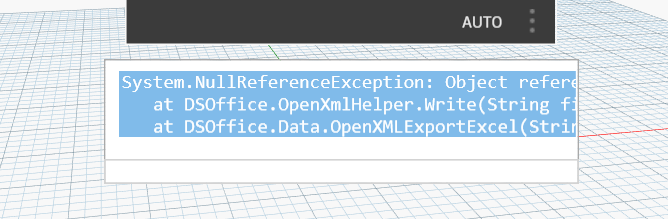
What did you see instead?
Problem may be error in line code : https://github.com/DynamoDS/Dynamo/blob/321793b96c2bfb882898f1896f6771bd6e149cff/src/Libraries/DSOffice/OpenXmlHelper.cs#L41-L41 Let use this file excels below to create error again: RST_Link.xlsx OpenXmlError.zip FYIs @mmisol

Thank you for submitting the issue to us. We are sorry to see you get stuck with your workflow. While waiting for our team member to respond, please feel free to browse our forum at https://forum.dynamobim.com/ for more Dynamo related information.
![github-actions[bot] avatar](https://avatars.githubusercontent.com/in/15368?v=4 "Published by a pub.dev verified publisher")
I tried to reproduce with local excel sheet, seems to work fine. I couldn't use the attached Excel file as the file seems to be corrupted?

Excel file attached is corrupted. Issue isn't reproducible with new excel file
