

 Djdefrag
Specs probably too small
I have an old AMD X4 646 and 16GB. Running with CPU did not hog the CPU, so something went wrong.
My father has a new Windows 11 PC with 8GB. Running with CPU did not hog the CPU, so something went wrong.
Finally I decided to rent a Azure NC6_Promo with K80 cuda. That does the job after a reboot for installing the K80.


It's already running more than an hour on quadrupalizing a 300 dpi A4, so the 6 core K80 is no luxury.


Wow! Thank you for the comprehensive tests that you did! I suppose that Pytorch-directml is not well optimized with CPU, in my tests i found that even when i set more cpus, it just use 1. The only thing i can say is that this library is still in alpha state, so maibe in future will be better optimized.
:D

The K80 contains a GPU, with CUDA codes sm_30, sm_35 and sm_37. It might be ignored by the used software.
DirectML should support Kepler according to the readme: https://github.com/microsoft/DirectML
Just to be sure, can you try first a x0.5 upscale or x1 to check if everything works fine, this must be quick
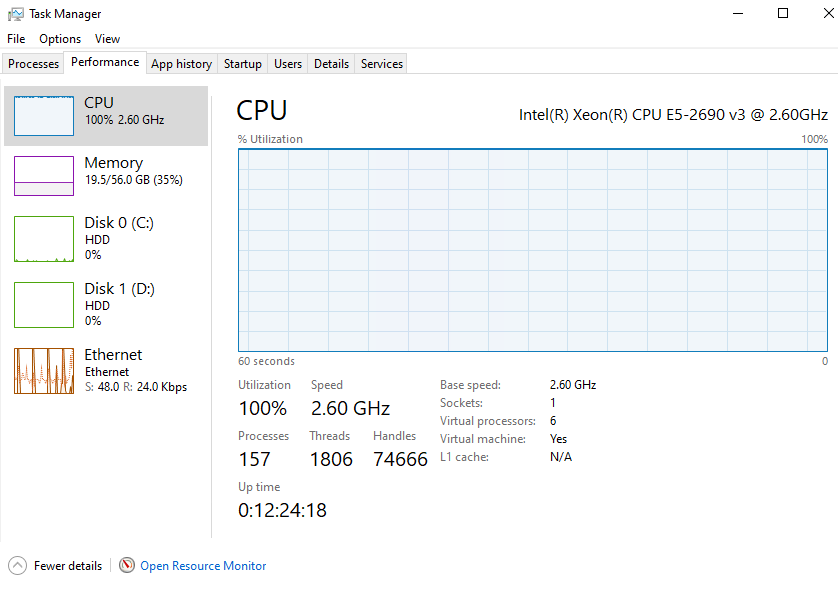
yes, maibe that will do the catch because when you screened the task manager i saw that there was no GPU panel. That usually happen when the driver is not installed
yes, maibe that will do the catch because when you screened the task manager i saw that there was no GPU panel. That usually happen when the driver is not installed
That feature only works with WDDM 2.0 I understand from this video. https://www.youtube.com/watch?v=gOo73cyeMUU
The K80 has 1.3.

I've restarted the x1 upscale after a reboot. nvidia-smi responds.
+-----------------------------------------------------------------------------+
| NVIDIA-SMI 473.47       Driver Version: 473.47       CUDA Version: 11.4     |
|-------------------------------+----------------------+----------------------+
| GPU  Name            TCC/WDDM | Bus-Id        Disp.A | Volatile Uncorr. ECC |
| Fan  Temp  Perf  Pwr:Usage/Cap|         Memory-Usage | GPU-Util  Compute M. |
|                               |                      |               MIG M. |
|===============================+======================+======================|
|   0  Tesla K80           TCC  | 00000001:00:00.0 Off |                    0 |
| N/A   32C    P8    35W / 149W |      9MiB / 11448MiB |      0%      Default |
|                               |                      |                  N/A |
+-------------------------------+----------------------+----------------------+

+-----------------------------------------------------------------------------+
| Processes:                                                                  |
|  GPU   GI   CI        PID   Type   Process name                  GPU Memory |
|        ID   ID                                                   Usage      |
|=============================================================================|
|  No running processes found                                                 |
+-----------------------------------------------------------------------------+
CPU is high, nvidia-smi states "No running processes found"
Ah, also did you try install all Visual Studio runtimes? https://www.techpowerup.com/download/visual-c-redistributable-runtime-package-all-in-one/
I'm downloading/uploading those other VC runtimes. There might be some truth in this thread: https://discuss.pytorch.org/t/ubuntu-what-version-of-cuda-pytorch-etc-can-run-on-a-nvidia-gtx-680-compute-capability-3-0/118469/4
The files mention 3.7, however there might be some issues with 3.7. The Tesla-driver I downloaded is supporting Cuda 11.4, so that might be introducing other issues.