

 DiscUtils
Allow ReadOnly mounting after initial creation?
After creating a VHDX, double-clicking it mounts it in Windows just fine. You can see all the files, etc. If you then unmount it, then mount it with PowerShell:
Mount-DiskImage -ImagePath C:\Temp\foo.vhdx -Access ReadOnly
it works as expected and it's read-only.
BUT, if you create a brand new VHDX and never mount it writable (by double-clicking it or using Mount-DiskImage without the -Access switch), but rather first access it with Mount-DiskImage using read-only mode, it will not work. Windows complains and wants to initialize it, etc. and shows the disk in Disk Management as Unknown, not initialized with the size of the volume being Unallocated.
if i detach the VHDX in Disk Management then attach it again without read-only, it immediately gets recognized as a Basic disk, Online, NTFS partition, and so on.
Unmounting this in Disk Management and then reattaching AND checking read-only when attaching it via Disk Management then mounts the VMDK in a usable way.
If i make a copy of the VHDX before mounting it and then compare it to the one i mount normally, then diff them, there are several areas that are different.
is there a method that needs to be called when creating the disk to allow this to work to finalize or initialize some underlying part of the VHDX? it does the same thing with VHD containers as well.
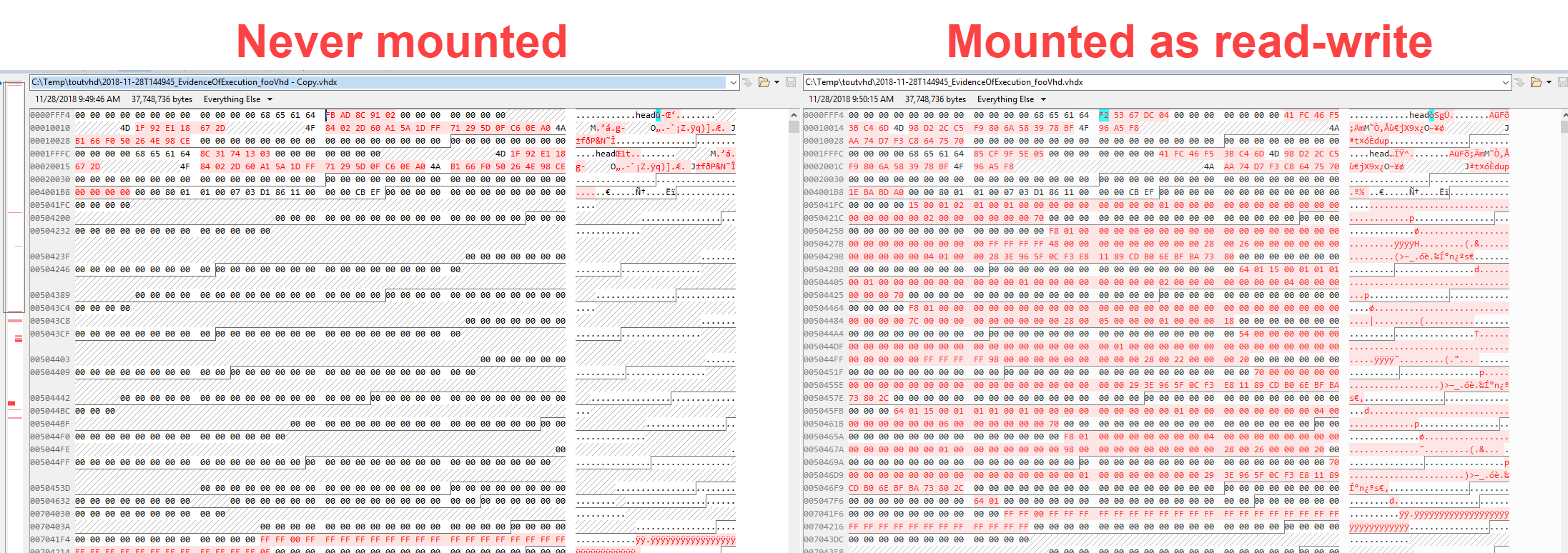

So, you created a VHD(X), partitioned it, and created a filesystem -- all using DU? -- and that's what Windows doesn't recognize?

yes, all DU in code. if i then double click the vhdx, it mounts and works great, but if i try to mount the vhdx right after DU is done creating it as read only, it isnt recognized.
here is the code i am using. allFiles is just a list of absolute paths
using (var fs = new FileStream(_vhfxFileName, FileMode.OpenOrCreate))
{
  VirtualDisk destDisk = Disk.InitializeDynamic(fs, Ownership.None, diskSize);

  BiosPartitionTable.Initialize(destDisk, WellKnownPartitionType.WindowsNtfs);
  var volMgr = new VolumeManager(destDisk);

  var label = $"Some label";

  using (var destNtfs = NtfsFileSystem.Format(volMgr.GetLogicalVolumes()[0], label, new NtfsFormatOptions()))
  {
    destNtfs.NtfsOptions.ShortNameCreation = ShortFileNameOption.Disabled;

    foreach (var fileSystemEntry in allFiles)
    {
      try
      {
        using (Stream source = new FileStream(fileSystemEntry, FileMode.Open, FileAccess.Read))
        {
          var nfo = new NewFileOptions {CreateShortNames = false};

          var destFileName = fileSystemEntry.Substring(_fluentCommandLineParser.Object.TargetDestination.Length);

          var destDirectory = Path.GetDirectoryName(destFileName);

          _loggerConsole.Debug($"Destination filename '{destFileName}' / Destination '{destDirectory}'");

          if (destNtfs.DirectoryExists(destDirectory) == false)
          {
            _loggerConsole.Trace($"Creating destination directory '{destDirectory}'");
            destNtfs.CreateDirectory(destDirectory, nfo);

            //get source directory attributes
            var sourceDirInfo =
              new DirectoryInfo(Path.GetDirectoryName(fileSystemEntry));

            //set destination file dates to source utc dates
            destNtfs.SetCreationTimeUtc(destDirectory, sourceDirInfo.CreationTimeUtc);
            destNtfs.SetLastWriteTimeUtc(destDirectory, sourceDirInfo.LastWriteTimeUtc);
            destNtfs.SetLastAccessTimeUtc(destDirectory, sourceDirInfo.LastAccessTimeUtc);
          }

          using (Stream dest = destNtfs.OpenFile(destFileName, FileMode.Create,
            FileAccess.ReadWrite))
          {
            _loggerConsole.Trace($"Copying '{destFileName}' to {ext.ToUpperInvariant()}");
            source.CopyTo(dest);
            dest.Flush();
          }

          //get source file attributes
          var sourceFileInfo = new FileInfo(fileSystemEntry);

          //set destination file dates to source utc dates
          destNtfs.SetCreationTimeUtc(destFileName, sourceFileInfo.CreationTimeUtc);
          destNtfs.SetLastWriteTimeUtc(destFileName, sourceFileInfo.LastWriteTimeUtc);
          destNtfs.SetLastAccessTimeUtc(destFileName, sourceFileInfo.LastAccessTimeUtc);

          var attr = destNtfs.GetAttributes(destFileName);

          destNtfs.SetAttributes(destFileName, attr | FileAttributes.ReadOnly);
        }
      }
      catch (Exception ex)
      {
        _loggerConsole.Error(ex,
          $"Error copying file '{fileSystemEntry}' to '{_vhfxFileName}': {ex.Message}");
      }
    }

    using (Stream source = new FileStream(_ntfsCopy.CsvOutFile, FileMode.Open, FileAccess.Read))
    {
      var destFileName = _ntfsCopy.CsvOutFile.Substring(_fluentCommandLineParser.Object.TargetDestination.Length);

      using (Stream dest = destNtfs.OpenFile(destFileName, FileMode.Create, FileAccess.ReadWrite))
      {
        _loggerConsole.Trace($"Copying '{destFileName}' to {ext.ToUpperInvariant()}");
        source.CopyTo(dest);
        dest.Flush();
      }

      var attr = destNtfs.GetAttributes(destFileName);

      destNtfs.SetAttributes(destFileName, attr | FileAttributes.ReadOnly);
    }

    using (Stream source = new FileStream(_ntfsCopy.ConsoleLogFile, FileMode.Open, FileAccess.Read))
    {
      var destFileName = _ntfsCopy.ConsoleLogFile.Substring(_fluentCommandLineParser.Object.TargetDestination.Length);

      using (Stream dest = destNtfs.OpenFile(destFileName, FileMode.Create, FileAccess.ReadWrite))
      {
        _loggerConsole.Trace($"Copying '{destFileName}' to {ext.ToUpperInvariant()}");
        source.CopyTo(dest);
        dest.Flush();
      }

      var attr = destNtfs.GetAttributes(destFileName);

      destNtfs.SetAttributes(destFileName, attr | FileAttributes.ReadOnly);
    }
  }
  //commit everything to the stream before closing
  fs.Flush();
}
my guess is, it has something to do with log replay. This would explain, why mounting writable does work.
I added Log replay in 34e3ea4db63426c09cf469f8c474cd9fc4a11e98 but I don't know anything about the create path.
