

 Digitalbrainstem
Formatter thinks that <%= %> is not closed.
If you add a <%= ... %> tag to the head of a file, the formatter indents everything afterwards as if the tag is still open.
Steps to reproduce:
Copy the "before" file from this gist into VSCode, format it, and observe that it formats into the "after" file:
https://gist.github.com/MitchTalmadge/e8afa2f47f67b77d095e8f573601a88c
| 📝 Note: Remember to link to a repository or upload a code snippet that reproduces the issue as an attachment (or a code block if it’s short) to this issue: https://help.github.com/en/articles/file-attachments-on-issues-and-pull-requests |
<html>

<head>
  <script src="blah"></script>
  <%= %>
    <script src="foo"></script>
</head>

</html>
Expected result:
It should have remained like the "before" file. The second script should not be indented further.

Actually this happens with <% %> and other tags too. I have no idea where to begin with figuring out why.
I have this issue too..been trying to figure out whats the issue for a while now. Any news on how to fix?

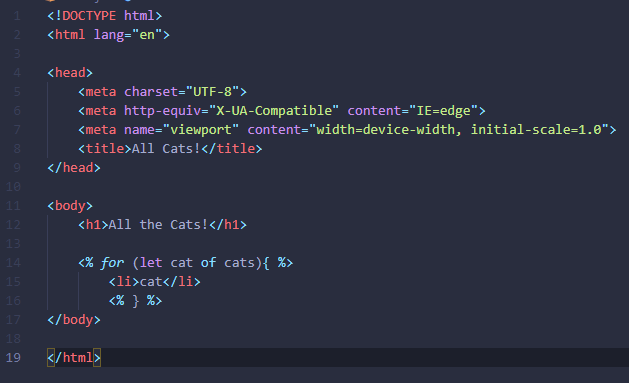
I'm also getting a similar issue. Mine seems to be when writing JS though. The opening { doesn't get canceled by the closing tag so the document keeps tabbing over the more I type in. If I had a larger if statement than this I would be clear across the window. See my screenshot below. Mine has something to do with the curly braces not being registered as inside the tag or something. I'll join in on looking for a fix for this, but if someone finds something I'd love the solution.

I am seeing this with the "Includes" sample code:
<ul>
    <% users.forEach(function(user){ %>
        <%- include('user/show', {user: user}) %>
            <% }); %>
</ul>

I have the same issue and I think an easy fix would be to provide an option to allow for custom snippets for ejs, such that we could write <% include('template') %/>. The formatter will think the tag is closed. Using ejs cli it seems to be possible to use custom delimiters.

Getting a similiar issue

As you can see on the "ejs vscode extension has some problems apparently" comment, I had to put a fake closing tag in an html comment, otherwise, the comment would not highlight.
