

 DarthAffe
Code Sample
Hello,
I am trying to work with this lib, but there is no document on how it works. Could you provide me some code samples to turn Aura LEDs Red, please?
Thanks, Sander

Hey,
this code will load all asus-aura-devices and turn the color of all their leds to red:
// The surface is the starting point for everything.
RGBSurface surface = RGBSurface.Instance;

// Obviously not needed, only a debug-thing
surface.Exception += args => Debug.WriteLine(args.Exception.Message);

// Load asus (aura)-devices. If you want to load other devices too, just add a LoadDevices-line for them.
surface.LoadDevices(new AsusDeviceProviderLoader().GetDeviceProvider());

// Aligning is not really necesarry if you don't want to work with the positions of devices, but it doesn't do any harm.
surface.AlignDevices();

// Enable auto-updates - I'll change this to be the default in the future, but for now it needs to be set.
surface.UpdateMode = UpdateMode.Continuous;

// Create a group for all leds you want to color with the same brush - since only aura is loaded just take all.
ILedGroup redGroup = new ListLedGroup(surface.Leds);

// Apply a brush to the group to color the leds.
redGroup.Brush = new SolidColorBrush(new Color(255, 0, 0));

I created this simple program, but the program only loads when I remove the surface.LoadDevices line. When I use another provider the programs still doesn't load. It doesn't give any build error, but it doesnt open.
using System.Diagnostics;
using System.Windows;

using RGB.NET.Core;
using RGB.NET.Devices.Asus;
using RGB.NET.Groups;
using RGB.NET.Brushes;

namespace Universal_RGB_Sync
{
    public partial class MainWindow : Window
    {
        RGBSurface surface = RGBSurface.Instance;

        public MainWindow()
        {
            InitializeComponent();

            surface.Exception += args => Debug.WriteLine(args.Exception.Message);
            surface.LoadDevices(new AsusDeviceProviderLoader().GetDeviceProvider());
            surface.AlignDevices();
            surface.UpdateMode = UpdateMode.Continuous;
        }

        private void btnRed_Click(object sender, RoutedEventArgs e)
        {
            ILedGroup redGroup = new ListLedGroup(surface.Leds);
            redGroup.Brush = new SolidColorBrush(new Color(255, 0, 0));
        }
    }
}
I think I'll need more information like what you did to setup everything and what's the exact issue is. I created a new WPF-application, added the RGB.NET-metapackage from nuget, updated all RGB.NET packages (this is needed due to a stupid nuget behavior) and copied your code into it - it works fine for me.
Just a assumption: Did you reference the assemblies without using the nuget packages? Then you need to take care on your own, that the SDK-files and layouts are copied to the output directory
I created a WPF application and then right click on "References" --> "Mangage NuGet Packages"

Then I copied your code and added it to the file like you see above. Do I need to do more stuff?
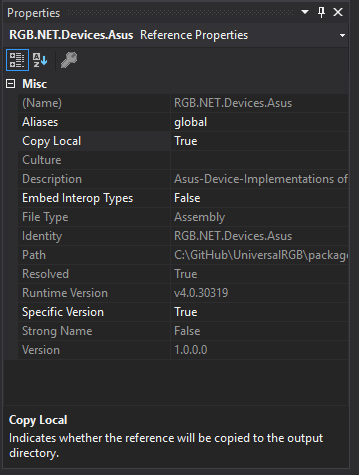
This sounds absolutely correct. The only thing that I did different (as far as I can tell on the images) is, that it seems that you built the nuget-packages on your own, I used the myget-packages. This shouldn't be a problem, but maybe something went wrong while building it.
Could you try to uninstall all RGB.NET-packages, change the RGB.NET package-source to https://www.myget.org/F/rgb_net/api/v3/index.json and reinstall them.
Thanks for your help, but it still doesnt work. I have created a video to show you what is going wrong.
https://www.youtube.com/watch?v=KYWrzFYFmbc
Ok it seems to just block somewhere while loading the devices. I somehow recall that I've heard of such an issue before but I don't remember what exactly was the cause. I think it had something to do with auras behavior of returning wrong devices in a lot of setups, but normally it fails with an AccessViolationException. You could try to only load the device you own (I expect a mainboard in the example, but this can be changed)
surface.LoadDevices(new AsusDeviceProviderLoader().GetDeviceProvider(), RGBDeviceType.Mainboard, throwExceptions: true);
If that doesn't help (at least it should give a exception) I'm afraid the issue can only be found with debugging inside the device-provider.
Thanks, this works!!!
I found one bug on the GraphicsCard mode, the RGB color is not Red Green Blue, but Red Blue Green
Blue Color --> redGroup.Brush = new SolidColorBrush(new Color(0, 255, 0)); Green Color --> redGroup.Brush = new SolidColorBrush(new Color(0, 0, 255));
Great to hear :)
Which device is having this issue? Aura colors are addressed internally with RBG (at least if you use a somehow recent version). If it's swapped for you it seems like your device needs RGB-data (which would be quite weird).
Its my Asus 1070Ti. I have the latest version of the Aura Software on my PC, so that is not the problem.
I have one question, why does Aura can only load the devices that are connected. Is it possible to update your library that is returns null or gives a no devices found exception?
Well since I don't know what aura can potentially return (there are quite a lot) I need to trust what the SDK returns as loadable. The aura-SDK is causing quite a lot of trouble with unexpected behaviors - one of them is to return wrong devices as loadable which can cause issues like the one you had. On my setup I see a graphic-card (even if I don't own a aura-ready card) which loads but is causing huge lags while updating. I've reported the problems to asus (in the forum) but it doesn't seem like there's much going on.
I tried to get the Asus Aura SDK working, but its a complete mess. There is very less documentation and no existing programs to look how it works or what can go wrong. This is the same with MSI and their MysticLight SDK.
Yeah i know, we tried to implement the MysticLight SDK (that's why there is code for it already) but we weren't able to get it work just from the documentation. As we tried to trial & error our way to it, we realized that the mainboard the other guy helping had was not supported by the SDK even though it explicitly stated that on the website (this was confirmed by MSI later). To be honest I don't have much hope that the mainboard-SDKs will ever be completely added - it seems the SDK is quite a low priority for most of that companies.
Aura is the one currently working the best (it works for a lot of people at least of most of the time) but I know that there quite a lot of things that can more or less randomly fail.
If you want, then I can help you test with the MysticLight SDK. I have a MSI Z370 KRAIT GAMING Motherboard with MysticLight Support.
https://www.msi.com/Motherboard/Z370-KRAIT-GAMING.html
That would be great! May I ask you to join the RGB.NET-discord for this? It'll lead to a lot of small test of different things which is better to be directly communicated.
Here is a quick snipet for using the new updateTriggers
                TimerUpdateTrigger TimerTrigger = new TimerUpdateTrigger();
                TimerTrigger.UpdateFrequency = 0.05;
                RGBSurface.Instance.RegisterUpdateTrigger(TimerTrigger);
                TimerTrigger.Start();
