

 DanielKeep
Tailor output to output terminal capabilities (specifically emacs?)
I just ran cargo script from emacs (which shows the command output in an emacs buffer) and got a load of control characters in the output. By contrast, when I start a fresh cargo project and build cargo build through emacs the output is much cleaner.
A quick test shows that cargo script thing.rs 2> test.txt does clean up the output, but I really don't know who's responsible for that.
-*- mode: compilation; default-directory: "~/code/" -*-
Compilation started at Fri Sep 28 09:31:27

cargo script statgen.rs
^[[0m^[[0m^[[1m^[[32m   Compiling^[[0m statgen v0.1.0
[...]
versus...
-*- mode: compilation; default-directory: "~/code/bob/src/" -*-
Compilation started at Fri Sep 28 09:33:01

cargo build
   Compiling bob v0.1.0 (file:///home/dominic/code/bob)
    Finished dev [unoptimized + debuginfo] target(s) in 0.55s
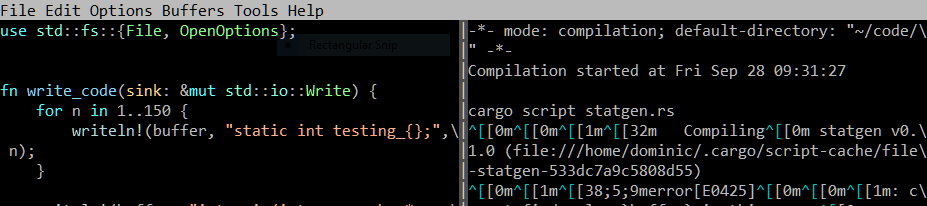

The output from cargo script looks fine when the build succeeds, I just noticed. cargo build is good in all cases. I'm really not sure where the issue is, here - emacs is clearly capable of showing colour and does so for the succeeding cargo script output.
The behaviour doesn't change when I unload the rust plugins (mode line: Rust ElDoc company racer), so I don't think those are at fault.