

 CorsairOfficial
Alpha blending/Opacity option
Please correct me if I'm wrong but right now there doesn't seem to be any alpha blending/opacity option for the colors that are being set. It would be really nice to have multiple effects stack without one overriding the other.
I also tried messing around with getting the colors set and manually adding an alpha blend but I seem to get the same color that's set by the previous instance of the code rather than color set by other shared instances so it has no effect.
For instance, I would like to have SDK applications that apply their effects without completely turning off/overriding the default iCUE effects. So while having the default rainbow animation, I could override one key to show a status indicator.
Letting us set an alpha value when when setting a color will enable that.

Hi @reisub0
Thank you for describing your use case with alpha blending. This option is not available in SDK.
Regarding the get_led_colors_by_device_index function, I just tried the code:
from cuesdk import CueSdk

sdk = CueSdk()
sdk.connect()
leds = list(sdk.get_led_positions_by_device_index(0))
print(sdk.get_led_colors_by_device_index(0, leds))
And it works as expected: returns the color set by iCUE playing some default effect. Unfortunately, this will not help you achieve the desired result, because your app overrides the color and then you read it back.
If I'm not mistaken, all that can be done now is to set layer priority less than 127 (i.e., sdk.set_layer_priority(125)), and run your effect "under" some other effect that has transparency configured in iCUE:
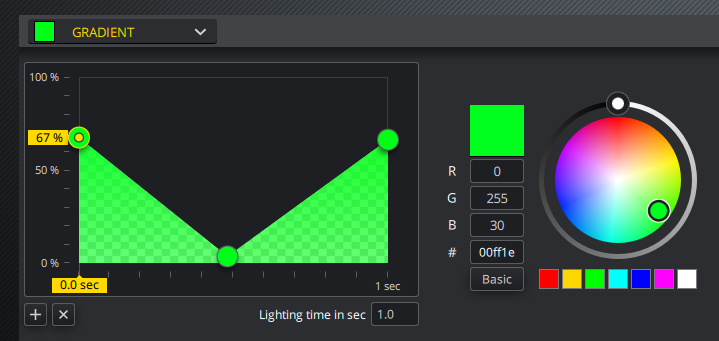
Not a solution though.
