

 ComplianceAsCode
Rules for NTP fail under Ubuntu 20.04 with chrony
Description of problem:
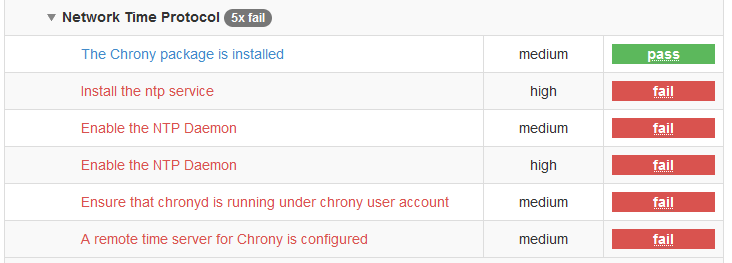
This is the result of scanning ubuntu 20.04 that has chrony configured.
-
xccdf_org.ssgproject.content_rule_package_ntp_installedshould be reportednot applicablewhenchronyis installed and running -
xccdf_org.ssgproject.content_rule_service_chronyd_or_ntpd_enablednot reporting green. I think its checking forchronyd.service, and notchrony.service -
xccdf_org.ssgproject.content_rule_service_ntp_enabledthis doesn't seem needed, since we have (2) -
xccdf_org.ssgproject.content_rule_chronyd_run_as_chrony_userfails as the user is_chronyand notchrony -
xccdf_org.ssgproject.content_rule_chronyd_specify_remote_serverfails as it looking for/etc/chrony.conf, instead of/etc/chrony/chrony.conf
SCAP Security Guide Version: 0.1.63
Operating System Version: Ubuntu 20.04

There are few problems here. this should all be handled by the chrony_conf_path variable, which defaults to /etc/chrony.conf but for ubuntu and debian is reset to /etc/chrony/chrony.conf in the .product files. products/ubuntu1604/product.yml:chrony_conf_path: "/etc/chrony/chrony.conf" products/debian10/product.yml:chrony_conf_path: "/etc/chrony/chrony.conf" products/debian9/product.yml:chrony_conf_path: "/etc/chrony/chrony.conf" products/ubuntu1804/product.yml:chrony_conf_path: "/etc/chrony/chrony.conf" products/ubuntu2004/product.yml:chrony_conf_path: "/etc/chrony/chrony.conf"
I see it referenced the following rule.yml files: linux_os/guide/services/ntp/chronyd_specify_remote_server/rule.yml linux_os/guide/services/ntp/chronyd_server_directive/rule.yml linux_os/guide/services/ntp/chronyd_or_ntpd_specify_multiple_servers/rule.yml linux_os/guide/services/ntp/chronyd_or_ntpd_specify_remote_server/rule.yml linux_os/guide/services/ntp/chronyd_sync_clock/rule.yml linux_os/guide/services/ntp/chronyd_client_only/rule.yml linux_os/guide/services/ntp/chronyd_or_ntpd_set_maxpoll/rule.yml linux_os/guide/services/ntp/chronyd_no_chronyc_network/rule.yml
I would expect to see it in oval associated with those, but I only see it in: linux_os/guide/services/ntp/chronyd_client_only/oval/shared.xml linux_os/guide/services/ntp/chronyd_or_ntpd_set_maxpoll/oval/shared.xml linux_os/guide/services/ntp/chronyd_no_chronyc_network/oval/shared.xml
And in some of the ovals, the reference is only in comments. chrony also supports confs under chrony.d wich seems to be skipped over in remediation.

- Which profile are you using? (I'm assuming this is CIS Level 1)
- If I run on top of the current USG, I get:
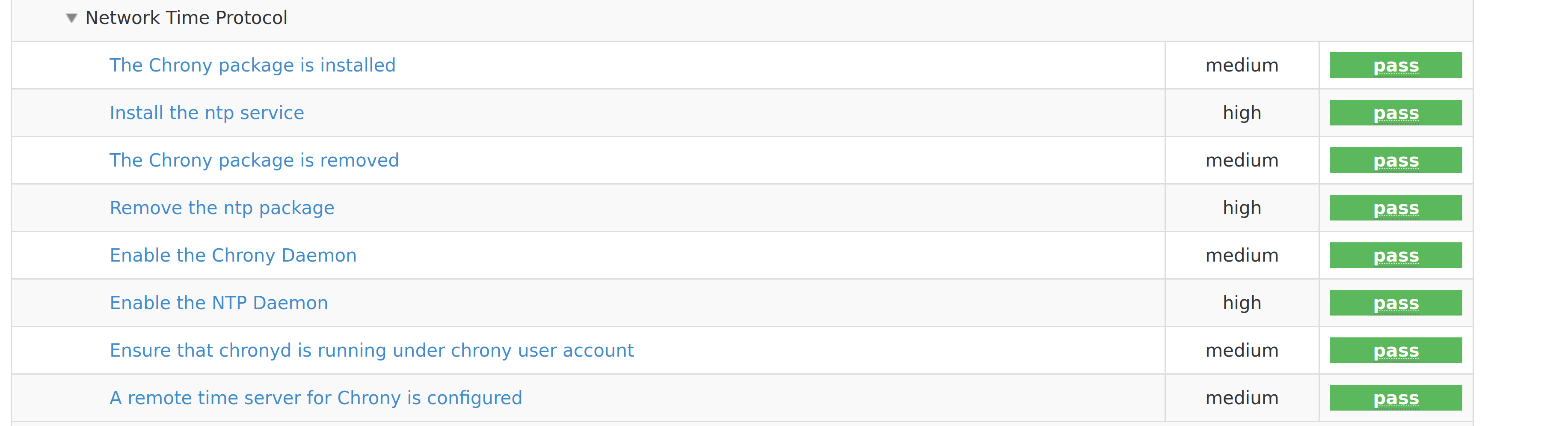 Can you try it?
 - Those rules are alternatives to one another, you should go through the cis benchmark and see which ones you need and disable in the profile the ones you don't. Or if using USG, you can do it so using tailoring files.

This is probably because CIS for 20.04 was never completely upstreamed but USG does contain the fix for this.
@dodys
- profile used is CIS Level 2
- USG appears to require purchase of Ubuntu Advantage. On your screenshot all the checks pass, do you actually have both
ntpdandchronydrunning at the same? - Does the tailor file take care of the check looking at wrong paths, usernames, service names?
@dodys
1. profile used is CIS Level 2

2. USG appears to require purchase of Ubuntu Advantage. On your screenshot all the checks pass, do you actually have both `ntpd` and `chronyd` running at the same?
It indeed does. No, they are just installing and uninstalling depending on the rule that is being audited/remediated.
3. Does the tailor file take care of the check looking at wrong paths, usernames, service names?
No, the tailoring file is just an XML file which contains all the rules for a given profile, and you can either enable or disable the rules. Then you can pass the tailoring file as a command line arg to USG/oscap. It is similar as if you went to the .profile file here and commented out the lines you don't want and rebuilt the profile. But in that case your XCCDF file (and other XMLs) won't have those rules anymore, while with tailoring file you don't touch at all on the XCCDF and just let them know what you want or not enabled. The correct paths and so on, are only included in USG for now as we still didn't upstream the full CIS profile. Only STIG is fully upstreamed at this point. And we don't currently have any ETA to having it upstreamed, maybe with 22.04 CIS this will be different.
@dodys I was working CIS level 2 on SUSE SLE 15 and hit an issue on SLE15 had with chrony. This was addressed with: https://github.com/ComplianceAsCode/content/pull/9257
I then saw this issue come through and since it was close to the issue I was working, I just added my two cents,
Looks like (4) was fixed in 1ac965ad2e2c8cd36b02afb9d0c3ef2f6ae57dff