

 CompVis
text2image training
Appreciate the great project! Do you plan to release the text2image training script?


@taoisu I tried that but the training always crashes, I think its gpu memory problem, but I am using 1 batch size and very small image size here is my config :
model:
  base_learning_rate: 5.0e-05
  target: ldm.models.diffusion.ddpm.LatentDiffusion
  params:
    linear_start: 0.00085
    linear_end: 0.012
    num_timesteps_cond: 1
    log_every_t: 200
    timesteps: 1000
    first_stage_key: image
    cond_stage_key: caption
    image_size: 16
    channels: 3
    cond_stage_trainable: true
    conditioning_key: crossattn
    monitor: val/loss_simple_ema
    scale_factor: 0.18215
    use_ema: False
    scheduler_config: # 10000 warmup steps
      target: ldm.lr_scheduler.LambdaLinearScheduler
      params:
        warm_up_steps: [10000]
        cycle_lengths: [10000000000000]
        f_start: [1.e-6]
        f_max: [1.]
        f_min: [ 1.]

    unet_config:
      target: ldm.modules.diffusionmodules.openaimodel.UNetModel
      params:
        image_size: 16
        in_channels: 4
        out_channels: 4
        model_channels: 320
        attention_resolutions:
        - 4
        - 2
        - 1
        num_res_blocks: 2
        channel_mult:
        - 1
        - 2
        - 4
        - 4
        num_heads: 8
        use_spatial_transformer: true
        transformer_depth: 1
        context_dim: 1280
        use_checkpoint: true
        legacy: False

    first_stage_config:
      target: ldm.models.autoencoder.AutoencoderKL
      params:
        embed_dim: 4
        monitor: val/rec_loss
        ddconfig:
          double_z: true
          z_channels: 4
          resolution: 64
          in_channels: 3
          out_ch: 3
          ch: 128
          ch_mult:
          - 1
          - 2
          - 4
          num_res_blocks: 2
          attn_resolutions: []
          dropout: 0.0
        lossconfig:
          target: torch.nn.Identity

    cond_stage_config:
      target: ldm.modules.encoders.modules.BERTEmbedder
      params:
        n_embed: 1280
        n_layer: 32
data:
  target: main.DataModuleFromConfig
  params:
    batch_size: 1
    num_workers: 1
    wrap: False
    train:
      target: ldm.data.Txt.Txttrain
      params:
        size: 64
        degradation: pil_nearest
    validation:
      target: ldm.data.Txt.Txtval
      params:
        size: 64
        degradation: pil_nearest

lightning:
  callbacks:
    image_logger:
      target: main.ImageLogger
      params:
        batch_frequency: 5000
        max_images: 8
        increase_log_steps: False

  trainer:
    benchmark: True

@ahmed-retrace could you share your processing data scripts for training text2image, like ldm.data.Txt.Txttrain or ldm.data.Txt.Txtval. thanks in advance!

@ahmed-retrace I also got gpu problem with 12G gpu memory during training. It is due to the large network parameters and too much crossattn computation. When I change num_res_blocks from 2 to 1, reduce model_channels from 320 to 256, and reduce context_dim from 1280 to 512, the gpu problem will not happen again. However, the performance may get lower.
@lostnighter that worked for me, still waiting for the results though.
@ahmed-retrace @lostnighter could you share your Implementation dataset script? I want to train text2image task, but I don't know how to load dataset. thanks in advance!
@lsjiiia sorry for the crude code but it works fine.
import os
import numpy as np
import PIL
from PIL import Image
from torch.utils.data import Dataset
from torchvision import transforms
import glob
import time
import cv2
import json

class Base(Dataset):
    def __init__(self,
                 txt_file,
                 degradation,
                 state,
                 size=None,
                 interpolation="bicubic",
                 flip_p=0.5,

                 ):

        self.data_root = '/opt/project/src/additional_data/'
        print('began')

        with open('all_caption.json', 'r') as fp:
            data = json.load(fp)
        if state == 'val':
            self.image_paths = data[:1000]
        else:
            self.image_paths = data[1000:]
        self.size = size

        self.labels = {
            "relative_file_path_": [0 for l in self.image_paths],
            "file_path_": self.image_paths,
        }
        self._length = len(self.image_paths)
        print(f'state: {state}, dataset size:{self._length}')
        self.hr_height, self.hr_width = (256,256)

    def __getitem__(self, i):
        example = {}
        image_path = self.data_root + self.image_paths[i]
        image = cv2.imread(image_path.replace('teeth_info.txt','im.jpg'))
        with open(image_path,'r') as f:
            txt = f.read()
        text = txt.replace('\n','\n ')
        image = cv2.resize(image,(256,256))
        example["image"] = (image / 127.5 - 1.0).astype(np.float32)
        example["caption"] = text
        return example

    def __len__(self):
        return self.size


class Txttrain(Base):
    def __init__(self, **kwargs):
        super().__init__(txt_file="data/lsun/church_outdoor_train.txt", state = 'train', **kwargs)

class Txtval(Base):
    def __init__(self, **kwargs):
        super().__init__(txt_file="data/lsun/church_outdoor_train.txt", state = 'val', **kwargs)

In the original paper, table 15, it says a single A100 can run text-to-image with batch size 680, how can that be possible?

@XavierXiao it can be possible if you set accumulate_grad_batches to a larger number.
@XavierXiao I bet with activation checkpointing plus bf16 this is achievable or at least close.
@taoisu The default config uses gradient checkpointing, and it can only run batch size 16 on an A6000 with 48GB ram...Even A100 has 80 gb, it still seems to be not even close. Perhaps there is a large gradient accumulation steps.
On Wed, Sep 14, 2022 at 12:47 PM Xiangyu Guo @.***> wrote:
@XavierXiao https://github.com/XavierXiao I bet with activation checkpointing plus bf16 this is achievable or at least close.
— Reply to this email directly, view it on GitHub https://github.com/CompVis/latent-diffusion/issues/132#issuecomment-1247228196, or unsubscribe https://github.com/notifications/unsubscribe-auth/ADND77Z7FDZKUCTB2LIYJFDV6ITT3ANCNFSM57HSRHHQ . You are receiving this because you were mentioned.Message ID: @.***>
@ahmed-retrace does your model train correctly with the config file you posted above? I have issues with my model training when I use the scheduler

What kind of issues, the results weren't great but the training was working fine.
The model initially starts to converge, but at a certain point the training becomes unstable and generates a loss curve like this:
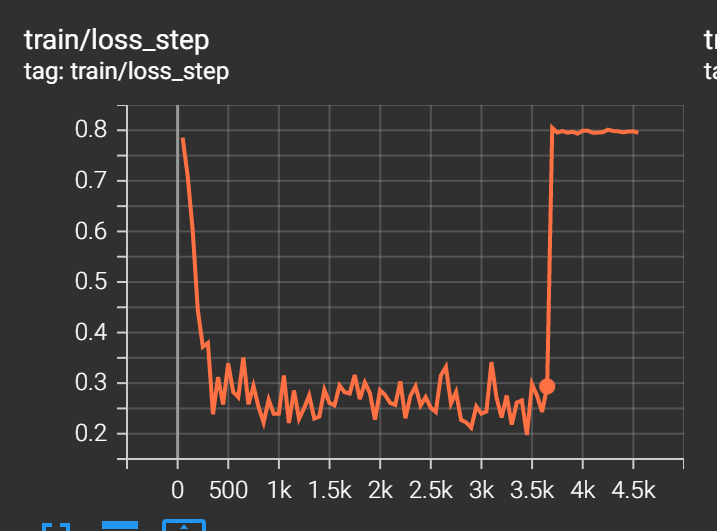
The model outputs also turn into pure noise when this starts to happen
For more context you can see this post: https://github.com/lstein/stable-diffusion/pull/546#issuecomment-1246678027
yeah exactly what happened with me, but I used the best checkpoint, I didn't think it would get better than this.
@ahmarey Wait so just to confirm - when using the scheduler and fine-tuning the model, your model eventually starting creating pure noise?
It produced the same kind of graph but I was saving best model only so couldn't visualise the results for the last part. But the best model produced decent photos, but not great.
@ahmarey Do you know if the best model was one where the loss was low? I suspect it was but just want to sanity check that.
I found the same with my results (though I was using a relatively small autoencoder and just training on lsun/churches) - it generated things resembling churches but they weren't good quality at all.
Removing the scheduler from your config might lead you to get better results btw! I don't have unstable training when the scheduler isn't present
Yes the best model was were the loss was low, ok I will remove it but I dont know where to set the learning rate.
It'll take on a default value if you don't explicitly set it anywhere. You can hard-code the value under the configure_optimizers method in ddpm.py (easy but hacky) or create a key in the config file and then initialize self.learning_rate in the init method in the LatentDiffusion class
@ahmed-retrace i used the similar training config to yours, and set --scale_lr False to avoid unsatble training.
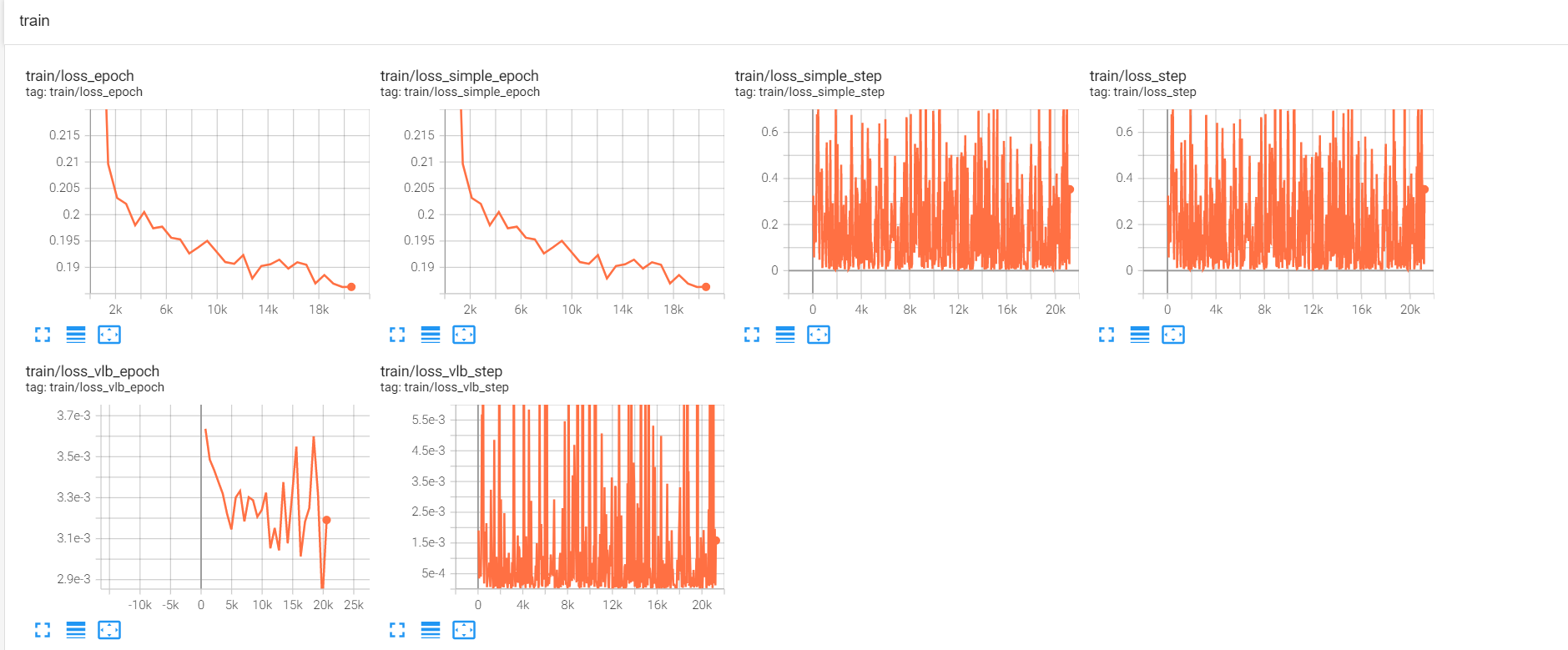 However, the training loss of step seems unstable and the generated images are bad. I have no idea what problem it is. Does your training work fine?
@ahmarey @lostnighter Just found out today that when training you're training from scratch you need to use an Autoencoder that's already trained. By default, training the latent-diffusion model won't train the autoencoder. So you have 2 options:
- Pretrain the autoencoder yourself
- Use one of the existing pre-trained autoencoders (you can find this in the readme of this repo)
The config that @ahmarey posted above doesn't seem to use a (pre)trained autoencoder (otherwise there'd be a ckpt_path key under first_stage_config.params)
@nihirv I pretrained the autoencoder, sorry, forgot to put the ckpt path entry in the posted config. @lostnighter as @nihirv stated, did you use a pretrained autoencoder, because I think you method and your loss, is better than mine at least it keeps going down and doesn't diverge.
@nihirv Would you like to post your updated config file here, I always encounter errors when choosing parameters of the pretrained model. Thank you.

@lxa9867 I'm currently struggling to figure out the parameters for kl-f4. The values for kl-f8 can be found in configs/latent-diffusion/lsun_churches-ldm-kl-8.yaml
@XavierXiao try the fairscale checkpointing, it will save more memory than the one implemented in openai's code