

 CommunityToolkit
Webview context menu doesn't open when embedded in 64bit Outlook addon
I'm submitting a...
- Bug report (I searched for similar issues and did not find one)
Current behavior
Create a VSTO (office addon) that uses the Windows-toolkit\WebView and host it inside Outlook. Add a context menu to this addon and attach it to the webview.
- 32bit Outlook hosting the addon. WebView will display the context menu on right mouse click.
- 64bit Outlook hosting the addon. WebView will NOT display the context menu on right mouse click
Expected behavior
Context menu should open the same for both 32bit & 64bit platforms.
Minimal reproduction of the problem with instructions
Sample code to reproduce this issue can be found here: https://github.com/shankslouis/64bitWebviewContextMenuIssue
Steps to repro:
- Download and run the sample provided on a PC running 64bit Office\Outlook.
- To see it in action click on New Email message
- Click on the button FormRegion1

In this screenshot you will see the webpage detected the right click but the context menu did not open when using 64bit Outlook. (It does open when using the 32bit version of Outlook)

To trigger the context menu without right clicking the mouse click the following button

Environment
Nuget Package(s):
Microsoft.Toolkit.Win32.UI.Controls  v4.0.30319

Package Version(s):

Windows 10 Build Number:
- [ ] Fall Creators Update (16299)
- [ ] April 2018 Update (17134)
- [X] October 2018 Update (17763)
- [ ] Insider Build (build number: )

App min and target version:
- [ ] Fall Creators Update (16299)
- [ ] April 2018 Update (17134)
- [X] October 2018 Update (17763)
- [ ] Insider Build (xxxxx)

Device form factor:
- [X] Desktop
- [ ] Mobile
- [ ] Xbox
- [ ] Surface Hub
- [ ] IoT

Visual Studio
- [X] 2017 (version: )
- [ ] 2017 Preview (version: )

Microsoft Office 365 ProPlus
- [X] Version 1810 (build 11001.20074 Click-to-Run)
         Microsoft Outlook for Office 365 MSO (16.0.11001.20070) 64-bit


I can't determine whether the following bug in 6.0.0-preview7 is fundamentally the same issue as @shankslouis reported, but it seems related at least. There is something strange going on with right-click / context menus. I didn't attach any context menu to my WPF WebView instance, rather I just simply tested right-clicking in the WPF WebView, and to my surprise, the window system menu appears! Here's a screenshot of what appears:
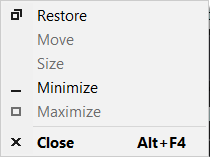
The system menu appears in the left/top corner of the screen, or maybe it's the left/top corner of the window, but I can't determine whether it's the screen or the window because the window is maximized, and this bug only happens when the window is maximized.
That's important to note: If you right-click at any time when the window is NOT maximized, then the system menu doesn't appear. Strange.
The left/top corner of the menu is located at absolute coordinate 0, 0 within the screen, meaning if the menu was any further left or up, then it would start to disappear off the left/top edge of the screen.
When I click the "Restore", "Minimize", or "Close" command in the menu, I can see that it is controlling the WPF window that contains the WPF WebView element. Thus this menu belongs to the System.Windows.Window and not to a special HwndHost of the WebView.
In regards to the 32 vs 64-bit question, I have this .cs project set to "Platform target: Any CPU", and I have unticked "Prefer 32-bit".

Any news here? I have the same issue in an Addin for Autodesk AutoCAD. WebView2 does not produce this problem. But it's not only blocking the WebViews Context Menu but also AutoCAD's Context Menu.
