CommunityToolkit
WebView launches WWAHost in the wrong desktop (HDESK)
I'm submitting a...
Bug report (I searched for similar issues and did not find one)
Current behavior
WPF WebView fails to display itself whenever the app using WebView is running in any desktop (HDESK) other than the default desktop. In other words, WebView always launches WWAHost.exe in the Default desktop instead of launching it in the same desktop as the app using WebView.
WWAHost.exe creates a HWND but this HWND fails to appear because it is in the desktop named "Default", whereas the HWND can only appear if it is the same desktop as the app using WebView. The result is that the WebView instance appears as a blank/empty space in the app because this blank space should be overlaid by the web HWND but the HWND fails to appear because it is not in the same desktop as the app.
Imagine you create two windows (HWND). When you create the second window, imagine that you configure either the parent or "owner" of the second window to be the first window. Thus the second window is either a child or "owned window" of the first window. Win32 supports this arrangement, but only if both of the windows are inside the same desktop (HDESK). The first HWND is for the app, and the second HWND is for the WebView with SeparateProcess mode, thus the separate web process fails to create/configure its HWND when it is running in a different desktop than the app's HWND.
Expected behavior
Windows.Web.UI.Interop.WebViewControlProcess needs to check what desktop the current app is inside (invoke GetThreadDesktop), and ensure that the WWAHost.exe instance is launched in that same desktop, instead of always launching in the default desktop.
Before WebView or WebViewControlProcess launches the separate web process, it should:
- Invoke the Win32 GetThreadDesktop function in order to determine which desktop the current app is running inside.
- Launch the separate web process in the same desktop as what
GetThreadDesktopreturns, by invoking the CreateProcessWithTokenW or CreateProcessAsUserW function. Set the STARTUPINFOW.lpDesktop field of the struct passed to thelpStartupInfoparameter of CreateProcessWithTokenW or CreateProcessAsUserW. - Consider also invoking GetCurrentProcessToken at the same time as GetThreadDesktop, in order to help solve the other bug where WebView +
WebViewExecutionMode.SeparateProcessfails when the app is run as a different user, such as when the app is run as administrator. i.e. WebView should launch the separate web process with the same user/access token and same desktop as the app using WebView. (See also windows-toolkit/Microsoft.Toolkit.Win32#13 "WebView can't run as administrator".)
Ideally, if possible, WebView should not fail when explorer.exe is only running in the default desktop and not in the other desktop. I suggest the following solution to avoid creating a new requirement for explorer.exe to run in other desktops:
- The same as currently done, when an app uses WebView, WebView should continue to always communicate only with the instance of explorer.exe in the default desktop, regardless of which desktop the app is in. (That's what it already does currently, and this part would remain unchanged.)
- Therefore WebView wouldn't care whether explorer.exe instances are running in other desktops because WebView would only communicate with the explorer.exe instance in the default desktop.
- The separate web process should be launched in the same desktop as the app using WebView, regardless of the fact that WebView always communicates only with the default explorer.exe in the default desktop.
- Thus WebView wouldn't fail when the app runs in a non-default desktop where NO explorer.exe instance is running, provided that the default explorer.exe instance is running as normal in the desktop desktop.
Minimal reproduction of the problem with instructions
- Write a small test WPF app that displays WebView and navigates to a webpage.
- Create and switch to a new desktop by using Microsoft SysInternals Desktops v2.0, or by writing your own program that executes the Win32 CreateDesktop and SwitchDesktop functions.
- In the new desktop, launch an instance of "explorer.exe" if not already running. This instance of the explorer.exe process should be running inside the newly created desktop. If you're using SysInternals Desktops, then it already launches explorer.exe for you.
- By using the mouse (meaning this step does not have to be performed programmatically), use the GUI of explorer.exe to launch the aforementioned WPF app that displays WebView and navigates to a webpage. The explorer.exe instance launches your WPF app in the same desktop as the explorer.exe instance. Thus your WPF app is launched in the new desktop, not in the default desktop.
- Observe that the WPF app doesn't crash and doesn't throw any exception, but the WebView remains blank (white) and fails to display the webpage.
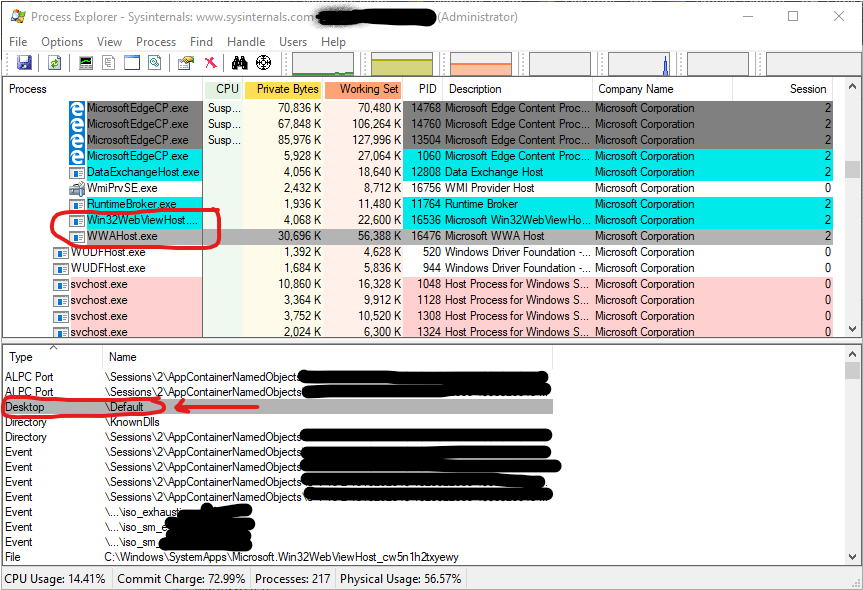
- Observe that the WebView instance did launch an instance of WWAHost.exe but in the wrong desktop. The WWAHost.exe instance is running in the desktop named "Default" instead of the newly created desktop where the app + WebView is located. You can use SysInternals Process Explorer to see which desktop a process runs in.
Note that the bug cannot be reproduced by using the so-called "desktops" feature that is available by clicking the "Task View" icon located immediately right of the Start menu icon in Windows 10 (Pro and Enterprise). That feature does not create the same kind of "desktop" as what the Win32 CreateDesktop function creates. I think the "desktops" in "Task View" operate by hiding and showing windows, not by creating HDESK instances. Thus WebView experiences no problems with multiple "desktops" created via "Task View". In contrast, in certain enterprise environments and in certain RDP scenarios etc, multiple HDESK desktops exist and this is where WebView fails.
We would much appreciate a bugfix that makes WebViewControlProcess launch the WWAHost instance in the correct desktop, meaning the same desktop as the app using WebView, not always the default desktop.
Environment
Nuget Package(s): Microsoft.Toolkit.Wpf.UI.Controls.WebView Package Version(s): 6.0.0-preview7.1 Windows 10 Version: 1903 (Build 18362.267) App min and target version: 1903 Device form factor: Desktop Visual Studio: 2019

You can use Microsoft SysInternals Desktops v2.0 in order to help test and debug the behavior of WebView with non-default desktops. SysInternals Desktops invokes the Win32 CreateDesktop and SwitchDesktop functions.
You can use SysInternals Process Explorer to see which desktop a process runs in:
- Run SysInternals Process Explorer as administrator.
- Click to select a process in the upper pane (the list of processes).
- Process details are displayed in the lower pane. The lower pane is a list with 2 columns named "Type" and "Name".
- Look for the row in the lower pane that says "Desktop" under the column named "Type". The name of the desktop is displayed in the second column.