
Borderless-Gaming

Borderless-Gaming copied to clipboard
 Codeusa
App won't start
I've tried completely reinstalling it already
It used to just be ready in the task tray Now it doesn't even start up
Only time I see it is for a split second after reinstall but only in the taskbar, then it disappears I try to manually start it, it pops up asking for admin permission but nothing happens when I allow it
Doesn't show up in the task manager either, nor in the startup tabs anymore

I went deeper down the rabbit hole and when I run a Win 10 trouble shoot, it says that the program isn't compatible :/
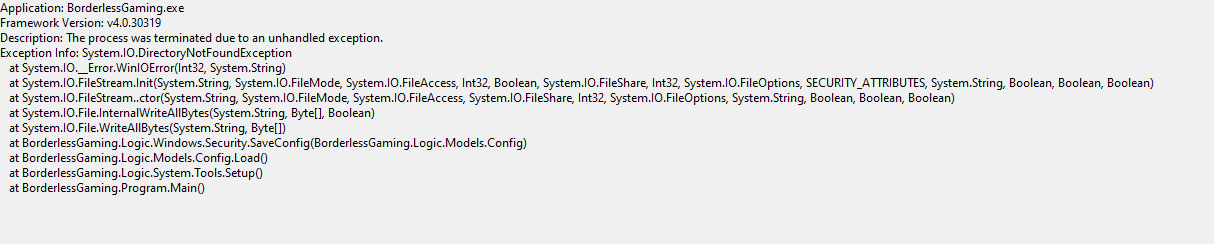 Even deeper I found this, I'm afraid I don't know what it means :/
Fault bucket 1867414804347635487, type 5
Event Name: CLR20r3
Response: Not available
Cab Id: 0

Problem signature:
P1: BorderlessGaming.exe
P2: 9.5.6.1328
P3: 5d228039
P4: mscorlib
P5: 4.8.4150.0
P6: 5e176d21
P7: 1693
P8: fc
P9: System.IO.DirectoryNotFound
P10:

Attached files:
\\?\C:\ProgramData\Microsoft\Windows\WER\Temp\WERF025.tmp.dmp
\\?\C:\ProgramData\Microsoft\Windows\WER\Temp\WERF084.tmp.WERInternalMetadata.xml
\\?\C:\ProgramData\Microsoft\Windows\WER\Temp\WERF0A4.tmp.xml
\\?\C:\ProgramData\Microsoft\Windows\WER\Temp\WERF0A2.tmp.csv
\\?\C:\ProgramData\Microsoft\Windows\WER\Temp\WERF0C2.tmp.txt

These files may be available here:
\\?\C:\ProgramData\Microsoft\Windows\WER\ReportArchive\AppCrash_BorderlessGaming_7655b5f8abeaeceb61262a811d9b48289abaf6_f87e3e26_defc5d45-0434-4222-a40d-50a05201da86

Analysis symbol:
Rechecking for solution: 0
Report Id: 37c1747b-4e22-4ae1-8c1d-481b11700e38
Report Status: 268435456
Hashed bucket: 0c3b76b2e550130a49ea63dedd72471f
Cab Guid: 0