

 Codeinwp
Latest update broke mega menu
All menu dropdowns are open when loading my website. I set it up using this guide. It worked before the latest update.
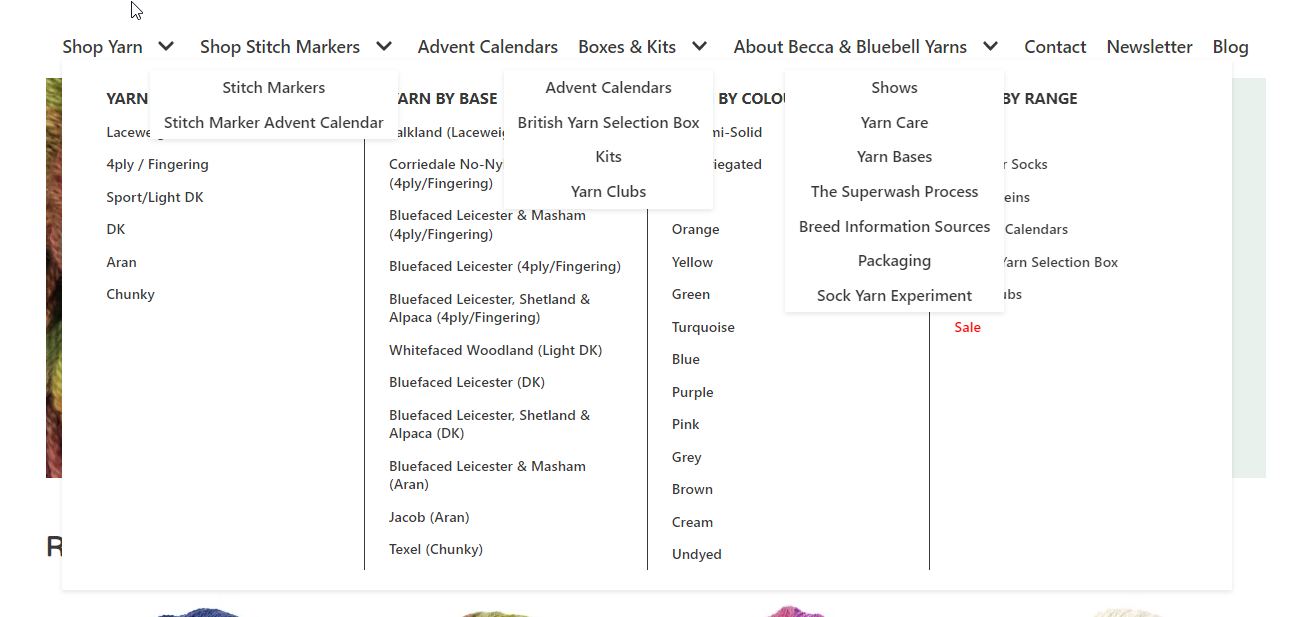
ETA: I rolled back to 3.4.0 where the issue remained, however going back to 3.3.7 fixed the issue.
- WordPress version: 6.0.2
- Theme version: 3.4.1

Thank you @beccabadger for reporting this. Will try to fix it ASAP.

Found the issue and here are some ways to fix it until we make a release to fix that:
- It appears you are using the previous skin that is not supported anymore. You should switch to the new Neve skin. If you choose to use the current skin, there will be some incompatibilities and features that will not be available. Here's how to switch to the new skin: https://docs.themeisle.com/article/1388-neve-3-0-core-design
- When editing the primary menu, you should switch off this setting: https://vertis.d.pr/NEb5md
- Rollback is an option too. Please wait until we release a fix for it.
Thanks for reporting this problem and sorry for the trouble!
Thank you for your quick help @cristian-ungureanu I'll look into switching to the new skin.
We have found a similar case where the mega menu gets opened while moving the mouse on the header image beneath the menu item. Disabling the option of expanding the first level of the dropdown fixed the issue.
HS: https://secure.helpscout.net/conversation/2016020354/337794/

:tada: This issue has been resolved in version 3.4.2 :tada:
The release is available on GitHub release
Your semantic-release bot :package::rocket:
