

 Codeinwp
Custom Content Width below "Full Width" is confusing
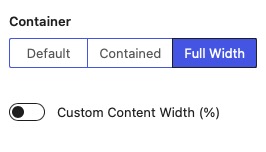

@cristianraiber While I understand the confusion from the initial issue, the container width refers strictly to the container and the custom content width to the content.
If you have a sidebar on that particular full-width page, there is no way to enlarge or shrink it from the meta (but it will still inherit the value from the customizer).
However, we need to make this less ambiguous and explain better what those controls mean. One idea would be to add a tooltip next to the label of the control explaining what each control does.
Another idea would be to replace the "Full Width" label with "Unbounded" or "Unconfined" as the term "Full Width" implies that the content would have width: 100%
Any other suggestion would be much appreciated.
