

 Codectory
Add Prevent HDR Option to Applications and choose if your Desktop is HDR On or Off
#21
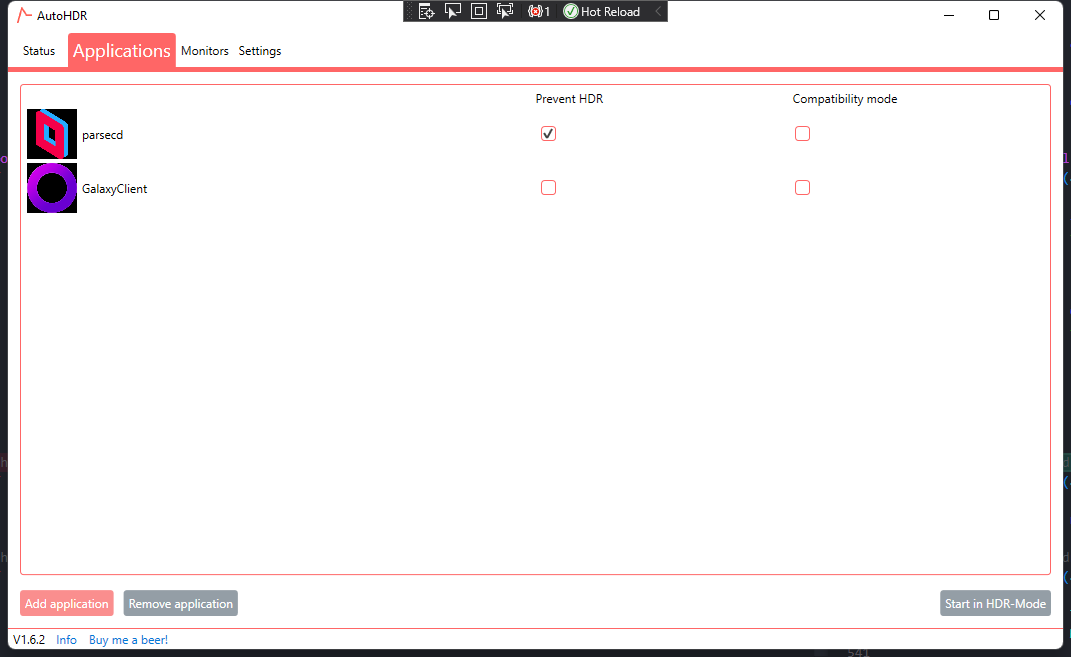
Why Parsec HDR Feature is payed only. To Stream your Screen you have to use non HDR Mode or your colors are off.
Now you can set any application as Prevent HDR. AutoHDR will not enable HDR if one program that prevents it is running
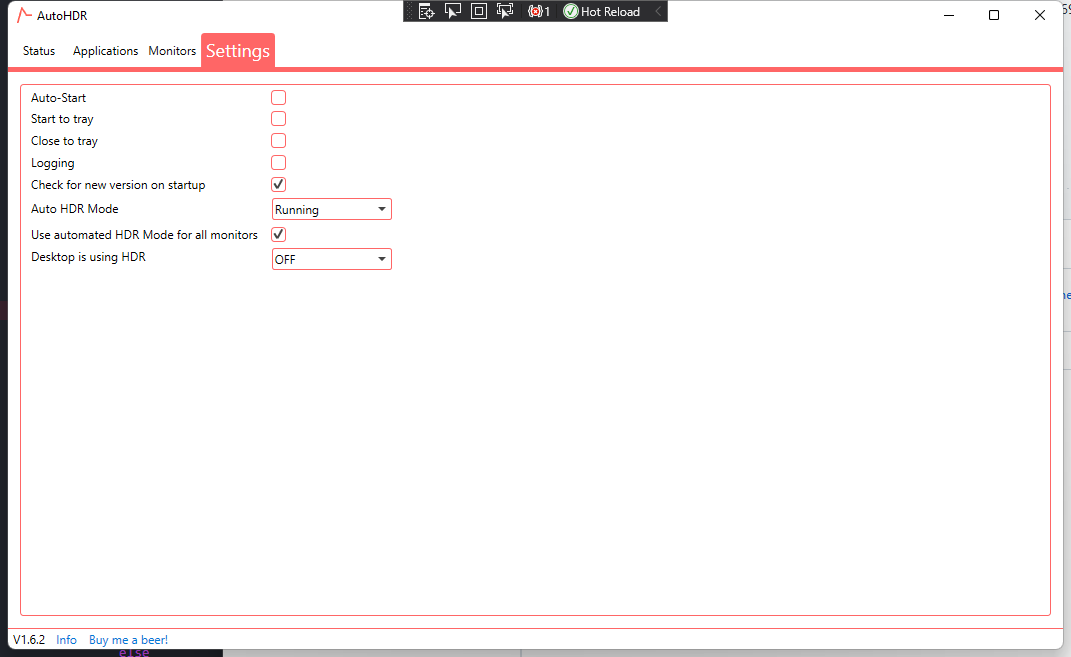
There is also a new Desktop HDR Feature. Meaning when you are on Desktop it will turn HDR on. So you will get back to HDR Mode if your Application that prevents it is closed.
Translations are already built in for german and english.
Code changes that are not feature dependend:
- Refactored HDRActivionMode.cs to ViewEnums.cs. There are now 2 Enums that are only used in the View
- Commit add try catch for logging. It hard exited on me if this log is hit in debugging mode
Problems I have found:
- Changing Settings will not have an immediate effect. So enabling desktop hdr will not trigger a hdr change
- Activating Prevent HDR on a running program will only trigger an hdr change if you click on another process Both of them are maybe desired. So you will not spam HDR changes only while changing settings

Hey,
thank you for your work. I will try to find some time to look into this. Please see my other branch. I am working on applications profile to set various settings (HDR, resolution, refresh rate, etc.). They will working with events ( started stopped, focused, lost focus) and a ranking. With this feature, you can prioritize apps and set hdr off for the started event, for example. It drives me nuts that I don’t have so mich time for this as I would like to have ^^
stefhol @.***> schrieb am Fr. 24. Sept. 2021 um 19:18:
[image: grafik] https://user-images.githubusercontent.com/35531567/134711619-9e699493-ff4a-49ba-abd6-d75a51c31167.png [image: grafik] https://user-images.githubusercontent.com/35531567/134711665-d5582e52-3c9a-4c8a-a2cf-5facd709af10.png
#21 https://github.com/Codectory/AutoHDR/issues/21
Why Parsec HDR Feature is payed only. To Stream your Screen you have to use non HDR Mode or your colors are off.
Now you can set any application as Prevent HDR. AutoHDR will not enable HDR if one program that prevents it is running
There is also a new Desktop HDR Feature. Meaning when you are on Desktop it will turn HDR on. So you will get back to HDR Mode if your Application that prevents it is closed.
Translations are already built in for german and english.
Code changes that are not feature dependend:
- Refactored HDRActivionMode.cs to ViewEnums.cs. There are now 2 Enums that are only used in the View
- Commit add try catch for logging. It hard exited on me if this log is hit in debugging mode
Problems I have found:
- Changing Settings will not have an immediate effect. So enabling desktop hdr will not trigger a hdr change
- Activating Prevent HDR on a running program will only trigger an hdr change if you click on another process Both of them are maybe desired. So you will not spam HDR changes only while changing settings
You can view, comment on, or merge this pull request online at:
https://github.com/Codectory/AutoHDR/pull/31 Commit Summary
- add switch to set desktop hdr mode https://github.com/Codectory/AutoHDR/pull/31/commits/db8751a4270009c62df6bf50134325d630dd12d8
- add preventHDR Application Property https://github.com/Codectory/AutoHDR/pull/31/commits/4270e983db825806a466379cd7d0c8d8ee0ca86e
- add settings for desktopHDR default https://github.com/Codectory/AutoHDR/pull/31/commits/45d5fcf9b163cbeb25a2da238f289652257c6093
- add try catch for logging https://github.com/Codectory/AutoHDR/pull/31/commits/f5db5ef290454210cebc0214f1deadec1be294b4
- add new logic for hdr changes https://github.com/Codectory/AutoHDR/pull/31/commits/3d5b4476d8b878f478c4b4b1aa1ba15740050f0d
- rename HDRActivationMode https://github.com/Codectory/AutoHDR/pull/31/commits/8bae1742468e723c94ff1487ded429fb9807ca25
- add new translations https://github.com/Codectory/AutoHDR/pull/31/commits/925ff07916385e44ffe001596e5c2863cfdf2e20
- revert accidently deleting if https://github.com/Codectory/AutoHDR/pull/31/commits/36dc29ec060124b6629198be3e4abacf5247adda
- fix spelling https://github.com/Codectory/AutoHDR/pull/31/commits/4b2edf5f659fa25e282daa8551476aeb1c7391a3
File Changes
- M Source/HDRProfile/ApplicationItem.cs https://github.com/Codectory/AutoHDR/pull/31/files#diff-0b0cf77053ce123e72fde7d72dcd232f0bcc7c178aa6dc6712441f14b5bc5585 (3)
- M Source/HDRProfile/AutoHDRDaemon.cs https://github.com/Codectory/AutoHDR/pull/31/files#diff-7f9b225d07003f1341725e01d08676e642e63ec7a31318682ea42ac621bfb89f (64)
- M Source/HDRProfile/HDRProfileSettings.cs https://github.com/Codectory/AutoHDR/pull/31/files#diff-9d809adbd8a2a73a0c603b406ce135daddfa0f91e03bf0ec497dfa95b2d49a3c (5)
- M Source/HDRProfile/ProjectResources/Locale_Enums.Designer.cs https://github.com/Codectory/AutoHDR/pull/31/files#diff-49bbf08c5169140b9941382d7bc6df7e9087af82a404a73e641dc4e97ec65dd9 (48)
- M Source/HDRProfile/ProjectResources/Locale_Enums.resx https://github.com/Codectory/AutoHDR/pull/31/files#diff-133625b0c326e0fc2278d15209c961355a68826dd5162164fa044ea87ba35a42 (6)
- M Source/HDRProfile/ProjectResources/Locale_Texts.Designer.cs https://github.com/Codectory/AutoHDR/pull/31/files#diff-12c645ea33349f779614d929fbcbfb25aa607cce232c8cc08fbb4941b5e36c78 (146)
- M Source/HDRProfile/ProjectResources/Locale_Texts.de.resx https://github.com/Codectory/AutoHDR/pull/31/files#diff-0c437804436810b3c79cbb70183afc847b795171d3178d1ce52733c4424da4b0 (6)
- M Source/HDRProfile/ProjectResources/Locale_Texts.resx https://github.com/Codectory/AutoHDR/pull/31/files#diff-99e0c4478098a2b479d816df4f8ef515d4cedd6844a356cce59ba6c0c624d257 (6)
- M Source/HDRProfile/UserAppSettings.cs https://github.com/Codectory/AutoHDR/pull/31/files#diff-49db98f7569e3f049188d6b6264d60f8e3c8e9ed6e72515233bcb587e74f0ac5 (5)
- R Source/HDRProfile/ViewEnums.cs https://github.com/Codectory/AutoHDR/pull/31/files#diff-8845906fbc70a345db3a327dfec1c7c6d267e5e9557058af816d55aff9c24d42 (5)
- M Source/HDRProfile/Views/AutoHDRMainView.xaml https://github.com/Codectory/AutoHDR/pull/31/files#diff-382a62461879ee3d86c124fbb8e31f35b6e6d1b219fe4ed2c6a0ef521c8c6643 (26)
- M Source/HDRProfile/Views/UserAppSettingsView.xaml https://github.com/Codectory/AutoHDR/pull/31/files#diff-7eaa69bf42ee55414e6c370497384f701cdb5f29aeec6d39be6d76c492305ee6 (10)
Patch Links:
- https://github.com/Codectory/AutoHDR/pull/31.patch
- https://github.com/Codectory/AutoHDR/pull/31.diff
— You are receiving this because you are subscribed to this thread. Reply to this email directly, view it on GitHub https://github.com/Codectory/AutoHDR/pull/31, or unsubscribe https://github.com/notifications/unsubscribe-auth/AOWXFILD6PWRPBKPPS63LDTUDSXF5ANCNFSM5EWMMRNQ .

Hey its no Problem there are more important things in life than hdr auto switching.
I used it quite a bit now and found no bug. I also made the commits extra tidy so it should be rather simple to integrate the changes
:)