
CodeEdit

CodeEdit copied to clipboard
 CodeEditApp
🐞 Tab Bar some considerations
Description
- I can't then reorder the tabs, it would be very nice if it could be done.
- The buttons you see in the video do not allow any action, it would be better if they are disabled at the moment.
https://user-images.githubusercontent.com/20476002/166136966-4a62e3c8-7170-46ab-b31b-522316afec91.mov
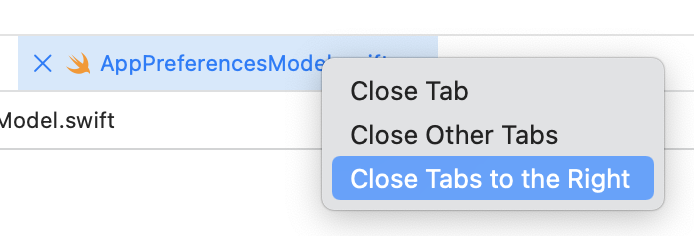
- In the last tab on the right there is in the menu "Close Tabs to the Right", being that it is last it makes no sense that it is there, so it would be better if it is disabled when it is last as xcode does.
- Tab native mode, as you can see from the video when I start opening the tabs they take up all the space, but when I start closing them they don't take up all the space anymore. They start to take up all the space when it becomes a single tab and then I open others, I wonder if this is the normal behavior it should have.
https://user-images.githubusercontent.com/20476002/166136920-5bae61e3-96c5-4f74-ad4b-7c4ca52cb89e.mov
Version information
CodeEdit: [e.g. 1.0] Hash: [e.g. 8d15242b977735269d14683582d8842c7526a1f8] MacOS: [e.g. 12.3.0] Xcode: [e.g. 13.3]

- I am going to add the drag-to-reorder feature in the next PR.
- Left buttons require tracking the navigation history, which need some further development, so I will make them disabled.
- Yeah disabling it makes more sense!
- In Finder, the tab only grows when you are not hovering over any tab, so I implemented it following this rule (to make sure that users are able to close tabs continuously).
https://user-images.githubusercontent.com/36816148/166149496-23d74917-f3ec-4e03-a31d-f849a051647a.mp4

Closing this as most are not a problem any longer. Please reopen separate issues if necessary.
