

 CodeEditApp
✨ Themes Preferences
Is your feature request related to a problem? Please describe. We need a better themes preferences tab to allow for better usability and more scalability as we add more features around themes.
Describe the solution you'd like
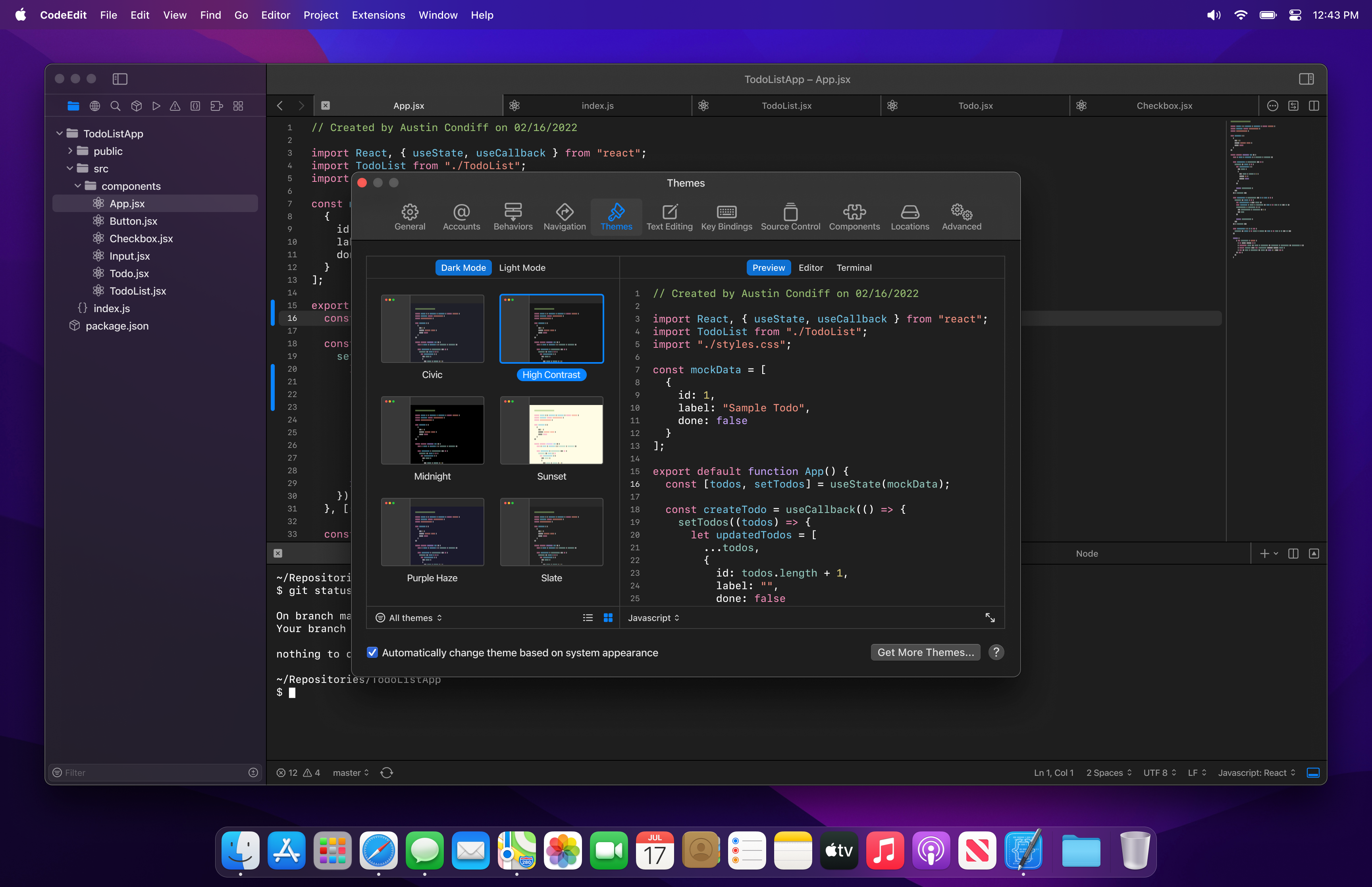
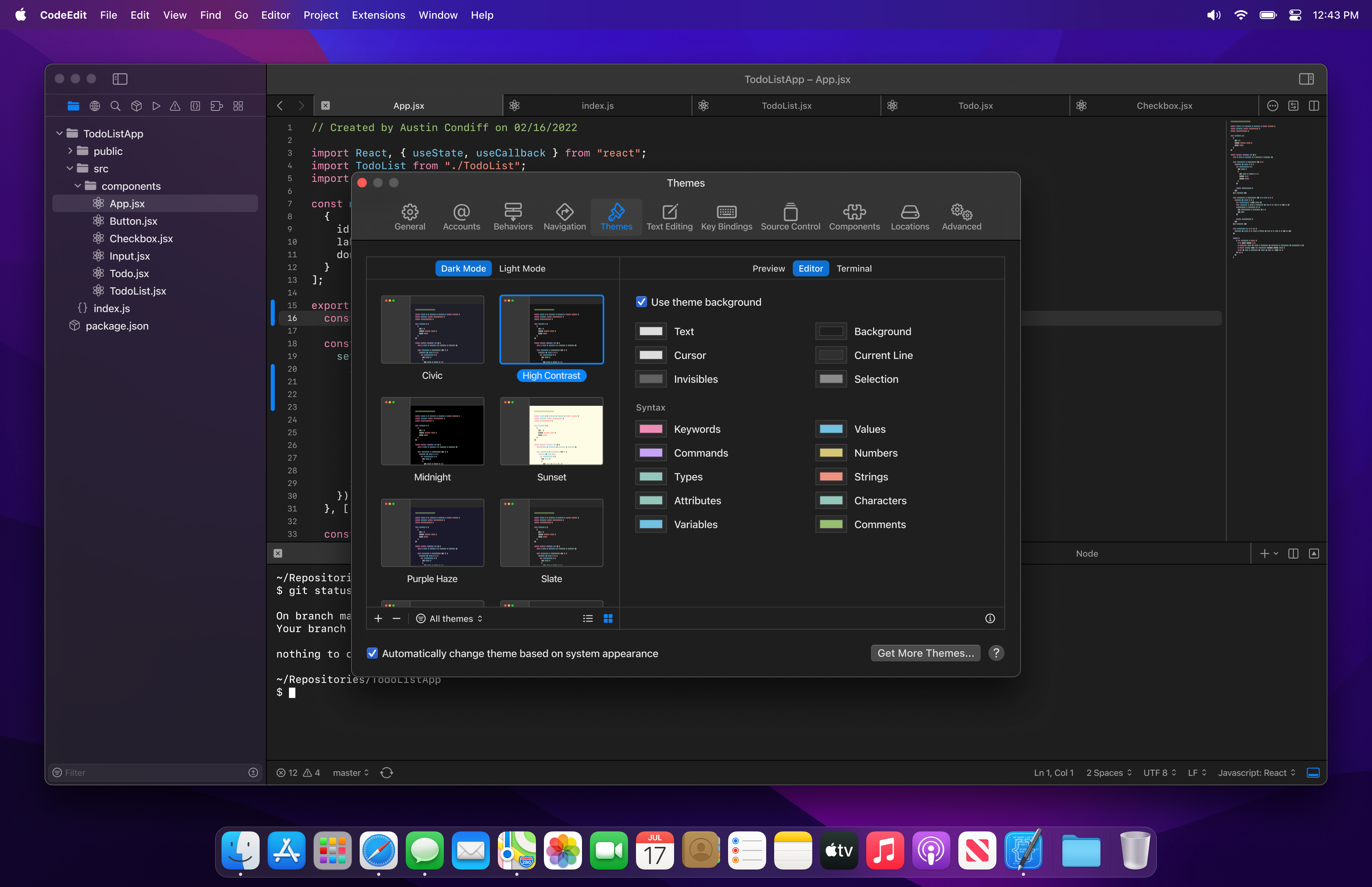
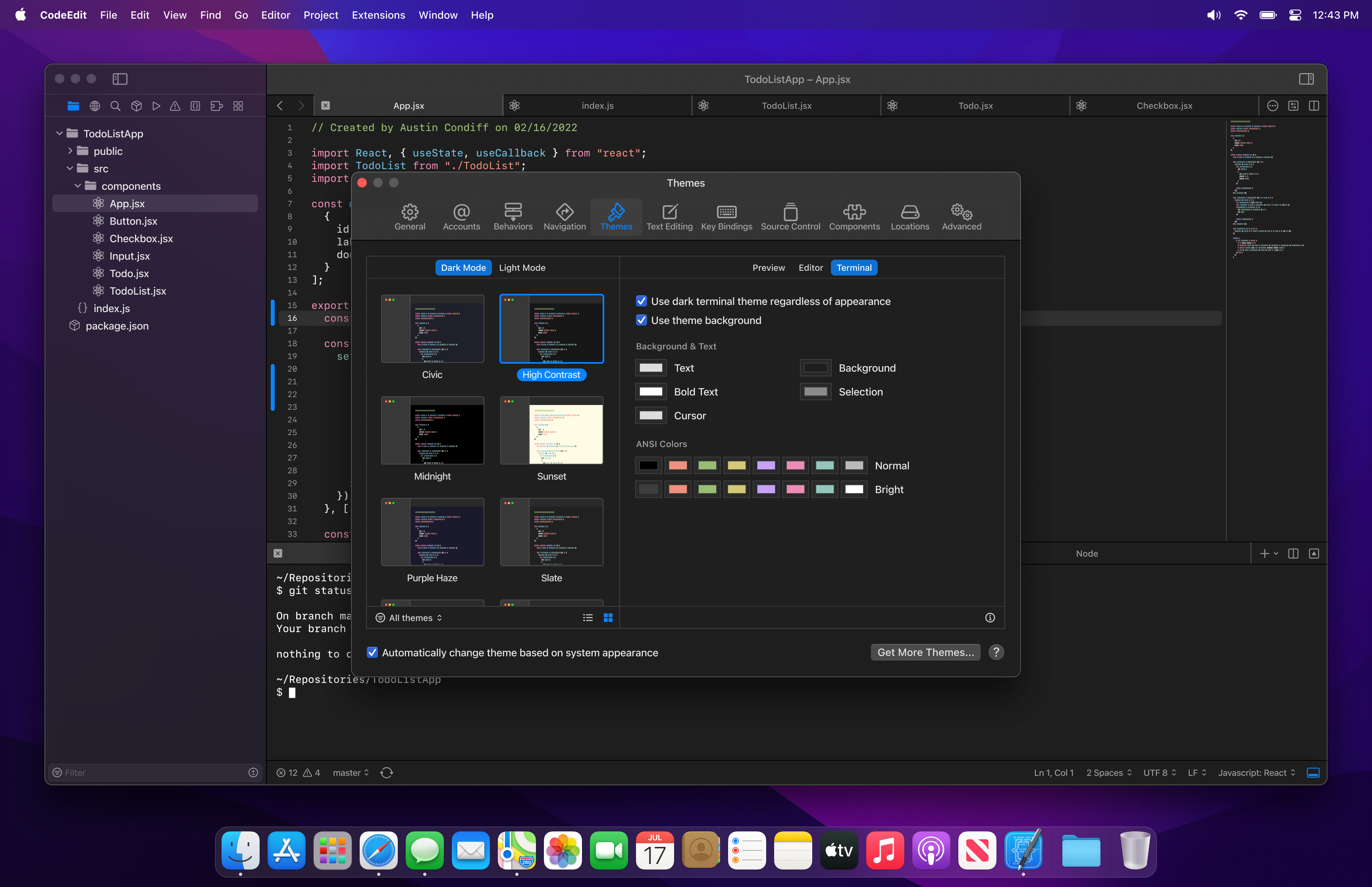
- You see two panels at the top to select a theme and a panel with three tabs, Preview, Editor, and Terminal.
- Preview: Preview the theme in various languages.
- Editor: Configure the theme colors for the editor.
- Terminal: Configure the theme colors for the terminal.
- Below the panels, you see two checkboxes.
- The first checkbox says, "Use theme background". When unchecked, it will use the standard window background, when it is checked, it will use the background color that the theme defines.
- The second checkbox says, "Automatically change theme based on system appearance".
- This will be checked by default.
- When this is checked
- The theme will automatically change with the system or application appearance (light/dark mode)
- At the top of the theme thumbnail selection panel, you will see two tabs. One for light mode, one for dark mode.
- The user will use these tabs to make a theme selection for each light and dark mode.
- When this is unchecked
- The theme remains the same regardless of system or application appearance (light/dark mode)
- There are no tabs at the top of the theme selection panel
Alternatives considered
Alternate Concept 2 by @underthestars-zhy
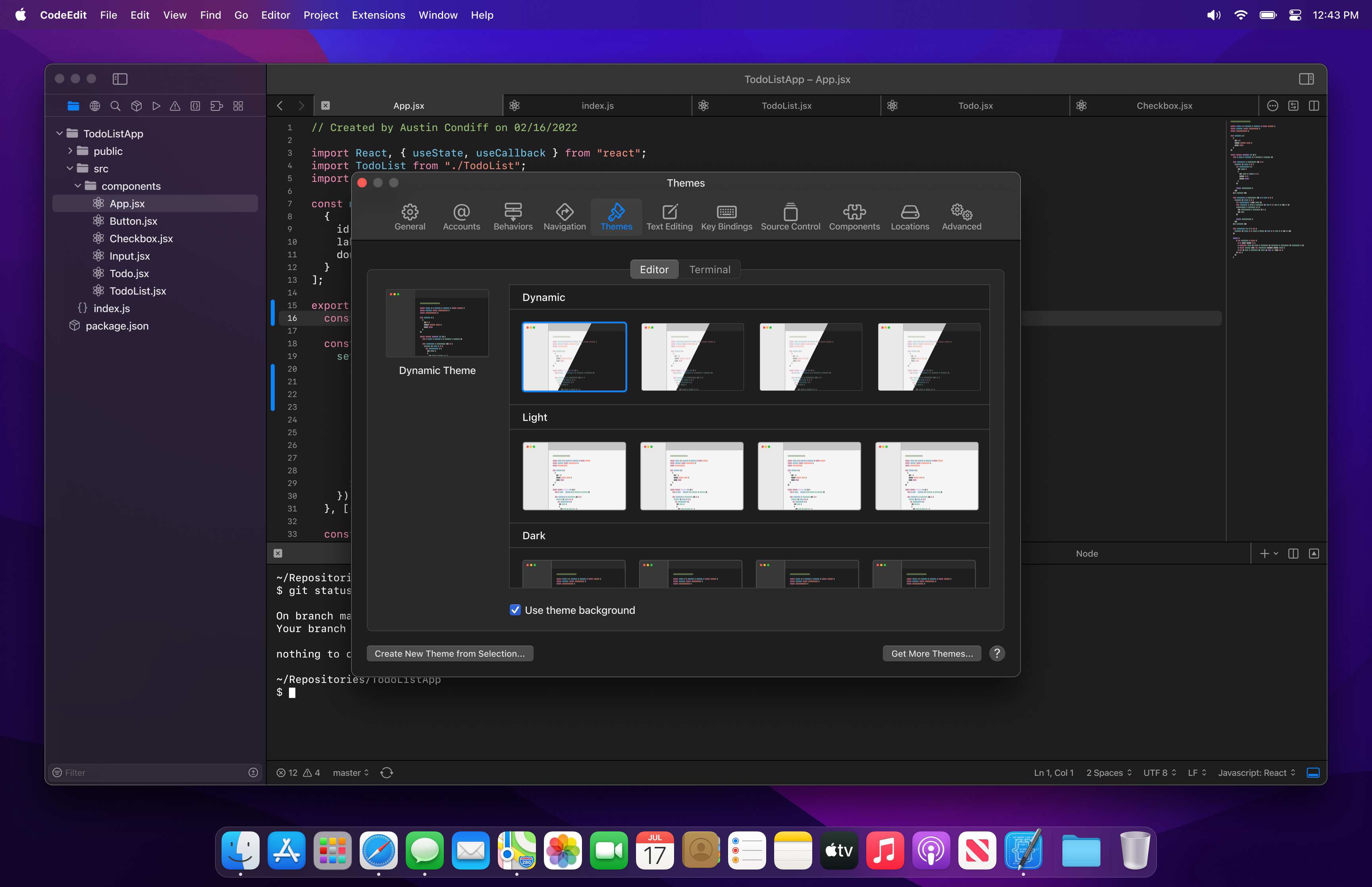
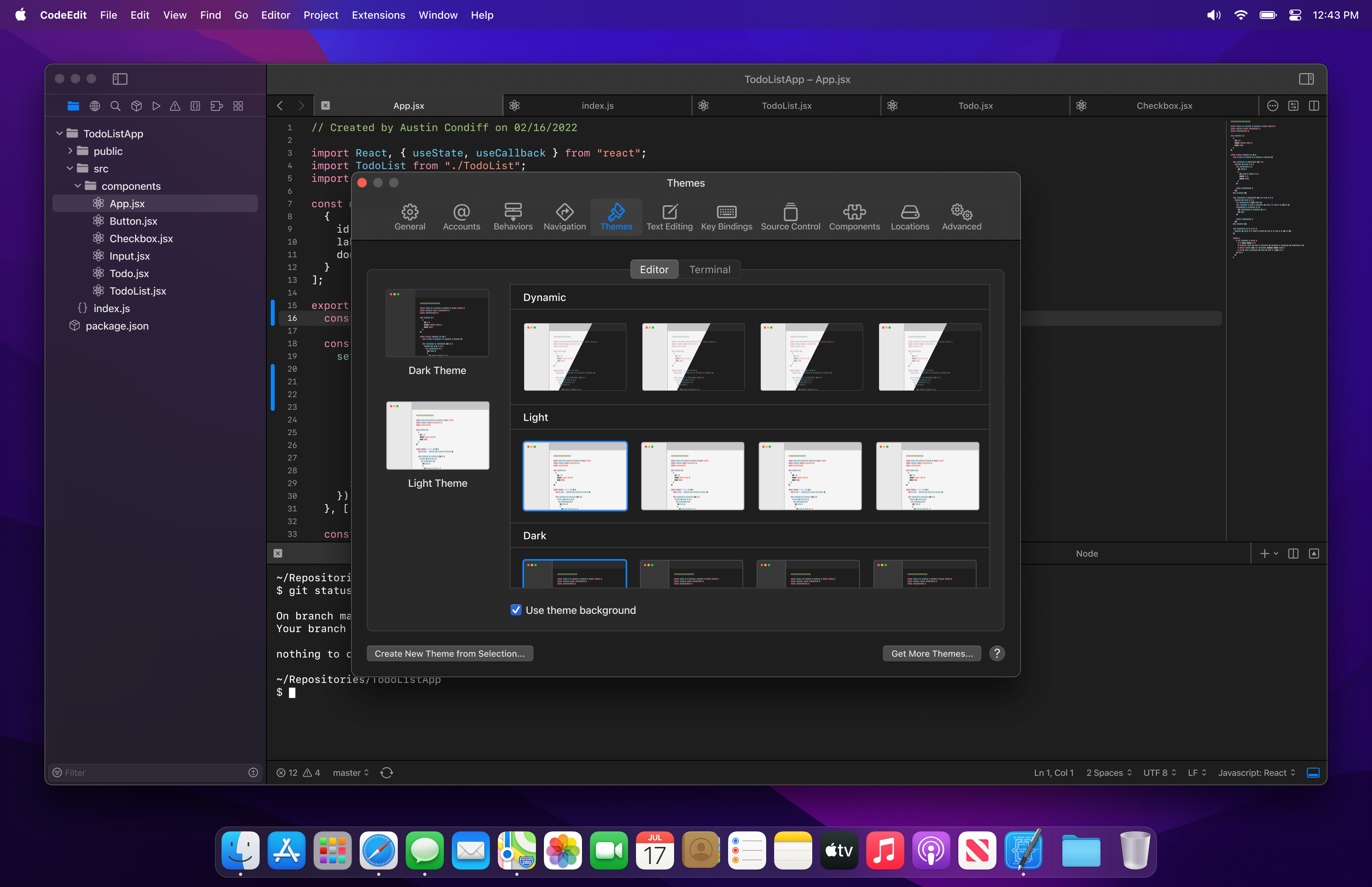
Alternate Concept 3
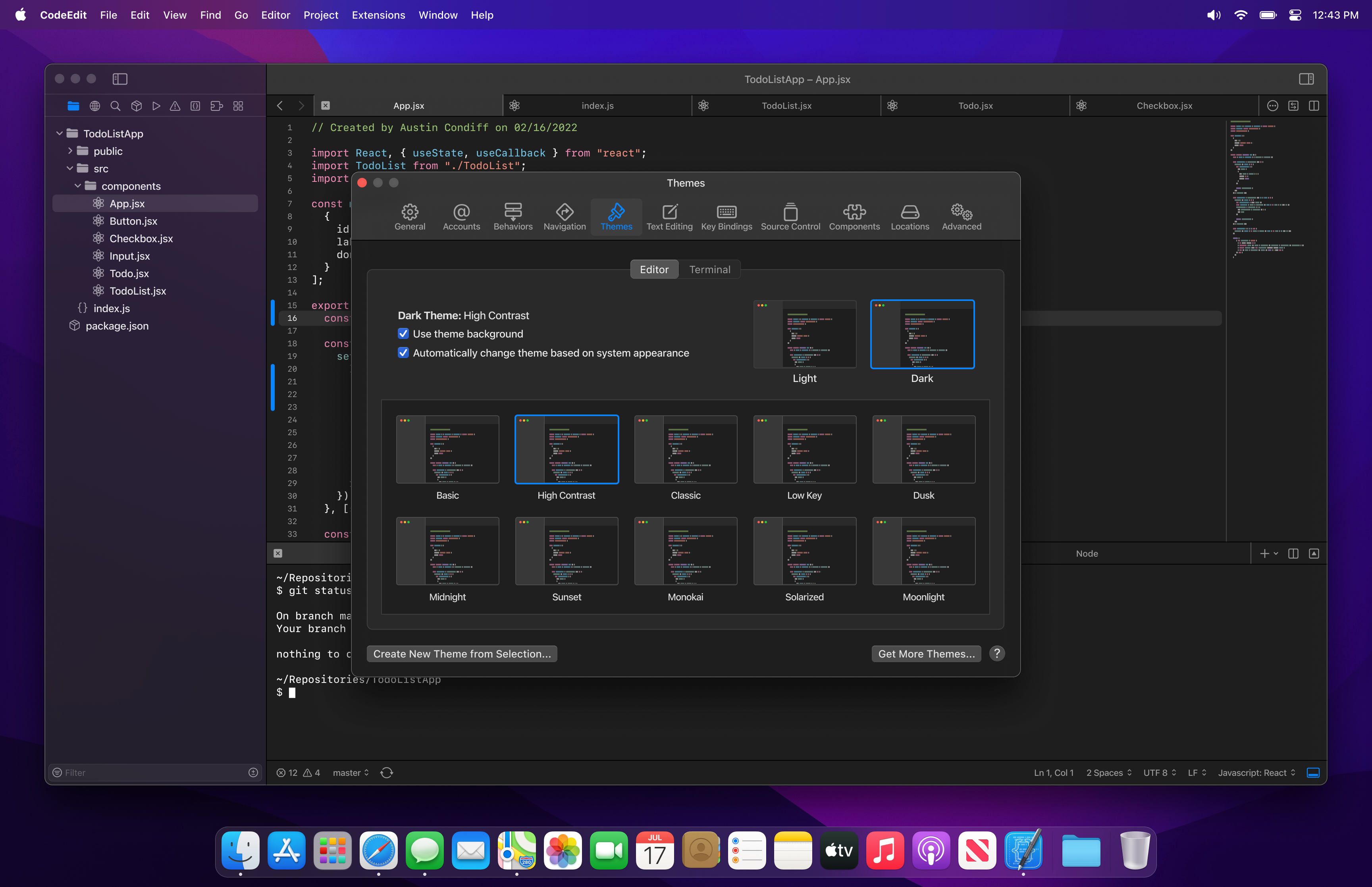
Description
- You see two tabs at the top to select a theme for the editor and a theme for the terminal.
- For the Editor theme, below the tabset inside the well, you see the selected theme name, along with two checkboxes.
- The first checkbox says, "Use theme background". When unchecked, it will use the standard window background, when it is checked, it will use the background color that the theme defines.
- The second checkbox says, "Automatically change theme based on system appearance".
- This will be checked by default.
- When this is checked
- The theme will automatically change with the system or application appearance (light/dark mode)
- To the right of the checkboxes you will see two preview thumbnails. One for light, one for dark.
- These thumbnails act as tabs to make a theme selection for the selected mode.
- When the light thumbnail is selected, you can select the theme below that will be applied when the application is in light mode.
- When the dark thumbnail is selected, the user can then select the dark theme to use when the application is in dark mode.
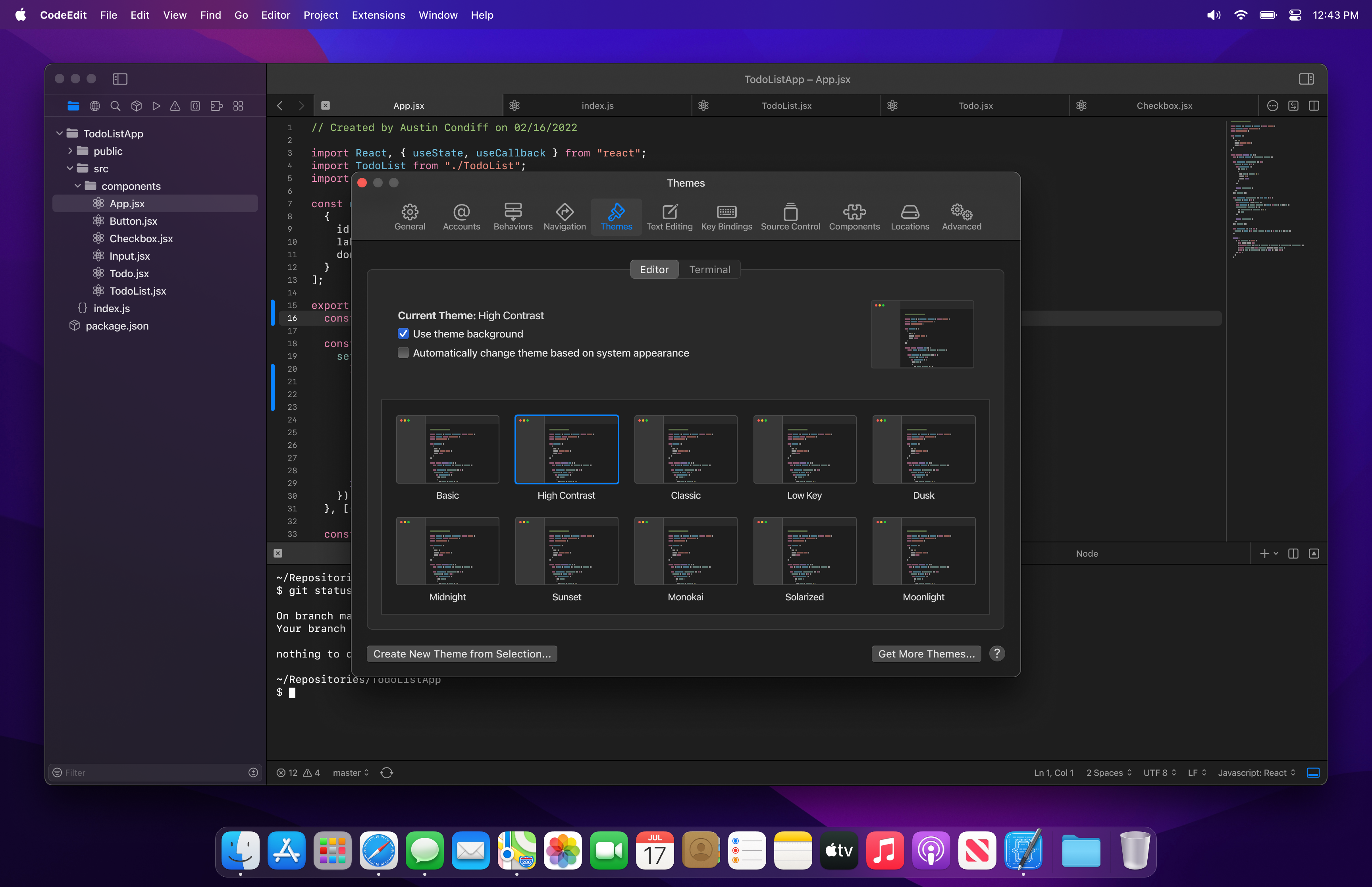
- When this is unchecked
- The theme remains the same regardless of system or application appearance (light/dark mode)
- To the right of the checkboxes you will see a single preview thumbnail when "Automatically change theme based on system appearance" is unchecked
- The terminal tabs contents are largely the same, with an added checkbox that says "Use the editor theme".
- This will be checked by default.
- When checked
- It will disable theme selection below while in the terminal tab.
- It will use the theme selected in the editor tab.
- When unchecked
- Theme selection below is enabled.
- It will apply the selected theme to the terminal only.
Alternate Concept 4
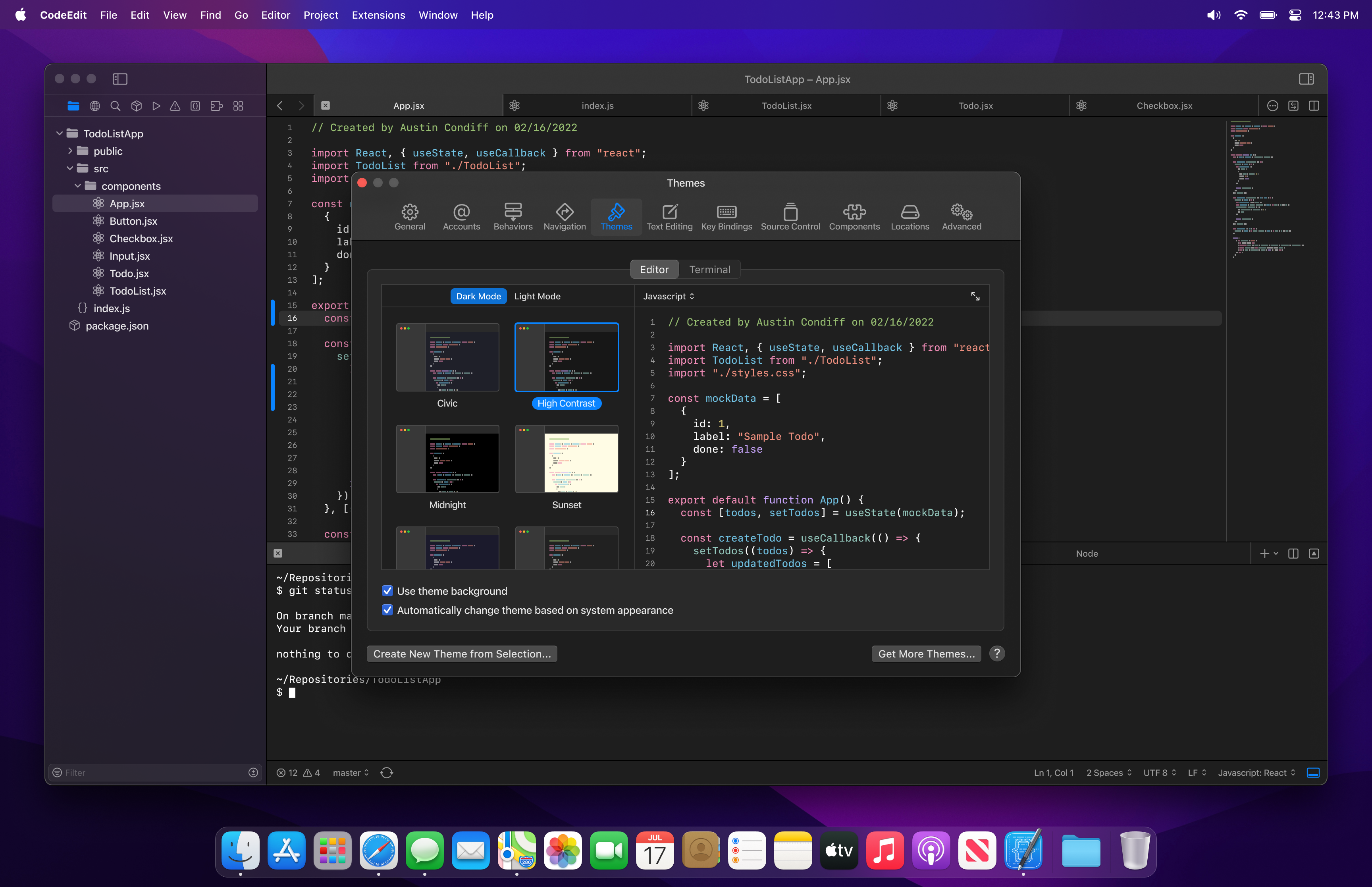
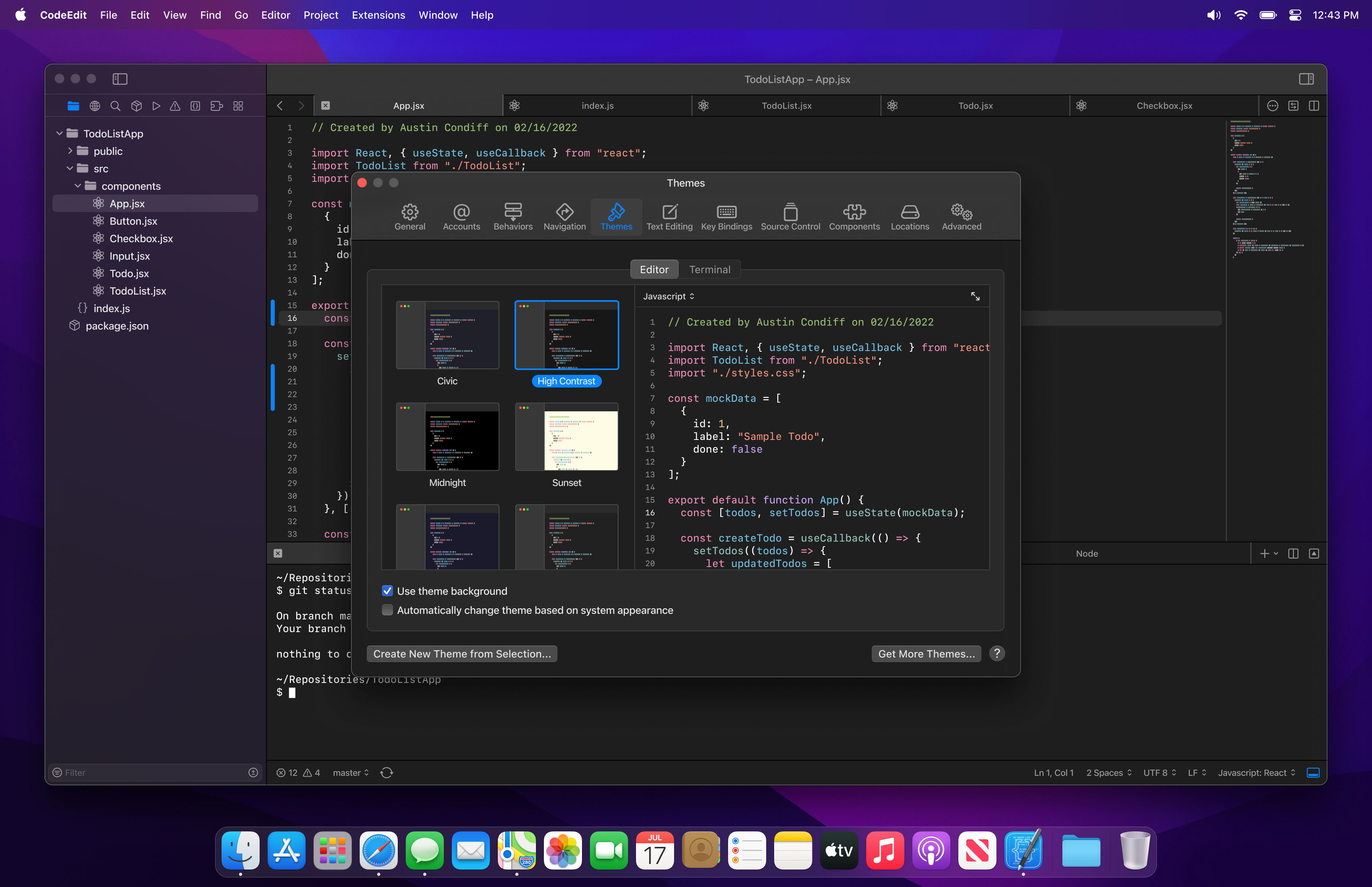
Description
- You see two tabs at the top to select a theme for the editor and a theme for the terminal.
- For the Editor theme, below the tabset and below the well, you see two checkboxes.
- The first checkbox says, "Use theme background". When unchecked, it will use the standard window background, when it is checked, it will use the background color that the theme defines.
- The second checkbox says, "Automatically change theme based on system appearance".
- This will be checked by default.
- When this is checked
- The theme will automatically change with the system or application appearance (light/dark mode)
- At the top of the theme thumbnail selection panel, you will see two tabs. One for light mode, one for dark mode.
- The user will use these tabs to make a theme selection for each light and dark mode.
- When this is unchecked
- The theme remains the same regardless of system or application appearance (light/dark mode)
- There are no tabs at the top of the theme selection panel
- The terminal tab contents are largely the same, with an added checkbox that says "Use the editor theme".
- This will be checked by default.
- When checked
- It will disable theme selection while in the terminal tab.
- It will use the theme selected in the editor tab.
- When unchecked
- Theme selection is enabled.
- It will apply the selected theme to the terminal only.
Additional context
We want to stay close to how macOS presents this type of interaction.

We may later consider other tabs such as "icons" for different icon sets and application icons.

vote in this comment by emoji
If you like @austincondiff ‘s idea, please give a rocket. If you like @underthestars-zhy ’s idea, please give it a heart
Concept 1 isn’t in this vote. Because concept one can be easily implemented into concepts 2 & 3

Quick instructions about option 2:
Q: If I want theme auto changes when I change the system appearance
A: Use a dynamic theme.
Q: If I want to have different themes on light and dark mode. And they can auto change
A: Choose a light theme and a dark theme. You will see two previews on the right side.
I really like concept 1. I think we should have this code preview to easily see how the theme looks on different languages. This will make customization a lot more accessible.

I really like concept 1. I think we should have this code preview to easily see how the theme looks on different languages. This will make customization a lot more accessible.
concept 1 can be implemented to concept 2 and 3 by using menu.
@underthestars-zhy I really appreciate the effort, but you are creating confusion in your attempts to oversimplify the UI. Sometimes being explicit and intentional drives increased user understanding and clarity. Same thing goes for #148 and #205.
@underthestars-zhy I really appreciate the effort, but you are creating confusion in your attempts to oversimplify the UI. Sometimes being explicit and intentional drives increased user understanding and clarity. Same thing goes for #148 and #205.
So, if you use your ideas. Then we need to abandon the dynamic theme. Is there any way to achieve a balance between the two?
Maybe we can have a related theme if a dark theme is associated with a light theme. When the user chooses this dark theme, the light theme can change to the related light theme if the user doesn’t like it. They can shift the light theme back.
This can use concept 3
Or we pop a button. If the user wants to change to the related theme, they tap them
I just discovered that Xcode automatically changes themes on system appearance change. It simply applies the theme selected when the user in in each mode.
For example:
- I am in dark mode
- The theme is set to Basic Dark (default)
- I select High Contrast Dark
- I change system appearance to light mode
- The theme automatically changes to Basic Light (default)
- I change the theme to Sunset
- I change the system appearance to dark mode
- The theme automatically changes to High Contrast Dark
- I change the system appearance to light mode
- The theme automatically changes to Sunset
As you can see, it simply remembers my preference for each mode. No need for additional UI to set for each mode. Should we do this or keep our design as is?
Please note: I just updated the mockups in the issue description with our new target design.
At the moment (as of #343 ) the themes get saved/read to/from ~/.codeedit/themes as a .json file that looks like this:
{
  "type" : "dark",
  "license" : "MIT",
  "author" : "CodeEdit",
  "description" : "CodeEdit default dark theme.",
  "name" : "Default (Dark)",
  "distributionURL" : "https:\/\/github.com\/CodeEditApp\/CodeEdit",
  "version" : "0.0.1",
  "editor" : {
    "strings" : {
      "color" : "#f0907f"
    },
    "comments" : {
      "color" : "#97be71"
    },
    "numbers" : {
      "color" : "#d6c775"
    },
    "commands" : {
      "color" : "#c6a3f9"
    },
    "lineHighlight" : {
      "color" : "#303030"
    },
    "values" : {
      "color" : "#70c1e2"
    },
    "background" : {
      "color" : "#1e1e1e"
    },
    "keywords" : {
      "color" : "#ef8bb6"
    },
    "text" : {
      "color" : "#DDDDDD"
    },
    "insertionPoint" : {
      "color" : "#DDDDDD"
    },
    "selection" : {
      "color" : "#8b8b8b"
    },
    "types" : {
      "color" : "#93c7bc"
    },
    "variables" : {
      "color" : "#70c1e2"
    },
    "attributes" : {
      "color" : "#93c7bc"
    },
    "characters" : {
      "color" : "#93c7bc"
    },
    "invisibles" : {
      "color" : "#636363"
    }
  },
  "terminal" : {
    "text" : {
      "color" : "#ffffff"
    },
    "boldText" : {
      "color" : "#ffffff"
    },
    "cursor" : {
      "color" : "#ffffff"
    },
    "background" : {
      "color" : "#1e1e1e"
    },
    "selection" : {
      "color" : "#8b8b8b"
    },
    "black" : {
      "color" : "#000000"
    },
    "red" : {
      "color" : "#990000"
    },
    "green" : {
      "color" : "#00a600"
    },
    "yellow" : {
      "color" : "#999900"
    },
    "blue" : {
      "color" : "#0000b2"
    },
    "magenta" : {
      "color" : "#b200b2"
    },
    "cyan" : {
      "color" : "#00a6b2"
    },
    "white" : {
      "color" : "#bfbfbf"
    },
    "brightBlack" : {
      "color" : "#666666"
    },
    "brightRed" : {
      "color" : "#e50000"
    },
    "brightGreen" : {
      "color" : "#00d900"
    },
    "brightYellow" : {
      "color" : "#e5e500"
    },
    "brightBlue" : {
      "color" : "#0000ff"
    },
    "brightMagenta" : {
      "color" : "#e500e5"
    },
    "brightCyan" : {
      "color" : "#00e5e5"
    },
    "brightWhite" : {
      "color" : "#e5e5e5"
    }
  }
}
What is left on this? @lukepistrol do you want to add a checklist at the issue description if it is still in progress?
@austincondiff, @lukepistrol Can we close this issue or is there still work being done?

@nanashili maybe this isn't closed yet because of #1215? I agree that we should close this though.
