

 CloudCompare
Subdividing a point cloud using the triangles of a mesh
Hello, I am writing here on the advice of Daniel Girardeau. I have created a mesh and would like to use it to divide a cloud of points (as seen in the example figure). The idea would be to make a subdivision using only the X and Y coordinates, obtaining N sub-clouds where N is the number of triangles. Basically I'd have to find a way to create a loop of the crop2D command, only I have no experience with meshes and wouldn't even know where to start. Any advice?
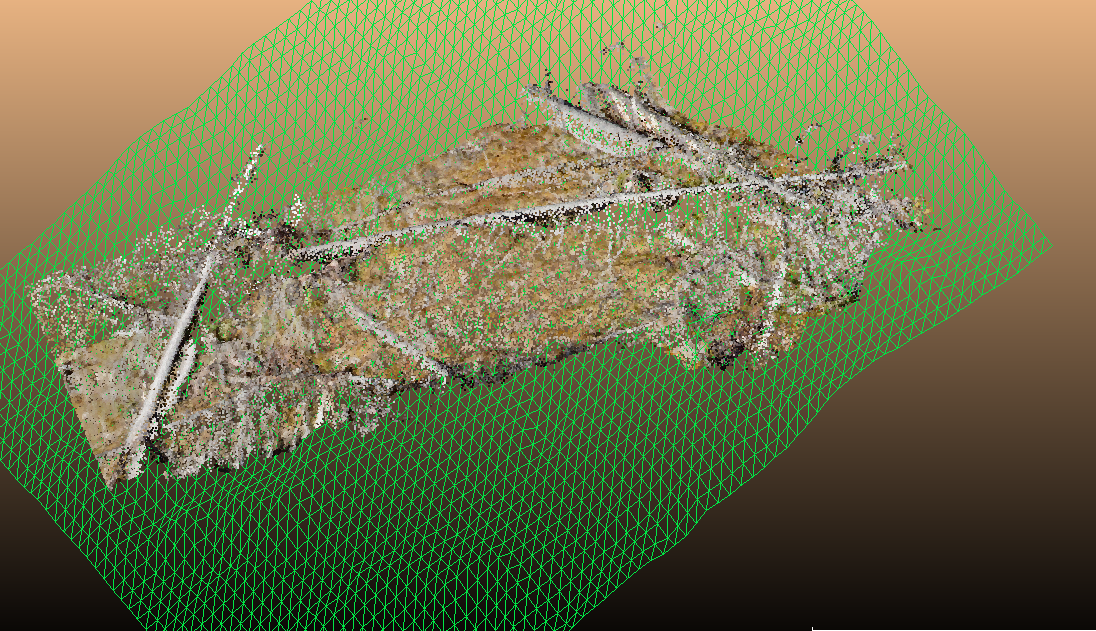

Hello, The idea here will be to iterate through the triangles, get the (x,y) coordinates of the 3 nodes to build a polyline used to make the crop2D. Doing this loop in Python in CloudComPy should not be a problem, but the CloudCompare functions required to iterate through the triangles of a mesh are not yet wrapped in CloudComPy. It should not be difficult for me to add these functions but they will not be available in a CloudComPy binary (Linux or Windows) until next release (probably 2or 3 weeks from now). I add this to my TODO list, these functions may have a lot of use. However, the calculation time may be a bit long if there are many triangles. Is the mesh completely imposed, or is it possible to build a mesh optimised for this task, given the edge size we would like, for instance ? Regards, Paul

Thank you for your reply. The mesh is generated by making a DTM pointwise and using that result to generate it, so it is quite complex to edit the mesh. It is a pity that the functions are not available yet because I really need them. I would like to ask another question: once the mesh has been generated in CloudCompare, how do I isolate the 3 vertices of each triangle? Because in that case I could simply use the geometry combined with the calculation of distances.
Internally, it's an array of N*3 integers (i1, i2, i3) (a triplet for each triangle). And the indices refer to the associated cloud ('vertices'). Each integer index is the index of the corresponding point in the cloud.

I am not sure to understand your question. I suppose you mean: once the mesh as been generated or loaded in CloudComPy, i.e. using a Python script, it is possible to get the cloud associated to the vertices of the mesh, and iterate through the vertices and get their coordinates. But, without the information giving the relation between nodes and triangles it is very difficult to go further. I have another idea. I was focused on using CloudCompare functions to iterate through nodes and triangles, but if the mesh is saved on a file with a known format ( .obj, .ply, .off, .stl, etc.), there are several Python tools to load the mesh and iterate through its elements. The problem will be to find a tool existing in the environment of CloudComPy, or easy to add. so I will try to find something (maybe not now, however). Regards, Paul
@dgirardeau Sorry, I didn't see your answer, I was working in the train... Unfortunately, in CloudComPy, the access to the mesh data is missing to get the array of triangles in a NumpyArray... Something more to add.
Hi, is there any news about the inclusion of this function? I need it badly!
Hello,
I have introduced functions to iterate on the triangles of a mesh and access their nodes and coordinates. I'm a little bit behind my initial planning, I still have some other developments to finish before producing the binaries. I hope to finish this within the week.