

 Clockmender
Create a toggle for hiding/showing the cursor (and 2D drawing plane anchor)
Is your feature request related to a problem? Please describe. Sometimes, the cursor (and the empty mesh anchor created at the origin) gets in the way when 2D drawing from the origin -- specifically when selecting (and merging) vertices at the origin.
As it is not uncommon to beging drawing at the origin, it would therefore be nice to be able to hide/show them as necessary.
Describe the solution you'd like A button like the show/hide pivot-point button for both the cursor and the sketch plane anchor would be nice?
The other option would be to selectively hide the cursor by default when it is moved to the origin (but still allow toggling its visibility for quick visual verification).
Describe alternatives you've considered (None)
Additional context (None)

This is already possible in Blender with the option in the 3D Overlays options, AFAICT this option is not available through the API:
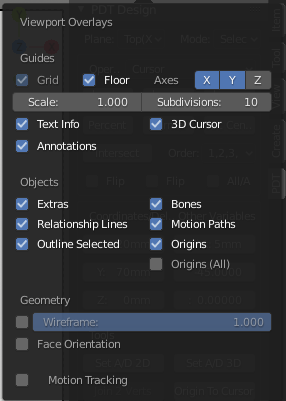
Also we will not be using Sketch Plane Anchor, as the 2D drawings will be produced as flat mesh objects oriented to the view Top axis. This will also apply for drawing borders, notes, annotations, etc. in order to be able to render them. These objects may well be a combination of Vertex Meshes and 2D Curve objects, depending on required output.
Comments on this proposal are most welcome!
