

 ChrisTitusTech
runspace.ps1 fails comparing versions when running with arguments
Describe the bug Running runspace.ps1 w/ arguments on a fresh installation w/o winget gives the following output. ====Chris Titus Tech===== =====Windows Toolbox===== VERBOSE: Arguments Detected, Running Args VERBOSE: Installing Microsoft.WindowsTerminal,Git.Git. WARNING: 10/23/2022 22:01:59 | Warning | Winget is not supported on this version of Windows (Pre-1809). Stopping installs Thank you for using winutil!
The GUI version runs correctly.
To Reproduce Steps to reproduce the behavior:
- New installation - I used a fresh Win10 sandbox that is still on "2004".
- $env:args="Install:Microsoft.WindowsTerminal,Git.Git"
- [Net.ServicePointManager]::SecurityProtocol=[Net.SecurityProtocolType]::Tls12;iex(New-Object Net.WebClient).DownloadString('https://raw.githubusercontent.com/ChrisTitusTech/winutil/[main¦test]/runspace.ps1')
- See error
Expected behavior winget shall be installed
Screenshots .
Additional context Started ISE / set breakpoint at - if (($sync.ComputerInfo.WindowsVersion) -lt "1809") The value of $sync.ComputerInfo.WindowsVersion is "2004" and it compares and runs as expected. Ended debugger and tried once more - issue is still there. [later] Could it be asynchronous processing and bad timing? Yes! Added a "sleep -s 3" just before "if (($sync.ComputerInfo.WindowsVersion) -lt "1809")" and it works fine. I run it at least 20 times, always sucessful as below. ====Chris Titus Tech===== =====Windows Toolbox===== VERBOSE: Arguments Detected, Running Args VERBOSE: Installing Microsoft.WindowsTerminal,Git.Git. VERBOSE: 10/23/2022 22:02:43 | INFO | WinGet was not detected VERBOSE: 10/23/2022 22:02:43 | INFO | Installing WinGet

Nice find! Most likely a timing issue.
I pull the computer info via a runspace to populate this info without delaying the GUI. However looks like the arguments allow the install process to start before that info is completed. https://github.com/ChrisTitusTech/winutil/blob/7adfb649d4ad8c5d7e6235dc876903961808cd03/runspace.ps1#L1262
Going to have to update the runspace.ps1 soon as I made an update to the applications json to work better with winutil.ps1 #326 so I will include a fix with that.

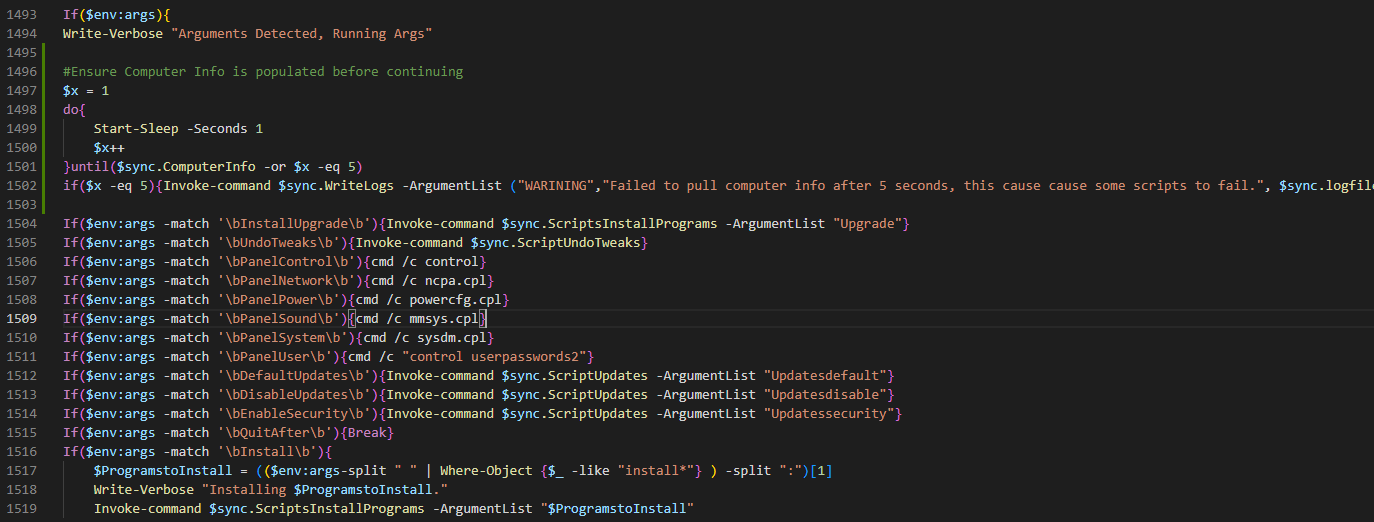
I am unable to replicate it, can you try adding this to the if($env:args) block and see if that helps?
$x = 1
do{
    Start-Sleep -Seconds 1
    $x++
}until($sync.ComputerInfo -or $x -eq 5)
if($x -eq 5){Invoke-command $sync.WriteLogs -ArgumentList ("WARINING","Failed to pull computer info after 5 seconds, this cause cause some scripts to fail.", $sync.logfile)}
Should look like this
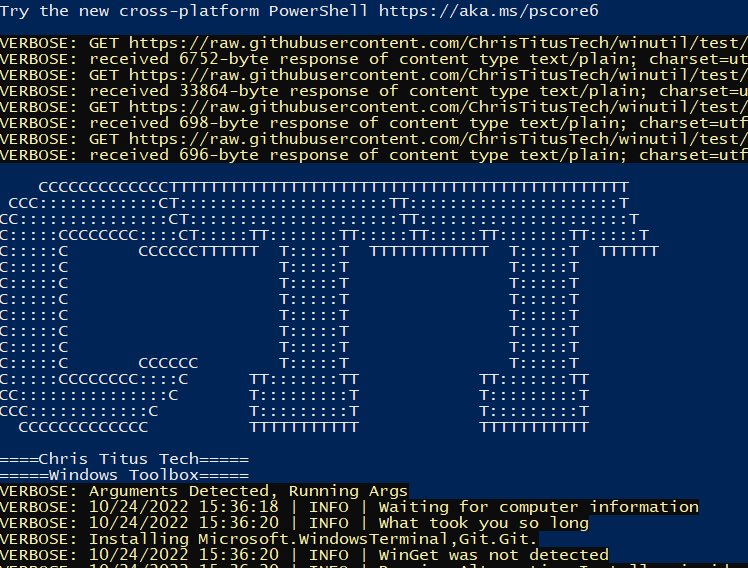
That works for me. Under heavy load (running a game in parallel) it took longer than 5 seconds on my crappy 3 years old laptop. But normally it was 1 to 3 seconds. I did add two messages with time stamp for local testing.
#Ensure Computer Info is populated before continuing
Invoke-command $sync.WriteLogs -ArgumentList ("INFO","Waiting for computer information", $sync.logfile)
$x = 0
do{
    Start-Sleep -Seconds 1
    $x++
}until($sync.ComputerInfo -or $x -eq 5)
if($x -eq 5){Invoke-command $sync.WriteLogs -ArgumentList ("WARINING","Failed to pull computer info after 5 seconds, this cause cause some scripts to fail.", $sync.logfile)}
else {Invoke-command $sync.WriteLogs -ArgumentList ("INFO","What took you so long", $sync.logfile)}
There was a little flaw in the logic. Counting from 1 to 5 gives 4 seconds only.

Good deal, I updated the time out to 10 seconds and updated the logic ($x = 0 instead of 1)
