

 CIDARLAB
Connection Button & Appearance [Story]
-
Currently, no menu opens upon clicking on the connection button. The menu should function like the component pop-ups which display the parameters and sliders.
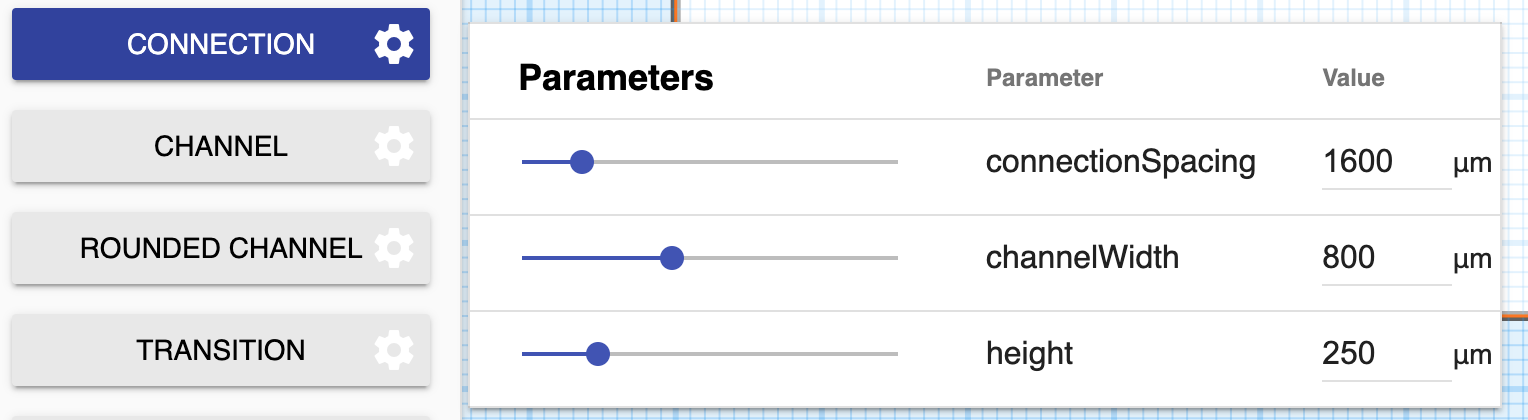 3DuF v1 version of connection button pop-up.
 -
The button currently does not toggle the connection tool between activated and deactivated. Clicking the button should highlight the button and activate the tool; a second click should unhighlight the button and deactivate the tool.

 Mixer button: selected and deselected.
 -
Changing the channelWidth of a connection does not change the width of the ui element corresponding to that connection.
Acceptance Criteria:
- [ ] Unit Test
- [ ] Pop-up appears upon clicking button
- [ ] Changes in connection properties reflected in resultant objects
- [ ] Button allows the user to activate and deactivate connection tool

It appears that the properties are not initializing before they are read, which is resulting in undefined properties and errors when trying to read into them