

 BookStackApp
Feature Request: Ordered List with attributes (e.g. alphabetically)
As of BS v21.05.3 the page editor offers either Bullet Lists or Ordered List, but those only as Numbered Lists. What I'm missing is the ability to choose a different order attribute such as „alphabetically“. See here for the available options.
GUI-wise this could be solved by turning the „Ordered List“ button into a drop down menu.
Also tried to edit the pages source code, but despite the HTML snippet <ol type="a"> as such being correct, I still see numbers instead of characters. (Some underlaying CSS? Perhaps...)
I currently help myself by using a Bullet List followed by manually entered characters.


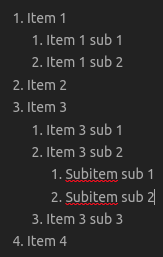
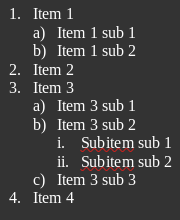
The ability to switch between ordered list attributes for subpoints would significantly improve the readability of ordered lists in Bookstack. This can either be accomplished by adding a dropdown list on the ordered list button, or by automatically starting with numerical, then switching to alpha or Roman numerals for subpoints, and then rotating through the available options. As Bookstack is often used for documentation, pages are often read at times when the reader is rushed, meaning that simply relying on indentation for differentiation can lead to misreading the lists, causing potential problems for employees and their customers. The first screenshot is of the current formatting available in Bookstack, and the second is an example of the proposed change. As you can see, the second screenshot is much easier to read and keep track of the current step when walking through an issue with an internal or external customer.

While it does not respect the HTML list "type" attribute, you can style lists inline using the "list-style" property:
<ol>
  <li>
    Item 1
    <ol style="list-style: lower-alpha;">
      <li>
        Subitem 1
      </li>
      <li>
        Subitem 2
      </li>
    </ol>
  </li>
  <li>
    Item 2
  </li>
</ol>
