
HousingPos
 HousingPos copied to clipboard
 Bluefissure
A xivlauncher plugin to save/load positions of the housing furnitures.
HousingPos

HousingPos is a Dalamud plugin that reads and saves FF14 housing furniture position presets. It can save the current housing furniture placement presets and apply them later.
Installation
Please refer to this page.
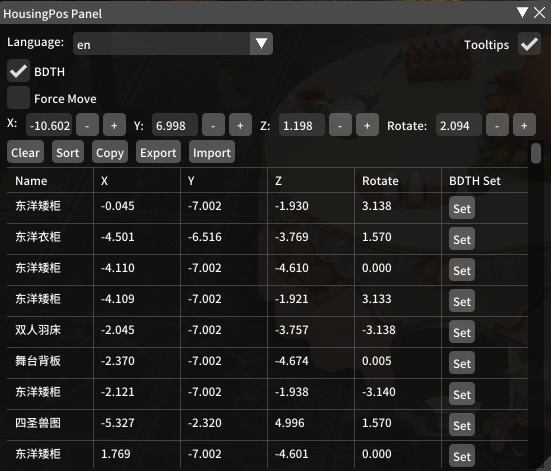
Use /xhouse in the game to open the config panel.
Instructions
Please clear the furniture list before entering the room. The furniture list will be automatically read after opening the Housing-Indoor Furnishings page.
BDTH: After enabling it, it will integrate with BDTHPlugin. Clicking on the set button will automatically invoke the BDTH placement command.
Import/Export Of The Whole House
Copy:Copy the furniture list to the clipboard. At the same time, you will be prompted: Copied ? items to your clipboard. For purchasing furniture only, please use Import / Export to save the preset.
Export:Export the furniture position preset to the clipboard. Hint:Exported ? items to your clipboard.
Import:Import the furniture position preset from the clipboard. Hint:Imported ? items to your clipboard.
Create/Export Group Of Furnitures
Group:
- Click the
groupbutton to enter the group mode. Furniture can be added to the group. The first furniture will be used as a benchmark, and the rest will be calculated by relative coordinates. - After selection, click the
groupingbutton to exit the group mode. The grouped furniture will be added to the data of the first furniture. At this time, the furniture combination can be exported by usingSingle Export. - Check
Single Exportto export a furniture or group separately. - For application grouping, you need to manually change the coordinates of the benchmark furniture at XYZR (consistent with BDTH coordinates), and then the rest of the furniture in the group will automatically calculate the updated coordinates.
Draw on screen
Draw on screen:Draw items on screen.
Export and Import with Cloud
Cloud Upload / Cloud Download:
-
Just like The Whole House's Import / Export,You can change the Server Address in the interface that appears after clicking
Cloud Upload.If you want, you can set up the Back End yourself. -
IMEPlugin is recommended for Chinese input.
-
Optional input contents: Tags (You can
Add Custom Tags), Uploader (Anonymousoptional).
FAQs
-
Can I use it to steal others' housing presets?
No, you can only read the furniture list of the house which you can decorate.
Metadata
Owner
 Bluefissure
Metadata
A xivlauncher plugin to save/load positions of the housing furnitures.