AndroidUtilCode

AndroidUtilCode copied to clipboard
 Blankj
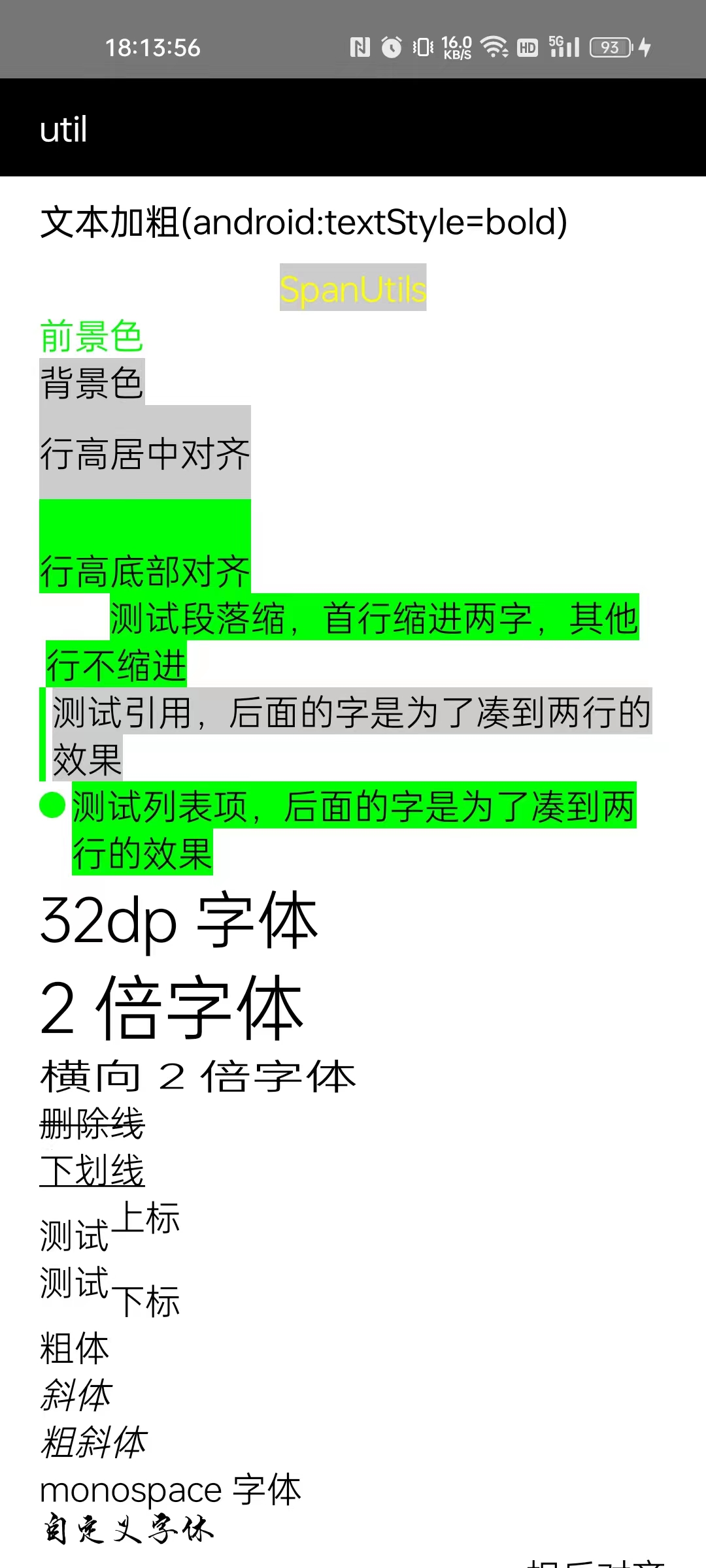
SpanUtils设置粗体似乎无效
描述 Bug
SpanUtils设置粗体似乎无效
- AndroidUtilCode 的版本:utilcodex:1.31.1
- 出现 Bug 的设备型号:realme
- 设备的 Android 版本:Android 13
相关代码
val lineHeight = tv_text.lineHeight
        val textSize = tv_text.textSize
        val density = resources.displayMetrics.density
        val clickableSpan = object : ClickableSpan() {
            override fun onClick(widget: View) {
                ToastUtils.show("事件触发了")
            }

            override fun updateDrawState(ds: TextPaint) {
                ds.color = Color.BLUE
                ds.isUnderlineText = false
            }
        }

        SpanUtils.with(tv_text)
            .appendLine("SpanUtils").setBackgroundColor(Color.LTGRAY).setBold()
            .setForegroundColor(Color.YELLOW).setHorizontalAlign(Layout.Alignment.ALIGN_CENTER)
            .appendLine("前景色").setForegroundColor(Color.GREEN)
//                .appendLine("测试哈哈").setForegroundColor(Color.RED).setBackgroundColor(Color.LTGRAY).setFontSize(10).setLineHeight(280, SpanUtils.ALIGN_BOTTOM)
            .appendLine("背景色").setBackgroundColor(Color.LTGRAY)
            .appendLine("行高居中对齐").setLineHeight(2 * lineHeight, SpanUtils.ALIGN_CENTER)
            .setBackgroundColor(Color.LTGRAY)
            .appendLine("行高底部对齐").setLineHeight(2 * lineHeight, SpanUtils.ALIGN_BOTTOM)
            .setBackgroundColor(Color.GREEN)
            .appendLine("测试段落缩,首行缩进两字,其他行不缩进").setLeadingMargin(textSize.toInt() * 2, 10)
            .setBackgroundColor(Color.GREEN)
            .appendLine("测试引用,后面的字是为了凑到两行的效果").setQuoteColor(Color.GREEN, 10, 10)
            .setBackgroundColor(Color.LTGRAY)
            .appendLine("测试列表项,后面的字是为了凑到两行的效果").setBullet(Color.GREEN, 20, 10)
            .setBackgroundColor(Color.LTGRAY).setBackgroundColor(Color.GREEN)
            .appendLine("32dp 字体").setFontSize(32, true)
            .appendLine("2 倍字体").setFontProportion(2f)
            .appendLine("横向 2 倍字体").setFontXProportion(1.5f)
            .appendLine("删除线").setStrikethrough()
            .appendLine("下划线").setUnderline()
            .append("测试").appendLine("上标").setSuperscript()
            .append("测试").appendLine("下标").setSubscript()
            .appendLine("粗体").setBold()
            .appendLine("斜体").setItalic()
            .appendLine("粗斜体").setBoldItalic()
            .appendLine("monospace 字体").setFontFamily("monospace")
            .appendLine("自定义字体").setTypeface(Typeface.createFromAsset(assets, "fonts/dnmbhs.ttf"))
            .appendLine("相反对齐").setHorizontalAlign(Layout.Alignment.ALIGN_OPPOSITE)
            .appendLine("居中对齐").setHorizontalAlign(Layout.Alignment.ALIGN_CENTER)
            .appendLine("正常对齐").setHorizontalAlign(Layout.Alignment.ALIGN_NORMAL)
            .append("测试").appendLine("点击事件").setClickSpan(clickableSpan)
            .append("测试").appendLine("Url").setUrl("https://github.com/Blankj/AndroidUtilCode")
            .append("测试").appendLine("模糊").setBlur(3f, BlurMaskFilter.Blur.NORMAL)
            .appendLine("颜色渐变").setShader(
                LinearGradient(
                    0f,
                    0f,
                    64f * density * 4f,
                    0f,
                    resources.getIntArray(R.array.rainbow),
                    null,
                    Shader.TileMode.REPEAT
                )
            ).setFontSize(64, true)
            .appendLine("图片着色").setFontSize(64, true).setShader(
                BitmapShader(
                    BitmapFactory.decodeResource(
                        resources,
                        R.drawable.span_cheetah
                    ), Shader.TileMode.REPEAT, Shader.TileMode.REPEAT
                )
            )
            .appendLine("阴影效果").setFontSize(64, true).setBackgroundColor(Color.BLACK)
            .setShadow(24f, 8f, 8f, Color.WHITE)

            .append("小图").setBackgroundColor(Color.GREEN)
            .appendImage(R.drawable.span_block_low, SpanUtils.ALIGN_TOP)
            .append("顶部").setBackgroundColor(Color.GREEN)
            .appendImage(R.drawable.span_block_low, SpanUtils.ALIGN_CENTER)
            .append("居中").setBackgroundColor(Color.GREEN)
            .appendImage(R.drawable.span_block_low, SpanUtils.ALIGN_BASELINE)
            .append("底部").setBackgroundColor(Color.GREEN)
            .appendImage(R.drawable.span_block_low, SpanUtils.ALIGN_BOTTOM)
            .appendLine("对齐").setBackgroundColor(Color.GREEN)
            .appendImage(R.drawable.span_block_high, SpanUtils.ALIGN_TOP)
            .append("大图").setBackgroundColor(Color.LTGRAY)
            .appendImage(R.drawable.span_block_high, SpanUtils.ALIGN_TOP)
            .append("顶部").setBackgroundColor(Color.LTGRAY)
            .appendImage(R.drawable.span_block_high, SpanUtils.ALIGN_TOP)
            .appendLine("对齐").setBackgroundColor(Color.LTGRAY)

            .appendImage(R.drawable.span_block_high, SpanUtils.ALIGN_CENTER)
            .append("大图").setBackgroundColor(Color.GREEN)
            .appendImage(R.drawable.span_block_high, SpanUtils.ALIGN_CENTER)
            .append("居中").setBackgroundColor(Color.GREEN)
            .appendImage(R.drawable.span_block_high, SpanUtils.ALIGN_CENTER)
            .appendLine("对齐").setBackgroundColor(Color.GREEN)

            .appendImage(R.drawable.span_block_high, SpanUtils.ALIGN_BOTTOM)
            .append("大图").setBackgroundColor(Color.LTGRAY)
            .appendImage(R.drawable.span_block_high, SpanUtils.ALIGN_BOTTOM)
            .append("底部").setBackgroundColor(Color.LTGRAY)
            .appendImage(R.drawable.span_block_high, SpanUtils.ALIGN_BOTTOM)
            .appendLine("对齐").setBackgroundColor(Color.LTGRAY)

            .append("测试空格").appendSpace(30, Color.LTGRAY).appendSpace(50, Color.GREEN)
            .appendSpace(100).appendSpace(30, Color.LTGRAY).appendSpace(50, Color.GREEN)
            .create()
截图