

 Baseflow
App rejected by Apple because of missing bluetooth request
🐛 Bug Report
My app was rejected by Apple after the upload only giving the message "Invalid binary", sadly also without any eMail and further explanation (which is of course not your fault but makes the issue much harder to solve).
The reason at the end turned out was, that I did not set "NSBluetoothAlwaysUsageDescription, NSBluetoothPeripheralUsageDescription" in my info.plist file. But basically I did not even want to use bluetooth. The reason why I missed this in first place was because
in the readme pod file example the following lines are missing
## dart: PermissionGroup.bluetooth
# 'PERMISSION_BLUETOOTH=0'
Expected behavior
A list of all permissions in the example podfile.
Reproduction steps
- Add the permission_handler to an app
- Set all permissions from the example pod file to "0"
- Upload the app to the app store -> The app will be rejected.
Configuration
Version: 7.0.0
Platform:
- [x ] :iphone: iOS
- [ ] :robot: Android

Hi @REKURDennis, so if I understand it correctly you don't want and need the Bluetooth permission in your app? Can you check the following things:
in the podfile you should add this:
Click to open
post_install do |installer|
  installer.pods_project.targets.each do |target|
    target.build_configurations.each do |config|
      ... # Here are some configurations automatically generated by flutter

      # You can remove unused permissions here
      # for more infomation: https://github.com/BaseflowIT/flutter-permission-handler/blob/develop/permission_handler/ios/Classes/PermissionHandlerEnums.h
      # e.g. when you don't need camera permission, just add 'PERMISSION_CAMERA=0'
      config.build_settings['GCC_PREPROCESSOR_DEFINITIONS'] ||= [
        '$(inherited)',

        ## dart: PermissionGroup.calendar
        # 'PERMISSION_EVENTS=0',

        ## dart: PermissionGroup.reminders
        # 'PERMISSION_REMINDERS=0',

        ## dart: PermissionGroup.contacts
        # 'PERMISSION_CONTACTS=0',

        ## dart: PermissionGroup.camera
        # 'PERMISSION_CAMERA=0',

        ## dart: PermissionGroup.microphone
        # 'PERMISSION_MICROPHONE=0',

        ## dart: PermissionGroup.speech
        # 'PERMISSION_SPEECH_RECOGNIZER=0',

        ## dart: PermissionGroup.photos
        # 'PERMISSION_PHOTOS=0',

        ## dart: [PermissionGroup.location, PermissionGroup.locationAlways, PermissionGroup.locationWhenInUse]
        # 'PERMISSION_LOCATION=0',

        ## dart: PermissionGroup.notification
        # 'PERMISSION_NOTIFICATIONS=0',

        ## dart: PermissionGroup.mediaLibrary
        # 'PERMISSION_MEDIA_LIBRARY=0',

        ## dart: PermissionGroup.sensors
        # 'PERMISSION_SENSORS=0',

        ## dart: PermissionGroup.bluetooth
         'PERMISSION_BLUETOOTH=0'
      ]

    end
  end
end
The "#" in front of the permission makes the difference in whether you're using the permission or not. As you mentioned you don't want to use the Bluetooth permission, so the "#" should be removed in front of that permission so that line will look like
PERMISSION_BLUETOOTH=0 than (the same as the example podfile above).
Also make sure you delete the corresponding permission description in Info.plist
I hope this will help you, more information can be found in the README.md of the permission_handler which can be found here.
If this didn't fix your answer, can you please send me your podfile and info.plist?

I am having this same issue currently trying to publish to the apple store:
ITMS-90683: Missing Purpose String in Info.plist - Your app's code references one or more APIs that access sensitive user data. The app's Info.plist file should contain a NSBluetoothPeripheralUsageDescription key with a user-facing purpose string explaining clearly and completely why your app needs the data. Starting Spring 2019, all apps submitted to the App Store that access user data are required to include a purpose string. If you're using external libraries or SDKs, they may reference APIs that require a purpose string. While your app might not use these APIs, a purpose string is still required. You can contact the developer of the library or SDK and request they release a version of their code that doesn't contain the APIs. Learn more (https://developer.apple.com/documentation/uikit/core_app/protecting_the_user_s_privacy).
Though you are not required to fix the following issues, we wanted to make you aware of them:
ITMS-90683: Missing Purpose String in Info.plist - Your app's code references one or more APIs that access sensitive user data. The app's Info.plist file should contain a NSBluetoothAlwaysUsageDescription key with a user-facing purpose string explaining clearly and completely why your app needs the data. Starting Spring 2019, all apps submitted to the App Store that access user data are required to include a purpose string. If you're using external libraries or SDKs, they may reference APIs that require a purpose string. While your app might not use these APIs, a purpose string is still required. You can contact the developer of the library or SDK and request they release a version of their code that doesn't contain the APIs. Learn more (https://developer.apple.com/documentation/uikit/core_app/protecting_the_user_s_privacy).
My podfile is as follows from the readme:
# Uncomment this line to define a global platform for your project
# platform :ios, '9.0'

# CocoaPods analytics sends network stats synchronously affecting flutter build latency.
ENV['COCOAPODS_DISABLE_STATS'] = 'true'

project 'Runner', {
  'Debug' => :debug,
  'Profile' => :release,
  'Release' => :release,
}

def flutter_root
  generated_xcode_build_settings_path = File.expand_path(File.join('..', 'Flutter', 'Generated.xcconfig'), __FILE__)
  unless File.exist?(generated_xcode_build_settings_path)
    raise "#{generated_xcode_build_settings_path} must exist. If you're running pod install manually, make sure flutter pub get is executed first"
  end

  File.foreach(generated_xcode_build_settings_path) do |line|
    matches = line.match(/FLUTTER_ROOT\=(.*)/)
    return matches[1].strip if matches
  end
  raise "FLUTTER_ROOT not found in #{generated_xcode_build_settings_path}. Try deleting Generated.xcconfig, then run flutter pub get"
end

require File.expand_path(File.join('packages', 'flutter_tools', 'bin', 'podhelper'), flutter_root)

flutter_ios_podfile_setup

target 'Runner' do
  use_frameworks!
  use_modular_headers!

  flutter_install_all_ios_pods File.dirname(File.realpath(__FILE__))
end

post_install do |installer|
  installer.pods_project.targets.each do |target|
    flutter_additional_ios_build_settings(target)

    target.build_configurations.each do |config|
      config.build_settings['GCC_PREPROCESSOR_DEFINITIONS'] ||= [
        '$(inherited)',

        ## dart: PermissionGroup.calendar
        'PERMISSION_EVENTS=0',

        ## dart: PermissionGroup.reminders
        'PERMISSION_REMINDERS=0',

        ## dart: PermissionGroup.contacts
        'PERMISSION_CONTACTS=0',

        ## dart: PermissionGroup.camera
        # 'PERMISSION_CAMERA=0',

        ## dart: PermissionGroup.microphone
        'PERMISSION_MICROPHONE=0',

        ## dart: PermissionGroup.speech
        'PERMISSION_SPEECH_RECOGNIZER=0',

        ## dart: PermissionGroup.photos
        # 'PERMISSION_PHOTOS=0',

        ## dart: [PermissionGroup.location, PermissionGroup.locationAlways, PermissionGroup.locationWhenInUse]
        # 'PERMISSION_LOCATION=0',

        ## dart: PermissionGroup.notification
        'PERMISSION_NOTIFICATIONS=0',

        ## dart: PermissionGroup.mediaLibrary
        'PERMISSION_MEDIA_LIBRARY=0',

        ## dart: PermissionGroup.sensors
        'PERMISSION_SENSORS=0',

        ## dart: PermissionGroup.bluetooth
        'PERMISSION_BLUETOOTH=0'
      ]
    end
  end
end
I do not have bluetooth permission descriptions in my Info.plist. So currently the 'PERMISSION_BLUETOOTH=0' is not working for me. In the mean time to get my app published I added the missing permission descriptions.

I am having this same issue. Any updates? Edit: Added this , but flutter clean to the rescue. Its now working.

@arodriguezgb, Good to hear it works after running flutter clean!
Maybe this will work for @REKURDennis and @VinceERS too, running the flutter clean command, can you let me know if it worked? Thanks in advance!
I am using codemagic to publish my app which should not require running a flutter clean as it should be a completely fresh build environment every time. I'm not sure what part of the build process requires this, but shouldn't a completely new checkout of the repository negate the need for running this?
I don't have experience with Codemagic, but I assume that flutter clean doesn't make a difference as it should be a completely fresh build. But I'm not a 100% certain of this, you can always try to run a flutter clean to make sure that dependency caching or options like that are not a thing or are turned off.
On stackoverflow, like this one, people mentioning that there might be third-party frameworks, external libraries or SDK's which might try to use Bluetooth. Are you sure this is not the case in your code?
On stackoverflow, like this one, people mentioning that there might be third-party frameworks, external libraries or SDK's which might try to use Bluetooth. Are you sure this is not the case in your code?
Not sure to be honest. I have gone through each package being included in the app and have not seen any that request bluetooth. I have previously released the app before flutter v2 and migrating to sound null safety without bluetooth permissions and did not have this problem. I do not know if upgrading all my packages with these migrations may have introduced changes to these permissions. I've included a list of dependencies and versions from my pubspec.yaml where I was having issues:
dependencies:
  flutter:
    sdk: flutter
  redux: ^5.0.0
  flutter_redux: ^0.8.2
  redux_thunk: ^0.4.0
  redux_logging: ^0.5.0
  redux_persist: ^0.9.0
  redux_persist_flutter: ^0.9.0
  package_info: ^2.0.0
  permission_handler: ^7.1.0
  location: ^4.1.1
  image_picker: ^0.7.4
  flutter_image_compress: ^1.0.0
  cached_network_image: ^3.0.0
  carousel_slider: ^4.0.0-nullsafety.0
  url_launcher: ^6.0.3
  intl: ^0.17.0
  flutter_svg: ^0.22.0
  material_design_icons_flutter: ^5.0.5955-rc.1
  another_flushbar: ^1.10.20
  flutter_credit_card: ^2.0.0
Hi @REKURDennis, so if I understand it correctly you don't want and need the Bluetooth permission in your app? Can you check the following things:
in the podfile you should add this:
Click to open The "#" in front of the permission makes the difference in whether you're using the permission or not. As you mentioned you don't want to use the Bluetooth permission, so the "#" should be removed in front of that permission so that line will look like
PERMISSION_BLUETOOTH=0than (the same as the example podfile above).Also make sure you delete the corresponding permission description in
Info.plistI hope this will help you, more information can be found in the README.md of the permission_handler which can be found here.
If this didn't fix your answer, can you please send me your podfile and info.plist?
Why your statement contradicts the Readme section from the plugin page?
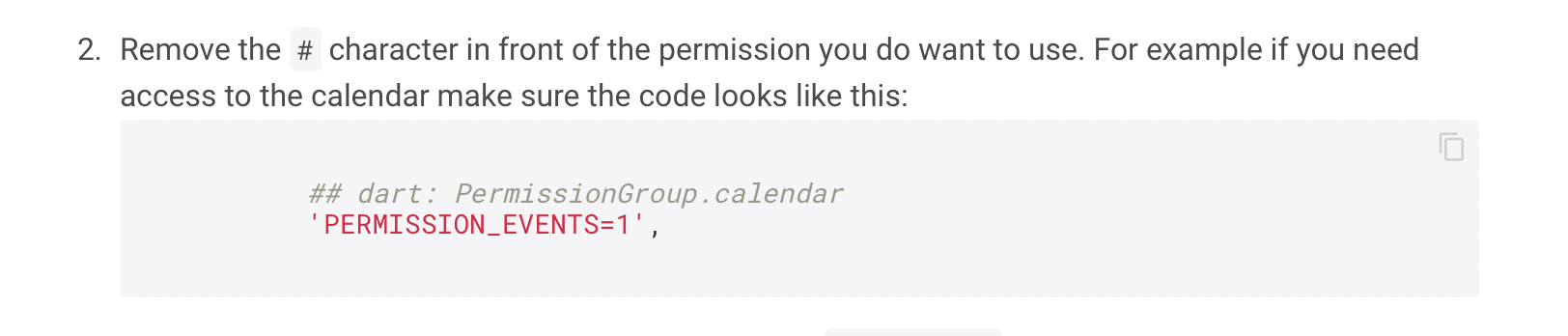
Should we remove # if we want to use or not use it?

Hi @Dararii, because when I reacted on the 5th of May the documentation/code was different than it is now. As you can see in the changelog since version 8.0.0 this has been changed. I also updated the documentation according to the changes made in the new 8.0.0 version. That's why it is different than what I said on the 5th of May.
Right now you should remove the # if you do want to use that permission.
I am going to close this issue as it has not seen activity for over 2 years. Feel free to open a new issue if you feel this is still relevant.
