

 Badgerati
Auto Restart crashes when using file monitor
Describe the Bug
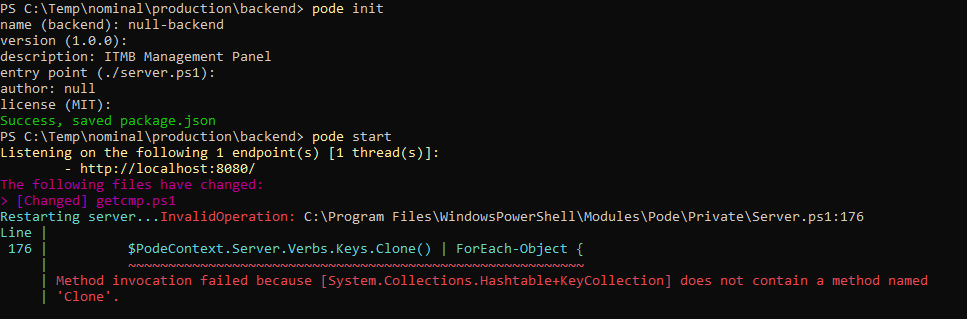
When manually restarting server using hotkey or using the file monitor auto restart, the server crashes with the following error:
Restarting server...InvalidOperation: C:\Program Files\WindowsPowerShell\Modules\Pode\Private\Server.ps1:176 Line | 176 | $PodeContext.Server.Verbs.Keys.Clone() | ForEach-Object { | ~~~~~~~~~~~~~~~~~~~~~~~~~~~~~~~~~~~~~~~~~~~~~~~~~~~~~~~~~ | Method invocation failed because [System.Collections.Hashtable+KeyCollection] does not contain a method named | 'Clone'.
Steps To Reproduce
1). Create dir and Pode init with default values
2). Create server.ps1 with the following:
Start-PodeServer -ScriptBlock { Add-PodeEndpoint -Address localhost -Port 8080 -Protocol Http Add-PodeRoute -Method Get -Path '\getcmp\:cmp' -FilePath ".\getcmp.ps1" }
3). Create server.psd1 with the following:
@{ Server = @{ FileMonitor = @{ Enable = $true ShowFiles = $true } } }
4). Create getcmp.ps1 with the following:
{ $cmp = Get-ADComputer -Identity $WebEvent.Parameters['cmp'] -Properties * Write-PodeJsonResponse -Value @{ 'name' = $cmp.Name; 'enabled' = $cmp.Enabled; 'DistinguisedName' = $cmp.DistinguishedName; 'IPv4Address' = $cmp.IPv4Address; 'DNSHostName' = $cmp.DNSHostName; 'whenCreated' = $cmp.whenCreated; 'OperatingSystem' = $cmp.OperatingSystem; 'OperatingSystemVersion' = $cmp.OperatingSystemVersion; } }
5). Pode start
6). Change the getcmp.ps1 file and save or use the hotkey to restart server
Expected Behavior
Restart the server successfully after file changes.
Screenshots
If applicable, add screenshots to help explain your problem.
Platform
- OS: Windows
- Browser: Chrome
- Versions:
- Pode: v2.7.0
- PowerShell: v7.2.5

I have this too. Was just about to finally raise it but it's been done already :)

Just reproduced it myself as well. It occurs when the Verbs hashtable is empty, just needs some validation to only clear Verbs on a restart when it not empty :)

I just threw in the following as a 'workaround':
if($PodeContext.Server.Verbs.Count -ge 1)
{
    $PodeContext.Server.Verbs.Keys.Clone() | ForEach-Object {
    $PodeContext.Server.Verbs[$_].Clear()
    }
}
Where would one put this line of code? Forgive the ignorance here. :-)
if($PodeContext.Server.Verbs.Count -ge 1) { $PodeContext.Server.Verbs.Keys.Clone() | ForEach-Object { $PodeContext.Server.Verbs[$_].Clear() } }

Where would one put this line of code? Forgive the ignorance here. :-)
if($PodeContext.Server.Verbs.Count -ge 1) { $PodeContext.Server.Verbs.Keys.Clone() | ForEach-Object { $PodeContext.Server.Verbs[$_].Clear() } }
@ardy564 In your PowerShell modules folder, depends on your configuration but I believe by default it's C:\Program Files\WindowsPowershell\Modules\Pode\Private\Server.ps1 - Replace lines 176 - 178