

 Backblaze
`b2 sync` fails part way though; leaves partial `b2.sync.tmp` files
I've had a problem with the sync command where b2 exits before the sync is complete, leaving some complete files and some partially files ending in b2.sync.tmp. This doesn't seem related to the other issue involving b2.sync.tmp files.
Eg. running sync exits with a Killed error (inline with the last status output):
$ b2 sync b2://molomby-archives/2017 ./
dnload 170217-Haruki_Codebases_mcb.7z.sha1
dnload 170217-Haruki_Codebases_mol-sieger.7z.sha1
dnload 170217-Haruki_Codebases_mol-sieger.7z
dnload 171120-helium_PurePrimeMaterial.final.7z.sha1
# .. more files
dnload 171120-helium_svn_Misc-dev.final.7z.sha1
dnload 171120-helium_svn_Misc-dev.final.7z
Killedre: 0/0 files   updated: 29/40 files   3.1 / 10.7 GB   104 MB/s
And I'm left with some complete files (the ones reported as dnload) and some incomplete:
$ ls -1 *.b2.sync.tmp
171120-helium_PurePrimeMaterial.final.7z.b2.sync.tmp
170217-Haruki_Codebases_mcb.7z.b2.sync.tmp
I was able to reproduce this a number of times. One (lucky?) attempt gave more info; a series of out of memory errors:
Traceback (most recent call last):
  File "/usr/lib/python2.7/threading.py", line 801, in __bootstrap_inner
    self.run()
  File "build/bdist.linux-x86_64/egg/b2sdk/transferer/parallel.py", line 219, in run
    for data in self.response.iter_content(chunk_size=self.chunk_size):
  File "/usr/lib/python2.7/dist-packages/requests/models.py", line 750, in generate
    for chunk in self.raw.stream(chunk_size, decode_content=True):
  File "/usr/lib/python2.7/dist-packages/urllib3/response.py", line 494, in stream
    data = self.read(amt=amt, decode_content=decode_content)
  File "/usr/lib/python2.7/dist-packages/urllib3/response.py", line 442, in read
    data = self._fp.read(amt)
  File "/usr/lib/python2.7/httplib.py", line 607, in read
    s = self.fp.read(amt)
  File "/usr/lib/python2.7/socket.py", line 408, in read
    return buf.getvalue()
MemoryError
And sure enough, the sync process was smashing though the 2 GB of memory on by VPS:
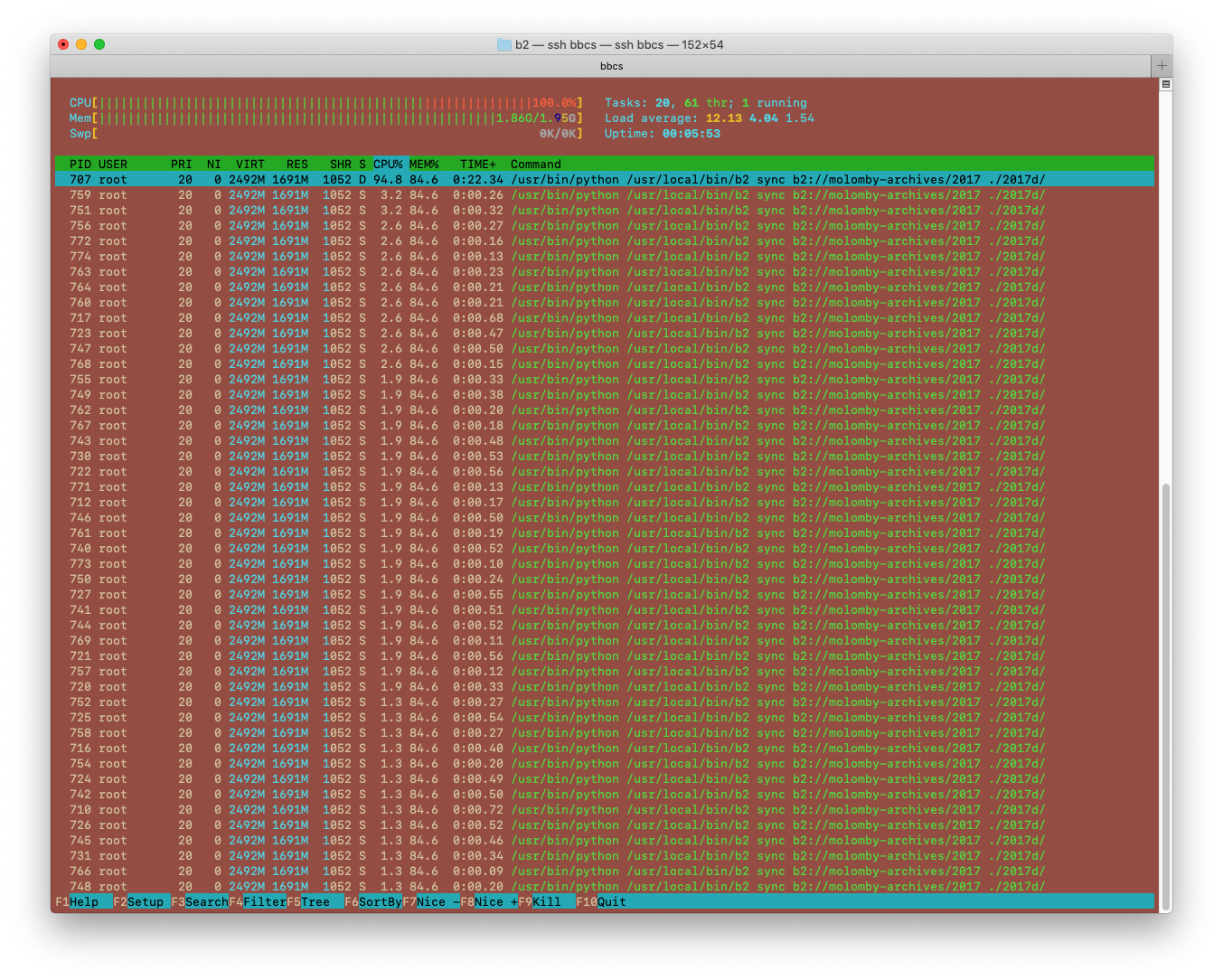
I was finally able to get a successful using --threads 1. This restricted the sync to a single file at a time but, even then, I was seeing multiple python processes for large files (8 or more at times?).
So as I see it, the issues here are probably:
- The
synccommand doesn't care how much memory is available, it will take what it wants and crash if that's not enough - 2 GB is an awful lot of memory for a sync command to be using in the first place
- The
--threadsoption doesn't seem to actually limit threads but files processed in parallel. I suspect each file being processed is actually using up to 10 threads, depending on size
I thought it might be a problem with the disk write speed being slower than the network (so filling up a buffer somewhere) but that doesn't seem to be it; I'm benchmarking the disk at over 800 MB/s for writes.
$ sync; dd if=/dev/zero of=tempfile bs=20M count=1024; sync
21474836480 bytes (21 GB, 20 GiB) copied, 25.8165 s, 832 MB/s
The version of b2 I'm using is 1.4.2, build from source (at the v1.4.2 tag), running on Debian 10.4 (buster).

We will add options to sync, upload, copy and download commands to let users tweak the number of upload threads, download threads and copy threads separately, but it still will take as much memory as it will like... I mean, it will not see that the system has low memory and conserve memory in such case. I don't think cli tools usually do that.
Your case with 2GB memory usage is way above what I would expect the tool to use in any case. Will you help investigate it further after release of the version with more thread count knobs?

I know what causes it - the version you are using has separate thread pools for each large file download, which can cause it to use a lot of memory when syncing down many large files at the same time. The next version that is being prepared for release now has a reusable thread pool so it will give you much more control over the memory consumption.
ok, we've looked it a little bit more and it seems that if you set thread count to two, it should consume at most 32MB, so we don't know what happened at your server. I'd like to find out. Will you help us investigate the high memory load @molomby?
