

 Azure
Azure
CosmosDB issue with x-ms-consistency-level header
-
Package Name:
azure-cosmos - Package Version: 4.3.0
- Operating System: Win10
- Python Version: 3.10.8
Describe the bug
I am having trouble connecting to a CosmosDB instance, with a variety of errors related to the x-ms-consistency-level header. This may be related to #26123 but I believe I'm getting further than that.
To Reproduce Steps to reproduce the behaviour:
First, try doing things as simply as possible:
>>> from azure.identity import DefaultAzureCredential
>>> import azure.cosmos.cosmos_client as cosmos_client
>>> cred = DefaultAzureCredential(exclude_shared_token_cache_credential=True)
>>> client = cosmos_client.CosmosClient(host, credential=cred)
Traceback (most recent call last):
  File "<stdin>", line 1, in <module>
  File "C:\Users\ME\Miniconda3\envs\env-01\lib\site-packages\azure\cosmos\cosmos_client.py", line 178, in __init__
    self.client_connection = CosmosClientConnection(
  File "C:\Users\ME\Miniconda3\envs\env-01\lib\site-packages\azure\cosmos\_cosmos_client_connection.py", line 213, in __init__
    self._set_client_consistency_level(database_account, consistency_level)
  File "C:\Users\ME\Miniconda3\envs\env-01\lib\site-packages\azure\cosmos\_cosmos_client_connection.py", line 230, in _set_client_consistency_level
    user_consistency_policy = database_account.ConsistencyPolicy
AttributeError: 'NoneType' object has no attribute 'ConsistencyPolicy'
I'm not sure why I'm getting this error - this seems to be the same as one of the examples
However, in the docs I see a consistency_level argument which is supposed to be optional. So try setting this, and the client creation goes fine:
>>> client = cosmos_client.CosmosClient(host, credential=cred, consistency_level='session')
>>>
So I go on to trying to create the database itself:
>>> db = client.create_database(id=database_name)
Traceback (most recent call last):
  File "<stdin>", line 1, in <module>
  File "C:\Users\ME\Miniconda3\envs\env-01\lib\site-packages\azure\core\tracing\decorator.py", line 78, in wrapper_use_tracer
    return func(*args, **kwargs)
  File "C:\Users\ME\Miniconda3\envs\env-01\lib\site-packages\azure\cosmos\cosmos_client.py", line 274, in create_database
    result = self.client_connection.CreateDatabase(database=dict(id=id), options=request_options, **kwargs)
  File "C:\Users\ME\Miniconda3\envs\env-01\lib\site-packages\azure\cosmos\_cosmos_client_connection.py", line 321, in CreateDatabase
    return self.Create(database, path, "dbs", None, None, options, **kwargs)
  File "C:\Users\ME\Miniconda3\envs\env-01\lib\site-packages\azure\cosmos\_cosmos_client_connection.py", line 2108, in Create
    result, self.last_response_headers = self.__Post(path, request_params, body, headers, **kwargs)
  File "C:\Users\ME\Miniconda3\envs\env-01\lib\site-packages\azure\cosmos\_cosmos_client_connection.py", line 2274, in __Post
    return synchronized_request.SynchronizedRequest(
  File "C:\Users\ME\Miniconda3\envs\env-01\lib\site-packages\azure\cosmos\_synchronized_request.py", line 206, in SynchronizedRequest
    return _retry_utility.Execute(
  File "C:\Users\ME\Miniconda3\envs\env-01\lib\site-packages\azure\cosmos\_retry_utility.py", line 77, in Execute
    result = ExecuteFunction(function, global_endpoint_manager, *args, **kwargs)
  File "C:\Users\ME\Miniconda3\envs\env-01\lib\site-packages\azure\cosmos\_retry_utility.py", line 136, in ExecuteFunction
    return function(*args, **kwargs)
  File "C:\Users\ME\Miniconda3\envs\env-01\lib\site-packages\azure\cosmos\_synchronized_request.py", line 154, in _Request
    raise exceptions.CosmosHttpResponseError(message=data, response=response)
azure.cosmos.exceptions.CosmosHttpResponseError: (BadRequest) Value 'session' specified for the header 'x-ms-consistency-level' is invalid.
ActivityId: 8706ed27-27bf-415d-806c-615e8b3854f1, Microsoft.Azure.Documents.Common/2.14.0
Code: BadRequest
Message: Value 'session' specified for the header 'x-ms-consistency-level' is invalid.
ActivityId: 8706ed27-27bf-415d-806c-615e8b3854f1, Microsoft.Azure.Documents.Common/2.14.0
Again, according to the example shouldn't this just work?
Expected behaviour
No exceptions when copying from example code.
Screenshots If applicable, add screenshots to help explain your problem.
Additional context Add any other context about the problem here.

Thanks for the feedback! We are routing this to the appropriate team for follow-up. cc @simorenoh, @gahl-levy, @JericHunter.
Issue Details
-
Package Name:
azure-cosmos - Package Version: 4.3.0
- Operating System: Win11
- Python Version: 3.10.8
Describe the bug
I am having trouble connecting to a CosmosDB instance, with a variety of errors related to the x-ms-consistency-level header. This may be related to #26123 but I believe I'm getting further than that.
To Reproduce Steps to reproduce the behaviour:
First, try doing things as simply as possible:
>>> from azure.identity import DefaultAzureCredential
>>> import azure.cosmos.cosmos_client as cosmos_client
>>> cred = DefaultAzureCredential(exclude_shared_token_cache_credential=True)
>>> client = cosmos_client.CosmosClient(host, credential=cred)
Traceback (most recent call last):
  File "<stdin>", line 1, in <module>
  File "C:\Users\ME\Miniconda3\envs\env-01\lib\site-packages\azure\cosmos\cosmos_client.py", line 178, in __init__
    self.client_connection = CosmosClientConnection(
  File "C:\Users\ME\Miniconda3\envs\env-01\lib\site-packages\azure\cosmos\_cosmos_client_connection.py", line 213, in __init__
    self._set_client_consistency_level(database_account, consistency_level)
  File "C:\Users\ME\Miniconda3\envs\env-01\lib\site-packages\azure\cosmos\_cosmos_client_connection.py", line 230, in _set_client_consistency_level
    user_consistency_policy = database_account.ConsistencyPolicy
AttributeError: 'NoneType' object has no attribute 'ConsistencyPolicy'
I'm not sure why I'm getting this error - this seems to be the same as one of the examples
However, in the docs I see a consistency_level argument which is supposed to be optional. So try setting this, and the client creation goes fine:
>>> client = cosmos_client.CosmosClient(host, credential=cred, consistency_level='session')
>>>
So I go on to trying to create the database itself:
>>> db = client.create_database(id=database_name)
Traceback (most recent call last):
  File "<stdin>", line 1, in <module>
  File "C:\Users\ME\Miniconda3\envs\env-01\lib\site-packages\azure\core\tracing\decorator.py", line 78, in wrapper_use_tracer
    return func(*args, **kwargs)
  File "C:\Users\ME\Miniconda3\envs\env-01\lib\site-packages\azure\cosmos\cosmos_client.py", line 274, in create_database
    result = self.client_connection.CreateDatabase(database=dict(id=id), options=request_options, **kwargs)
  File "C:\Users\ME\Miniconda3\envs\env-01\lib\site-packages\azure\cosmos\_cosmos_client_connection.py", line 321, in CreateDatabase
    return self.Create(database, path, "dbs", None, None, options, **kwargs)
  File "C:\Users\ME\Miniconda3\envs\env-01\lib\site-packages\azure\cosmos\_cosmos_client_connection.py", line 2108, in Create
    result, self.last_response_headers = self.__Post(path, request_params, body, headers, **kwargs)
  File "C:\Users\ME\Miniconda3\envs\env-01\lib\site-packages\azure\cosmos\_cosmos_client_connection.py", line 2274, in __Post
    return synchronized_request.SynchronizedRequest(
  File "C:\Users\ME\Miniconda3\envs\env-01\lib\site-packages\azure\cosmos\_synchronized_request.py", line 206, in SynchronizedRequest
    return _retry_utility.Execute(
  File "C:\Users\ME\Miniconda3\envs\env-01\lib\site-packages\azure\cosmos\_retry_utility.py", line 77, in Execute
    result = ExecuteFunction(function, global_endpoint_manager, *args, **kwargs)
  File "C:\Users\ME\Miniconda3\envs\env-01\lib\site-packages\azure\cosmos\_retry_utility.py", line 136, in ExecuteFunction
    return function(*args, **kwargs)
  File "C:\Users\ME\Miniconda3\envs\env-01\lib\site-packages\azure\cosmos\_synchronized_request.py", line 154, in _Request
    raise exceptions.CosmosHttpResponseError(message=data, response=response)
azure.cosmos.exceptions.CosmosHttpResponseError: (BadRequest) Value 'session' specified for the header 'x-ms-consistency-level' is invalid.
ActivityId: 8706ed27-27bf-415d-806c-615e8b3854f1, Microsoft.Azure.Documents.Common/2.14.0
Code: BadRequest
Message: Value 'session' specified for the header 'x-ms-consistency-level' is invalid.
ActivityId: 8706ed27-27bf-415d-806c-615e8b3854f1, Microsoft.Azure.Documents.Common/2.14.0
Again, according to the example shouldn't this just work?
Expected behaviour
No exceptions when copying from example code.
Screenshots If applicable, add screenshots to help explain your problem.
Additional context Add any other context about the problem here.
| Author: | riedgar-ms |
|---|---|
| Assignees: | - |
| Labels: |
|
| Milestone: | - |

Thank you for your feedback. This has been routed to the support team for assistance.
Having done some more digging, it appears that this may well be related to #26123.
If I use the same Azure credential to access the control plane, and pull out the master key:
from azure.mgmt.cosmosdb import CosmosDBManagementClient
import azure.cosmos.cosmos_client as cosmos_client

from azure.identity import DefaultAzureCredential

cdbmc = CosmosDBManagementClient(credential=DefaultAzureCredential(exclude_shared_token_cache_credential=True), subscription_id=config.settings["subscription_id"])
db_uri = cdbmc.database_accounts.get(resource_group_name=config.settings["resource_group_name"], account_name=config.settings["database_instance"]).document_endpoint
key = cdbmc.database_accounts.list_keys(resource_group_name=config.settings["resource_group_name"], account_name=config.settings["database_instance"]).primary_master_key

client = cosmos_client.CosmosClient(url=db_uri, credential=key)
I can then call subsequent APIs without issue.
Hi @riedgar-ms, thank you for using our SDK and raising this issue. I believe the current problem you are facing has to do with the credentials you are passing into the client to use AAD with. And you are correct, this does have to do with the issue you linked.
The reason why you are seeing this issue is because within the SDK we make a call to retrieve your database account information within the client initialization. When this doesn't work, your database_account gets initialized to None, which is why you see the 'NoneType has no attribute ConsistencyPolicy'. This is why I say there may be something not complete with the credentials you're using - maybe it doesn't have enough permissions to fetch this information for instance. This is also why when you use the master key in your latest snippet the code works, and why you can initialize the client by passing in 'session' (since this skips the step pulling your database account's default consistency level).
The reason the subsequent requests fail when you use the 'session' option manually is two part; for one thing, the variables that are used for setting a consistency level are usually capitalized and is likely causing an issue by not being so (documents.py):
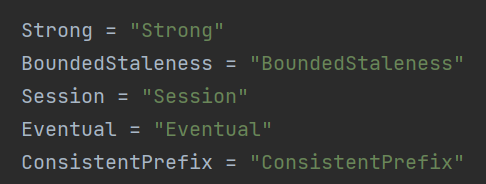
The second part is that using AAD credentials does not allow you to create databases or containers (since these are management operations) and AAD only works for the data plane SDK for item-level operations. More info: https://learn.microsoft.com/en-us/azure/cosmos-db/how-to-setup-rbac#permission-model
Hope this makes sense, do let me know if you have any questions!

Thanks for the feedback! We are routing this to the appropriate team for follow-up. cc @simorenoh, @gahl-levy, @pjohari-ms, @JericHunter.
Issue Details
-
Package Name:
azure-cosmos - Package Version: 4.3.0
- Operating System: Win10
- Python Version: 3.10.8
Describe the bug
I am having trouble connecting to a CosmosDB instance, with a variety of errors related to the x-ms-consistency-level header. This may be related to #26123 but I believe I'm getting further than that.
To Reproduce Steps to reproduce the behaviour:
First, try doing things as simply as possible:
>>> from azure.identity import DefaultAzureCredential
>>> import azure.cosmos.cosmos_client as cosmos_client
>>> cred = DefaultAzureCredential(exclude_shared_token_cache_credential=True)
>>> client = cosmos_client.CosmosClient(host, credential=cred)
Traceback (most recent call last):
  File "<stdin>", line 1, in <module>
  File "C:\Users\ME\Miniconda3\envs\env-01\lib\site-packages\azure\cosmos\cosmos_client.py", line 178, in __init__
    self.client_connection = CosmosClientConnection(
  File "C:\Users\ME\Miniconda3\envs\env-01\lib\site-packages\azure\cosmos\_cosmos_client_connection.py", line 213, in __init__
    self._set_client_consistency_level(database_account, consistency_level)
  File "C:\Users\ME\Miniconda3\envs\env-01\lib\site-packages\azure\cosmos\_cosmos_client_connection.py", line 230, in _set_client_consistency_level
    user_consistency_policy = database_account.ConsistencyPolicy
AttributeError: 'NoneType' object has no attribute 'ConsistencyPolicy'
I'm not sure why I'm getting this error - this seems to be the same as one of the examples
However, in the docs I see a consistency_level argument which is supposed to be optional. So try setting this, and the client creation goes fine:
>>> client = cosmos_client.CosmosClient(host, credential=cred, consistency_level='session')
>>>
So I go on to trying to create the database itself:
>>> db = client.create_database(id=database_name)
Traceback (most recent call last):
  File "<stdin>", line 1, in <module>
  File "C:\Users\ME\Miniconda3\envs\env-01\lib\site-packages\azure\core\tracing\decorator.py", line 78, in wrapper_use_tracer
    return func(*args, **kwargs)
  File "C:\Users\ME\Miniconda3\envs\env-01\lib\site-packages\azure\cosmos\cosmos_client.py", line 274, in create_database
    result = self.client_connection.CreateDatabase(database=dict(id=id), options=request_options, **kwargs)
  File "C:\Users\ME\Miniconda3\envs\env-01\lib\site-packages\azure\cosmos\_cosmos_client_connection.py", line 321, in CreateDatabase
    return self.Create(database, path, "dbs", None, None, options, **kwargs)
  File "C:\Users\ME\Miniconda3\envs\env-01\lib\site-packages\azure\cosmos\_cosmos_client_connection.py", line 2108, in Create
    result, self.last_response_headers = self.__Post(path, request_params, body, headers, **kwargs)
  File "C:\Users\ME\Miniconda3\envs\env-01\lib\site-packages\azure\cosmos\_cosmos_client_connection.py", line 2274, in __Post
    return synchronized_request.SynchronizedRequest(
  File "C:\Users\ME\Miniconda3\envs\env-01\lib\site-packages\azure\cosmos\_synchronized_request.py", line 206, in SynchronizedRequest
    return _retry_utility.Execute(
  File "C:\Users\ME\Miniconda3\envs\env-01\lib\site-packages\azure\cosmos\_retry_utility.py", line 77, in Execute
    result = ExecuteFunction(function, global_endpoint_manager, *args, **kwargs)
  File "C:\Users\ME\Miniconda3\envs\env-01\lib\site-packages\azure\cosmos\_retry_utility.py", line 136, in ExecuteFunction
    return function(*args, **kwargs)
  File "C:\Users\ME\Miniconda3\envs\env-01\lib\site-packages\azure\cosmos\_synchronized_request.py", line 154, in _Request
    raise exceptions.CosmosHttpResponseError(message=data, response=response)
azure.cosmos.exceptions.CosmosHttpResponseError: (BadRequest) Value 'session' specified for the header 'x-ms-consistency-level' is invalid.
ActivityId: 8706ed27-27bf-415d-806c-615e8b3854f1, Microsoft.Azure.Documents.Common/2.14.0
Code: BadRequest
Message: Value 'session' specified for the header 'x-ms-consistency-level' is invalid.
ActivityId: 8706ed27-27bf-415d-806c-615e8b3854f1, Microsoft.Azure.Documents.Common/2.14.0
Again, according to the example shouldn't this just work?
Expected behaviour
No exceptions when copying from example code.
Screenshots If applicable, add screenshots to help explain your problem.
Additional context Add any other context about the problem here.
| Author: | riedgar-ms |
|---|---|
| Assignees: | simorenoh, JericHunter |
| Labels: |
|
| Milestone: | - |
Hi, we're sending this friendly reminder because we haven't heard back from you in a while. We need more information about this issue to help address it. Please be sure to give us your input within the next 7 days. If we don't hear back from you within 14 days of this comment the issue will be automatically closed. Thank you!
Hi, we're sending this friendly reminder because we haven't heard back from you in a while. We need more information about this issue to help address it. Please be sure to give us your input within the next 7 days. If we don't hear back from you within 14 days of this comment the issue will be automatically closed. Thank you!
I wish the error would be more explicit about the lack of rights given to the user/SP/MSI. The only thing that "kind of" helped me to think that it was a permission issue was this line of documentation.
It is still not very explicit on what rights I have to give to the user/SP/MSI. I guess it's based on this link.
Anyway, throw an explicit warring or error log when we can not ask for database account information

Hi @Uranium2, yes as you mentioned this is a gap on the SDK with us not throwing an error properly stating what is going on - I was going to link this issue to your reply on https://github.com/Azure/azure-sdk-for-python/issues/27547 since they are directly connected, glad to see you found this.
We should be working on a fix to be more verbose with this error when we get some more bandwidth, and yes like you mentioned we included those links in the README section of AAD authentication so users know what to do, how to set up, and what to expect in case they'd like to authenticate that way: https://github.com/Azure/azure-sdk-for-python/tree/main/sdk/cosmos/azure-cosmos#aad-authentication
Thank you for using our SDK, and do let us know if you have any more questions!
This issue is solved with release 4.4.0b1 and authentication messages should be properly raised now. Thanks!