

 Azure
Azure
Set-AzSqlServer returns "BadRequest" with "The specified api-version is invalid."
Description
Running version 3.11.0 of Az.Sql, calling Set-AzSqlServer seems to always return "Set-AzSqlServer: Operation returned an invalid status code 'BadRequest", no matter what input parameters are passed to Set-AzSqlServer (as long as the server name and resource group are valid). The underlying error is "The specified api-version is invalid. The value must exactly match a supported version."
Reverting to version 3.10.0 of Az.Sql appears to resolve the issue.
Issue script & Debug output
PS C:\> $DebugPreference='Continue'
PS C:\> Set-AzSqlServer -Name $mTenancyServerName -ResourceGroupName
$resourceGroupName -Verbose
DEBUG: 10:57:24 AM - SetAzureSqlServer begin processing with ParameterSet '__AllParameterSets'.
DEBUG: 10:57:24 AM - using account id '<<REDACTED>>'...
DEBUG: 10:57:24 AM - [ConfigManager] Got nothing from [DisplayBreakingChangeWarning], Module = [], Cmdlet = []. Returning default value [True].
VERBOSE: Performing the operation "About to process resource" on target "".
DEBUG: ============================ HTTP REQUEST ============================

HTTP Method:
GET

Absolute Uri:
https://management.azure.com/subscriptions/<<redacted>>/resourceGroups/<<redacted>>/providers/Microsoft.Sql/servers/<<redacted>>?$expand=administrators%2Factivedirectory&api-version=2021-02-01-preview

Headers:
x-ms-client-request-id        : d0f99a7e-b208-4f19-9f91-e61c8fb9a785
Accept-Language               : en-US

Body:


DEBUG: ============================ HTTP RESPONSE ============================

Status Code:
OK

Headers:
Cache-Control                 : no-cache
Pragma                        : no-cache
x-ms-request-id               : 67e5ae87-877d-40b3-bf2c-3170ad8e67a2
x-ms-ratelimit-remaining-subscription-reads: 11999
Server                        : Microsoft-HTTPAPI/2.0
x-ms-correlation-request-id   : e200af22-6232-49d6-bd44-9cd00c8ba97d
x-ms-routing-request-id       : NORTHCENTRALUS:20220909T155725Z:e200af22-6232-49d6-bd44-9cd00c8ba97d
Strict-Transport-Security     : max-age=31536000; includeSubDomains
X-Content-Type-Options        : nosniff
Date                          : Fri, 09 Sep 2022 15:57:24 GMT

Body:
{
  "kind": "v12.0",
  "properties": {
    "administratorLogin": "<<redacted>>",
    "version": "12.0",
    "state": "Ready",
    "fullyQualifiedDomainName": "<<redacted>>",
    "privateEndpointConnections": [
      {
        "id": "/subscriptions/<<redacted>>/resourceGroups/<<redacted>>/providers/Microsoft.Sql/servers/<<redacted>>/privateEndpointConnections/<<redacted>>",
        "properties": {
          "privateEndpoint": {
            "id": "/subscriptions/<<redacted>>/resourceGroups/<<redacted>>/providers/Microsoft.Network/privateEndpoints/<<redacted>>"
          },
          "groupIds": [
            "sqlServer"
          ],
          "privateLinkServiceConnectionState": {
            "status": "Approved",
            "description": "Auto-approved",
            "actionsRequired": "None"
          },
          "provisioningState": "Ready"
        }
      }
    ],
    "minimalTlsVersion": "1.2",
    "publicNetworkAccess": "Enabled",
    "administrators": {
      "administratorType": "ActiveDirectory",
      "principalType": "Group",
      "login": "<<redacted>>",
      "sid": "<<redacted>>",
      "tenantId": "<<redacted>>"
    },
    "restrictOutboundNetworkAccess": "Disabled"
  },
  "location": "westeurope",
  "tags": {},
  "id": "/subscriptions/<<redacted>>/resourceGroups/<<redacted>>/providers/Microsoft.Sql/servers/<<redacted>>",
  "name": "<<redacted>>",
  "type": "Microsoft.Sql/servers"
}


DEBUG: [Common.Authentication]: Authenticating using Account: '<<redacted>>', environment: 'AzureCloud', tenant: '<<redacted>>'
DEBUG: 10:57:24 AM - [SilentAuthenticator] Calling SharedTokenCacheCredential.GetTokenAsync - TenantId:'<<redacted>>', Scopes:'https://graph.windows.net//.default', AuthorityHost:'https://login.microsoftonline.com/', UserId:'<<redacted>>'
DEBUG: SharedTokenCacheCredential.GetToken invoked. Scopes: [ https://graph.windows.net//.default ] ParentRequestId:
DEBUG: False MSAL 4.39.0.0 MSAL.NetCore .NET 6.0.8 Microsoft Windows 10.0.19044 [09/09 15:57:24.39 - 0458e001-df64-443c-8b1b-4f26e211208e] IsLegacyAdalCacheEnabled: yes
DEBUG: False MSAL 4.39.0.0 MSAL.NetCore .NET 6.0.8 Microsoft Windows 10.0.19044 [09/09 15:57:24.39 - 0458e001-df64-443c-8b1b-4f26e211208e] [Region discovery] Not using a regional authority.
DEBUG: False MSAL 4.39.0.0 MSAL.NetCore .NET 6.0.8 Microsoft Windows 10.0.19044 [09/09 15:57:24.39 - 0458e001-df64-443c-8b1b-4f26e211208e] [Region discovery] Not using a regional authority.
DEBUG: False MSAL 4.39.0.0 MSAL.NetCore .NET 6.0.8 Microsoft Windows 10.0.19044 [09/09 15:57:24.39 - 0458e001-df64-443c-8b1b-4f26e211208e] IsLegacyAdalCacheEnabled: yes
DEBUG: False MSAL 4.39.0.0 MSAL.NetCore .NET 6.0.8 Microsoft Windows 10.0.19044 [09/09 15:57:24.39 - 0458e001-df64-443c-8b1b-4f26e211208e] IsLegacyAdalCacheEnabled: yes
DEBUG: False MSAL 4.39.0.0 MSAL.NetCore .NET 6.0.8 Microsoft Windows 10.0.19044 [09/09 15:57:24.39] Found 1 cache accounts and 0 broker accounts
DEBUG: False MSAL 4.39.0.0 MSAL.NetCore .NET 6.0.8 Microsoft Windows 10.0.19044 [09/09 15:57:24.39] Returning 1 accounts
DEBUG: False MSAL 4.39.0.0 MSAL.NetCore .NET 6.0.8 Microsoft Windows 10.0.19044 [09/09 15:57:24.39 - 8780a119-bcc5-40c6-80cf-8fee5a24b520] MSAL MSAL.NetCore with assembly version '4.39.0.0'. CorrelationId(8780a119-bcc5-40c6-80cf-8fee5a24b520)
DEBUG: False MSAL 4.39.0.0 MSAL.NetCore .NET 6.0.8 Microsoft Windows 10.0.19044 [09/09 15:57:24.39 - 8780a119-bcc5-40c6-80cf-8fee5a24b520] === AcquireTokenSilent Parameters ===
DEBUG: False MSAL 4.39.0.0 MSAL.NetCore .NET 6.0.8 Microsoft Windows 10.0.19044 [09/09 15:57:24.39 - 8780a119-bcc5-40c6-80cf-8fee5a24b520] LoginHint provided: False
DEBUG: False MSAL 4.39.0.0 MSAL.NetCore .NET 6.0.8 Microsoft Windows 10.0.19044 [09/09 15:57:24.39 - 8780a119-bcc5-40c6-80cf-8fee5a24b520] Account provided: True
DEBUG: False MSAL 4.39.0.0 MSAL.NetCore .NET 6.0.8 Microsoft Windows 10.0.19044 [09/09 15:57:24.39 - 8780a119-bcc5-40c6-80cf-8fee5a24b520] ForceRefresh: False
DEBUG: False MSAL 4.39.0.0 MSAL.NetCore .NET 6.0.8 Microsoft Windows 10.0.19044 [09/09 15:57:24.39 - 8780a119-bcc5-40c6-80cf-8fee5a24b520]
=== Request Data ===
Authority Provided? - True
Scopes - https://graph.windows.net//.default
Extra Query Params Keys (space separated) -
ApiId - AcquireTokenSilent
IsConfidentialClient - False
SendX5C - False
LoginHint ? False
IsBrokerConfigured - False
HomeAccountId - False
CorrelationId - 8780a119-bcc5-40c6-80cf-8fee5a24b520
UserAssertion set: False
LongRunningOboCacheKey set: False

DEBUG: False MSAL 4.39.0.0 MSAL.NetCore .NET 6.0.8 Microsoft Windows 10.0.19044 [09/09 15:57:24.39 - 8780a119-bcc5-40c6-80cf-8fee5a24b520] === Token Acquisition (SilentRequest) started:
         Scopes: https://graph.windows.net//.default
        Authority Host: login.microsoftonline.com
DEBUG: False MSAL 4.39.0.0 MSAL.NetCore .NET 6.0.8 Microsoft Windows 10.0.19044 [09/09 15:57:24.39 - 8780a119-bcc5-40c6-80cf-8fee5a24b520] [Region discovery] Not using a regional authority.
DEBUG: False MSAL 4.39.0.0 MSAL.NetCore .NET 6.0.8 Microsoft Windows 10.0.19044 [09/09 15:57:24.39 - 8780a119-bcc5-40c6-80cf-8fee5a24b520] Access token is not expired. Returning the found cache entry. [Current time (09/09/2022 15:57:24) - Expiration Time (09/09/2022 16:55:28 +00:00) - Extended Expiration Time (09/09/2022 16:55:28 +00:00)]
DEBUG: False MSAL 4.39.0.0 MSAL.NetCore .NET 6.0.8 Microsoft Windows 10.0.19044 [09/09 15:57:24.39 - 8780a119-bcc5-40c6-80cf-8fee5a24b520] Returning access token found in cache. RefreshOn exists ? False
DEBUG: False MSAL 4.39.0.0 MSAL.NetCore .NET 6.0.8 Microsoft Windows 10.0.19044 [09/09 15:57:24.39 - 8780a119-bcc5-40c6-80cf-8fee5a24b520] [Region discovery] Not using a regional authority.
DEBUG: False MSAL 4.39.0.0 MSAL.NetCore .NET 6.0.8 Microsoft Windows 10.0.19044 [09/09 15:57:24.39 - 8780a119-bcc5-40c6-80cf-8fee5a24b520] Fetched access token from host login.microsoftonline.com.
DEBUG: False MSAL 4.39.0.0 MSAL.NetCore .NET 6.0.8 Microsoft Windows 10.0.19044 [09/09 15:57:24.39 - 8780a119-bcc5-40c6-80cf-8fee5a24b520]
        === Token Acquisition finished successfully:
DEBUG: False MSAL 4.39.0.0 MSAL.NetCore .NET 6.0.8 Microsoft Windows 10.0.19044 [09/09 15:57:24.39 - 8780a119-bcc5-40c6-80cf-8fee5a24b520]  AT expiration time: 9/9/2022 4:55:28 PM +00:00, scopes https://graph.windows.net//62e90394-69f5-4237-9190-012177145e10 https://graph.windows.net//.default source Cache from login.microsoftonline.com appHashCode 46392360
DEBUG: SharedTokenCacheCredential.GetToken succeeded. Scopes: [ https://graph.windows.net//.default ] ParentRequestId:  ExpiresOn:
2022-09-09T16:55:28.0000000+00:00
DEBUG: [Common.Authentication]: Received token with LoginType 'User', Tenant: '<<redacted>>', UserId: '<<redacted>>'
DEBUG: ============================ HTTP REQUEST ============================

HTTP Method:
GET

Absolute Uri:
https://graph.windows.net/v1.0/groups/85175c9a-72cc-4f0d-ac0e-893f57a29134

Headers:
x-ms-client-request-id        : d0f99a7e-b208-4f19-9f91-e61c8fb9a785
Accept-Language               : en-US

Body:


DEBUG: ============================ HTTP RESPONSE ============================

Status Code:
BadRequest

Headers:
ocp-aad-diagnostics-server-name: Vfq5fgG6e1f0piUAwF2HwveHR2GZCBFD6lUNCAtxjdc=
request-id                    : b82b4150-210b-4f71-8d23-19dba5ab5dba
client-request-id             : d0f99a7e-b208-4f19-9f91-e61c8fb9a785
X-Powered-By                  : ASP.NET
Strict-Transport-Security     : max-age=31536000; includeSubDomains
Access-Control-Allow-Origin   : *
Duration                      : 5946774
Date                          : Fri, 09 Sep 2022 15:57:24 GMT

Body:
{
  "odata.error": {
    "code": "Request_DataContractVersionMissing",
    "message": {
      "lang": "en",
      "value": "The specified api-version is invalid. The value must exactly match a supported version."
    }
  }
}


DEBUG: ============================ HTTP REQUEST ============================

HTTP Method:
GET

Absolute Uri:
https://graph.windows.net/v1.0/servicePrincipals?$filter=appId eq %2785175c9a-72cc-4f0d-ac0e-893f57a29134%27

Headers:
x-ms-client-request-id        : d0f99a7e-b208-4f19-9f91-e61c8fb9a785
Accept-Language               : en-US

Body:


DEBUG: ============================ HTTP RESPONSE ============================

Status Code:
BadRequest

Headers:
ocp-aad-diagnostics-server-name: Vfq5fgG6e1f0piUAwF2HwveHR2GZCBFD6lUNCAtxjdc=
request-id                    : 8df6bed8-0655-4f83-90a6-fcf8509ce83d
client-request-id             : d0f99a7e-b208-4f19-9f91-e61c8fb9a785
X-Powered-By                  : ASP.NET
Strict-Transport-Security     : max-age=31536000; includeSubDomains
Access-Control-Allow-Origin   : *
Duration                      : 991122
Date                          : Fri, 09 Sep 2022 15:57:25 GMT

Body:
{
  "odata.error": {
    "code": "Request_DataContractVersionMissing",
    "message": {
      "lang": "en",
      "value": "The specified api-version is invalid. The value must exactly match a supported version."
    }
  }
}


DEBUG: 10:57:25 AM - [ConfigManager] Got [True] from [EnableDataCollection], Module = [], Cmdlet = [].
Set-AzSqlServer: Operation returned an invalid status code 'BadRequest'
DEBUG: 10:57:25 AM - [ConfigManager] Got nothing from [DisplayBreakingChangeWarning], Module = [], Cmdlet = []. Returning default value [True].
DEBUG: AzureQoSEvent: Module: Az.Sql:3.11.0; CommandName: Set-AzSqlServer; PSVersion: 7.2.6; IsSuccess: False; Duration: 00:00:01.3404201; Exception: Operation returned an invalid status code 'BadRequest';
DEBUG: Finish sending metric.
DEBUG: 10:57:25 AM - SetAzureSqlServer end processing.
Environment data
Name                           Value
----                           -----
PSVersion                      7.2.6
PSEdition                      Core
GitCommitId                    7.2.6
OS                             Microsoft Windows 10.0.19044
Platform                       Win32NT
PSCompatibleVersions           {1.0, 2.0, 3.0, 4.0…}
PSRemotingProtocolVersion      2.3
SerializationVersion           1.1.0.1
WSManStackVersion              3.0
Module versions
ModuleType Version    PreRelease Name                                ExportedCommands
---------- -------    ---------- ----                                ----------------
Script     2.10.0                Az.Accounts                         {Add-AzEnvironment, Clear-AzConfig, Clear-AzContext, Clear-AzDefault…}
Script     4.7.0                 Az.KeyVault                         {Add-AzKeyVaultCertificate, Add-AzKeyVaultCertificateContact, Add-AzKeyVault…
Script     6.2.0                 Az.Resources                        {Export-AzResourceGroup, Export-AzTemplateSpec, Get-AzDenyAssignment, Get-Az…
Script     3.11.0                Az.Sql                              {Add-AzSqlDatabaseToFailoverGroup, Add-AzSqlElasticJobStep, Add-AzSqlElastic…
Error output
DEBUG: 11:08:21 AM - ResolveError begin processing with ParameterSet 'AnyErrorParameterSet'.
DEBUG: 11:08:21 AM - using account id '<<redacted>>'...
DEBUG: 11:08:21 AM - [ConfigManager] Got nothing from [DisplayBreakingChangeWarning], Module = [], Cmdlet = []. Returning default value [True].
WARNING: Upcoming breaking changes in the cmdlet 'Resolve-AzError' :
The `Resolve-Error` alias will be removed in a future release.  Please change any scripts that use this alias to use `Resolve-AzError` instead.
Note : Go to https://aka.ms/azps-changewarnings for steps to suppress this breaking change warning, and other information on breaking changes in Azure PowerShell.

   HistoryId: 8

Message        : Operation returned an invalid status code 'BadRequest'
StackTrace     :    at Microsoft.Azure.Commands.Common.MSGraph.Version1_0.Applications.ServicePrincipalsOperations.ListServicePrincipalWithHttpMes
                 sagesAsync(String consistencyLevel, Nullable`1 top, Nullable`1 skip, String search, String filter, Nullable`1 count, IList`1
                 orderby, IList`1 select, IList`1 expand, Dictionary`2 customHeaders, CancellationToken cancellationToken)
                    at Microsoft.Azure.Commands.Common.MSGraph.Version1_0.Applications.ServicePrincipalsOperationsExtensions.ListServicePrincipalA
                 sync(IServicePrincipalsOperations operations, String consistencyLevel, Nullable`1 top, Nullable`1 skip, String search, String
                 filter, Nullable`1 count, IList`1 orderby, IList`1 select, IList`1 expand, CancellationToken cancellationToken)
                    at Microsoft.Azure.Commands.Common.MSGraph.Version1_0.Applications.ServicePrincipalsOperationsExtensions.ListServicePrincipal(
                 IServicePrincipalsOperations operations, String consistencyLevel, Nullable`1 top, Nullable`1 skip, String search, String filter,
                 Nullable`1 count, IList`1 orderby, IList`1 select, IList`1 expand)
                    at
                 Microsoft.Azure.Commands.Common.MSGraph.Version1_0.MicrosoftGraphClientExtensions.FilterServicePrincipals(IMicrosoftGraphClient
                 client, ODataQuery`1 odataQuery)
                    at
                 Microsoft.Azure.Commands.Sql.Server.Adapter.AzureSqlServerAdapter.GetActiveDirectoryInformation(ServerExternalAdministrator
                 input)
                    at Microsoft.Azure.Commands.Sql.Server.Adapter.AzureSqlServerAdapter.UpsertServer(AzureSqlServerModel model)
                    at Microsoft.Azure.Commands.Sql.Server.Cmdlet.SetAzureSqlServer.PersistChanges(IEnumerable`1 entity)
                    at Microsoft.Azure.Commands.Sql.Common.AzureSqlCmdletBase`2.<>c__DisplayClass16_0.<ExecuteCmdlet>b__0()
                    at Microsoft.WindowsAzure.Commands.Utilities.Common.AzurePSCmdlet.ConfirmAction(String processMessage, String target, Action
                 action)
                    at Microsoft.Azure.Commands.Sql.Common.AzureSqlCmdletBase`2.ExecuteCmdlet()
                    at Microsoft.WindowsAzure.Commands.Utilities.Common.CmdletExtensions.<>c__3`1.<ExecuteSynchronouslyOrAsJob>b__3_0(T c)
                    at Microsoft.WindowsAzure.Commands.Utilities.Common.CmdletExtensions.ExecuteSynchronouslyOrAsJob[T](T cmdlet, Action`1
                 executor)
                    at Microsoft.WindowsAzure.Commands.Utilities.Common.CmdletExtensions.ExecuteSynchronouslyOrAsJob[T](T cmdlet)
                    at Microsoft.WindowsAzure.Commands.Utilities.Common.AzurePSCmdlet.ProcessRecord()
Exception      : Microsoft.Azure.Commands.Common.MSGraph.Version1_0.Applications.Models.OdataErrorException
InvocationInfo : {Set-AzSqlServer}
Line           : Set-AzSqlServer -Name $mTenancyServerName -ResourceGroupName $resourceGroupName -Verbose
Position       : At line:1 char:1
                 + Set-AzSqlServer -Name $mTenancyServerName -ResourceGroupName $resourc …
                 + ~~~~~~~~~~~~~~~~~~~~~~~~~~~~~~~~~~~~~~~~~~~~~~~~~~~~~~~~~~~~~~~~~~~~~
HistoryId      : 8


The Azure PowerShell team is listening, please let us know how we are doing: https://aka.ms/azpssurvey?Q_CHL=ERROR.

DEBUG: 11:08:21 AM - [ConfigManager] Got [True] from [EnableDataCollection], Module = [], Cmdlet = [].
DEBUG: AzureQoSEvent: Module: Az.Accounts:2.10.0; CommandName: Resolve-AzError; PSVersion: 7.2.6; IsSuccess: True; Duration: 00:00:00.0799669
DEBUG: Finish sending metric.
DEBUG: 11:08:21 AM - ResolveError end processing.

Thank you for your feedback. This has been routed to the support team for assistance.

@theboojit We are looking into it and get back to you for any additional information.

@theboojit I do not see any issues running Set-AzSqlServer using 3.11.0 version.
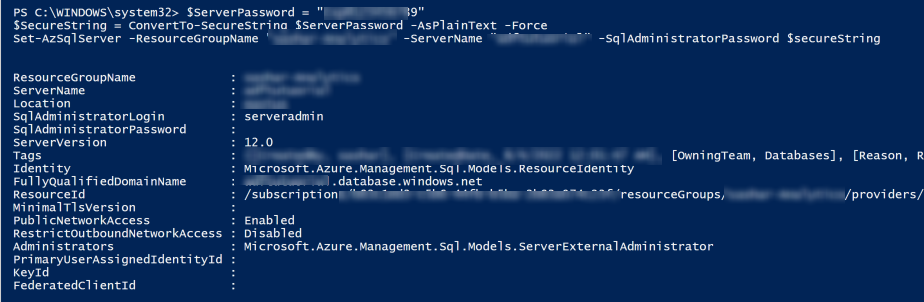
Can you please update the Az.Accounts package version and check if that helps. Thanks.
HI @SaurabhSharma-MSFT . Thanks for your reply. My Az.Accounts package appeared to be up-to-date, but I uninstalled it and installed it again just to be sure. I tried the operation again and I still get "bad request" as before; 3.10.0 package seems to work fine.
Just now, I tried the same command using the Cloud Shell from the Azure Portal. I still get the same thing.
Could it have something to do with the SQL server resource in Azure that I'm running the command against? I could deploy a new SQL server and try the command again against the new server, see if I get any different results?
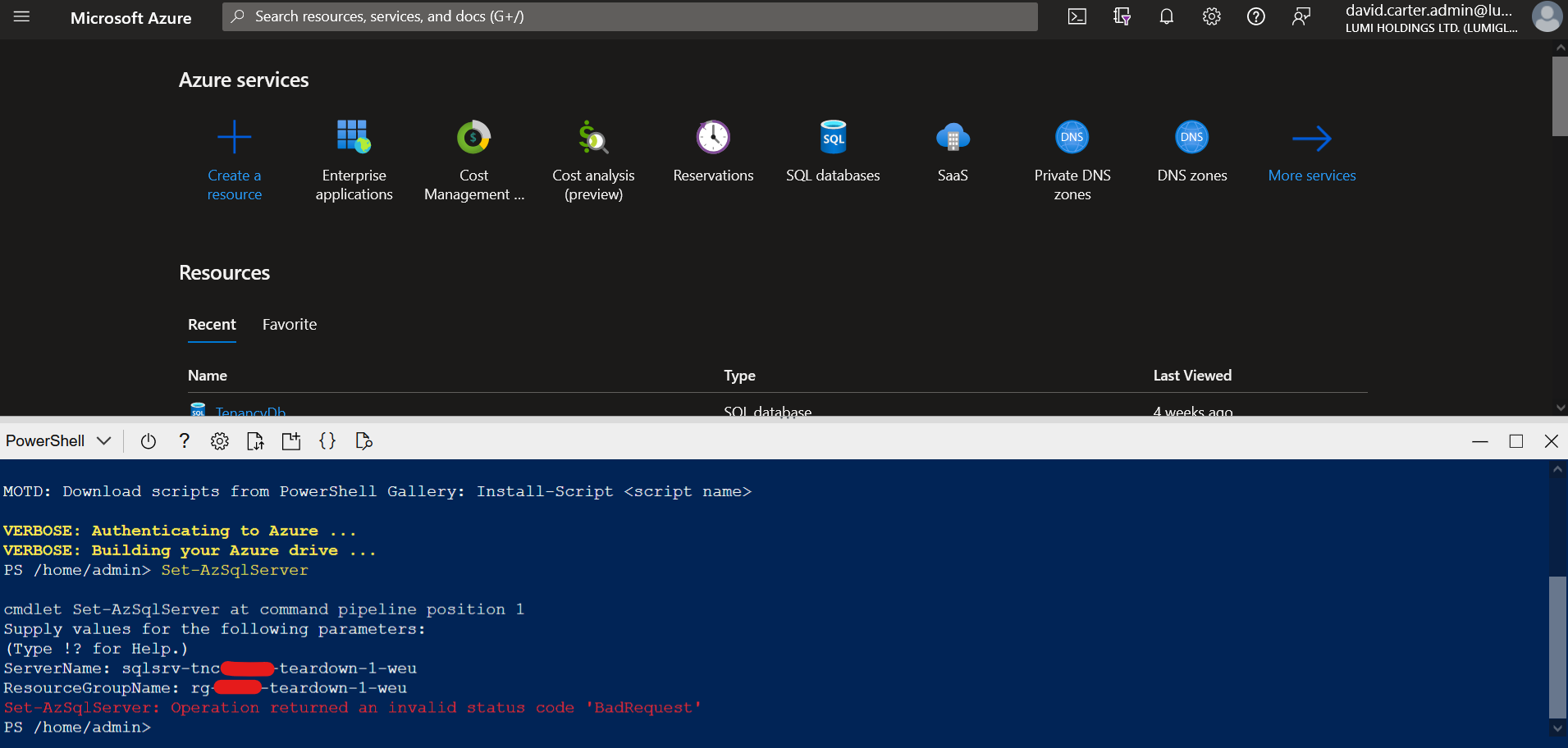
@theboojit sure, can you please try that. Just to confirm - Are you creating an Azure SQL server instance through Azure portal?
@SaurabhSharma-MSFT Not typically, no. We have Powershell scripts that use New-AzResourceGroupDeployment and use a template+params to create the SQL server. Would you like me to share that template?
And when I make this new server, do you want me to do it thru the Portal, using my scripts, or both?
@theboojit yes, please share the template. I will take a look at it. Try creating through Azure portal to see you get the same error compared to SQL server created through the template.
@theboojit yes, please share the template. I will take a look at it. Try creating through Azure portal to see you get the same error compared to SQL server created through the template.
Please ignore the above. I am able to reproduce this issue and looking into it. I will update you as soon as I have any updates.
@SaurabhSharma-MSFT Outstanding news! I'll stand by for your updates. Thank you.
We have the same issue running version 3.11.0.
$SqlServer | Set-AzSqlServer -SqlAdministratorPassword ("password" | ConvertTo-SecureString -AsPlainText -Force) -Debug
Response:
{
  "odata.error": {
    "code": "Request_DataContractVersionMissing",
    "message": {
      "lang": "en",
      "value": "The specified api-version is invalid. The value must exactly match a supported version."
    }
  }
}
Exception:
Set-AzSqlServer: Operation returned an invalid status code 'BadRequest'

@theboojit @dmitryserbin It looks like an issue with the Set-AzSQLServer when the server is setup with AAD admin as well. I am internally checking with the team on this but on the interim use CLI until PS is fixed. Or Setup SQL server without AAD Admin.
@SaurabhSharma-MSFT @dmitryserbin Yes this makes sense -- we are using AAD admin so that all checks out. We'll continue to use 3.10.0 of Az.Sql until respolved. Thanks for staying on top of this!
Hello @theboojit ,
Can you please latest version of Az.SQL and validate. I fix was made in that release for this issue.
Get-Module -Name Az.Sql -ListAvailable
ModuleType Version Name ExportedCommands
Script 3.12.0 Az.Sql {Get-AzSqlDatabaseTransparentDataEncryption, Get-AzSqlData...
We apologize for any inconvenience this caused to your team.

Hi, we're sending this friendly reminder because we haven't heard back from you in a while. We need more information about this issue to help address it. Please be sure to give us your input within the next 7 days. If we don't hear back from you within 14 days of this comment the issue will be automatically closed. Thank you!
I suspect this issue is related to https://github.com/Azure/azure-powershell/issues/19274. In my investigations it seemed to be related to verifying the SID of the user/group in AAD that is being set as the SQL administrator.
If you remove the ExternalAdminSid, ExternalAdminName and EnableActiveDirectoryOnlyAuthentication from the call then it works OK. You can then use Set-AzSqlServerActiveDirectoyAdministrator command to set it ok (which is a clunky work around).

I checked #19274 with the Az.Sql v4.1.0 and it appears to be fixed, so it's possible that this issue is also fixed in that version.
Hi, we're sending this friendly reminder because we haven't heard back from you in a while. We need more information about this issue to help address it. Please be sure to give us your input within the next 7 days. If we don't hear back from you within 14 days of this comment the issue will be automatically closed. Thank you!
Hi @theboojit. Thank you for opening this issue and giving us the opportunity to assist. We believe that this has been addressed. If you feel that further discussion is needed, please add a comment with the text “/unresolve” to remove the “issue-addressed” label and continue the conversation.
Hi @theboojit, since you haven’t asked that we “/unresolve” the issue, we’ll close this out. If you believe further discussion is needed, please add a comment “/unresolve” to reopen the issue.