

 Azure
Azure
Verified Templates for All Languages
Look into vscode-azurefunctions verified templates to verify what we can do prior to GA and post-GA.

The reason why we would not show up in the verified templates is due to how vscode-azurefunctions pulls from non-preview bundles for the vscode command prompt list. As a result, we currently would have to put SQL templates into the ExtensionBundle (non-preview) in order to get pulled to the latest verified list.
However, if a user has a host.json that has ExtensionBundle.Preview ID / Version:
 and then a user does
 func new in the terminal -> then it will load up a list of templates from the host.json extension bundle id (preview) and version for it.
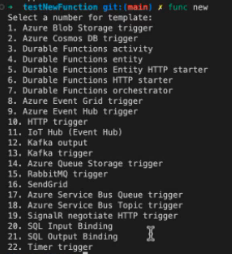 .
Core tools look at the bundle version in the host.json -> goes to the feed link here that stores the list of templates from preview bundle and the specific version (>4.31) and then find the templates that are a part of the bundle and then shows you in the above list.
The functions team hosts the templates feed links. VSCode only pulls from the stable bundle/versions so we will never see it unless we discuss with the vscode team the utilizing preview bundle feed link as well.
.
Core tools look at the bundle version in the host.json -> goes to the feed link here that stores the list of templates from preview bundle and the specific version (>4.31) and then find the templates that are a part of the bundle and then shows you in the above list.
The functions team hosts the templates feed links. VSCode only pulls from the stable bundle/versions so we will never see it unless we discuss with the vscode team the utilizing preview bundle feed link as well.
We can always verify the templates in vscode via the method I showed above.