

 Azure
Azure
Store files in '.azurite/' subdirectory of cwd by default, and ensure location exists
This is a change to the default directory used to store Azurite files to utilize an '.azurite' folder in the current working directory. This allows for consolidation of files without polluting the working directory, and makes it easier to .gitignore the files.
Additionally, this change now ensures the directory exists on startup, creating it if it does not.
Partially Fixes https://github.com/Azure/Azurite/issues/391 -- I was not able to add the ability to use relative paths nor workspace variables as requested, but the main requests in the issue are addressed with this PR.
I am not sure how you'd like to manage this change as it is potentially breaking. I'm also not sure how/where to build appropriate tests for this.


Thanks @dpolivy! It helps a lot!
As you mentioned, it's a breaking change. How about split into 2 separate PRs:
- [Non-Breaking ] Support creating unexisted path, and support relative path in VSC by location parameter. This allows us specifying a relative directory in the configuration. The configuration can be synced via VSC account cross all projects.
- [Breaking] Change the default location value for azurite. I'd like leave this breaking change in next major release.

@XiaoningLiu Thanks for taking a look. I didn't really resolve the relative/absolute path in the location setting issue, though I suppose that could be done with path.isAbsolutePath.
I don't have a ton of time to devote to this but could probably do one more pass to add the above and split this into 2 PRs. Before I do that, it'd be great if you could review and advise if there's any other changes or additions you'd like to see.
I also didn't see any easy way to resolve VSCode variables in the settings; if you know of a way to do this easily, let me know and I can look at including it too.
I also didn't see any easy way to resolve VSCode variables in the settings; if you know of a way to do this easily, let me know and I can look at including it too.
Hi, the VSCode variables apply to the VS Code config files for tasks or debugging, and not within the code / runtime, for that we need to use the runtime framework that we are in. In this case that is node and typescript, and we would need a package which would then translate the variables to runtime objects that we can reference.

@XiaoningLiu Now that the other PR was merged, I cleaned up this one which sets the default directory to .azurite. I know you wanted to save this for a breaking change release, but let me know if there's anything else that needs to be done now. Or, I can just hand this over to you to manage going forward as you see fit.
@XiaoningLiu - Any update on this review? I know quite a few users who would really appreciate the default setting of azurite to be consolidating it's files into a ./azurite subfolder.

Come on now maintainers, this PR has been open since September last year, it's a small simple change that addresses a real issue faced by users (our team included). It's frustrating to see people donate their time and effort to fix a real issue, only to have their contribution completely ignored. Not good open source culture IMO - you can do better MS. Ping @XiaoningLiu since you're the current assignee.

For any PRs including breaking changes, we will wait for next major release by default, i.e Azurite v4.
For example, following scenario should work under same major version releases:
- User lunches Azurite v3.18.0 in VSC under project1. Azurite creates database files under directory c:/project1
- User upgrades Azurite to v3.19.0 in VSC under same project1.
- User lunches Azurite 3.19.0. We will expect Azurite 3.19.0 loads databases from 3.18.0 by default.
Obviously, the PR is still breaking. In step#3, Azurite 3.19.0 will try to load and create databases from c:/project1/.azurite and ignore files under c:/project1. It's treated as a breaking change. It breaks user experiences and brings additional manual efforts for someone upgrading Azurite version.
For quick merge, please consider making it non-breaking. For example, by adding a new parameter as flag to turn on the behavior. The default value of the parameter should be false in current major version, and in next major version, we can enable the parameter to true be default.
By the way, the PR should create .azurite folder if it doesn't exist. Again, the PR is great, and I don't see other issues.
So if this PR is updated to do the following:
- Check if default azurite files exist and use those if present
- If not, default to .azurite folder (or whatever is in settings)
You will accept the PR?

@JustinGrote IMO a better order would be:
- If a location is set in settings, always use that
- Otherwise if files exist in legacy default location, use that
- Otherwise use new
.azuritedir
@JustinGrote IMO a better order would be:
- If a location is set in settings, always use that
- Otherwise if files exist in legacy default location, use that
- Otherwise use new
.azuritedir
Well yes, I meant to imply the first step
@JustinGrote Would be awesome if you did! 🍻
One slight drawback of this approach though is that it would not be possible to use any other directory relative to the workspace than the default .azurite - any explicitly specified location would still be absolute.
The best non-breaking way I see to rectify that, would be to also add support for VS Code variables so that one could use ${workspaceFolder} in the setting.
As @edwin-huber mentions above however, generically supporting resolution of all VS Code variables may not be possible in this context. But I don't see why we could not just add code to replace the tokens ${workspaceFolder} and ${workspaceFolder:name} with the corresponding workspace path provided to us by the API:
https://code.visualstudio.com/api/references/vscode-api#workspace
To support multi-root workspaces, we should use the workspaceFolders property and support named workspace folders as described here:
https://code.visualstudio.com/docs/editor/variables-reference#_variables-scoped-per-workspace-folder
And mention in docs, settings hint etc. that this particular variable token is supported.
Another big bonus, at least from my point of view, would be also supporting environment variables in the path, which I think would also definitely qualify as non-breaking.
Thanks for pushing on this, everyone. It's been a while since I worked on this. While I like the approach of trying to make this not a breaking change, from what I recall that's going to be much easier said than done due to the separation between the configuration/environment which defines the location path and the code that actually tries to load the database files to see if they exist.
I don't know that I'll have the ability to revisit this right away, so if someone is motivated to dig in, I'm happy to provide write access to my fork so you can update this PR.
One slight drawback of this approach though is that it would not be possible to use any other directory relative to the workspace than the default
.azurite- any explicitly specified location would still be absolute.
A prior PR (#1153) I submitted added support for relative paths to the location setting; this has been merged and should be in the code today.
@dpolivy Dude.. 😅 I had no idea relative folder support had already been merged. That actually fixes our issues, for all intents and purposes. Thank you!
OOC though, do you know if there is any way to configure this ⬇️ in workspace settings?
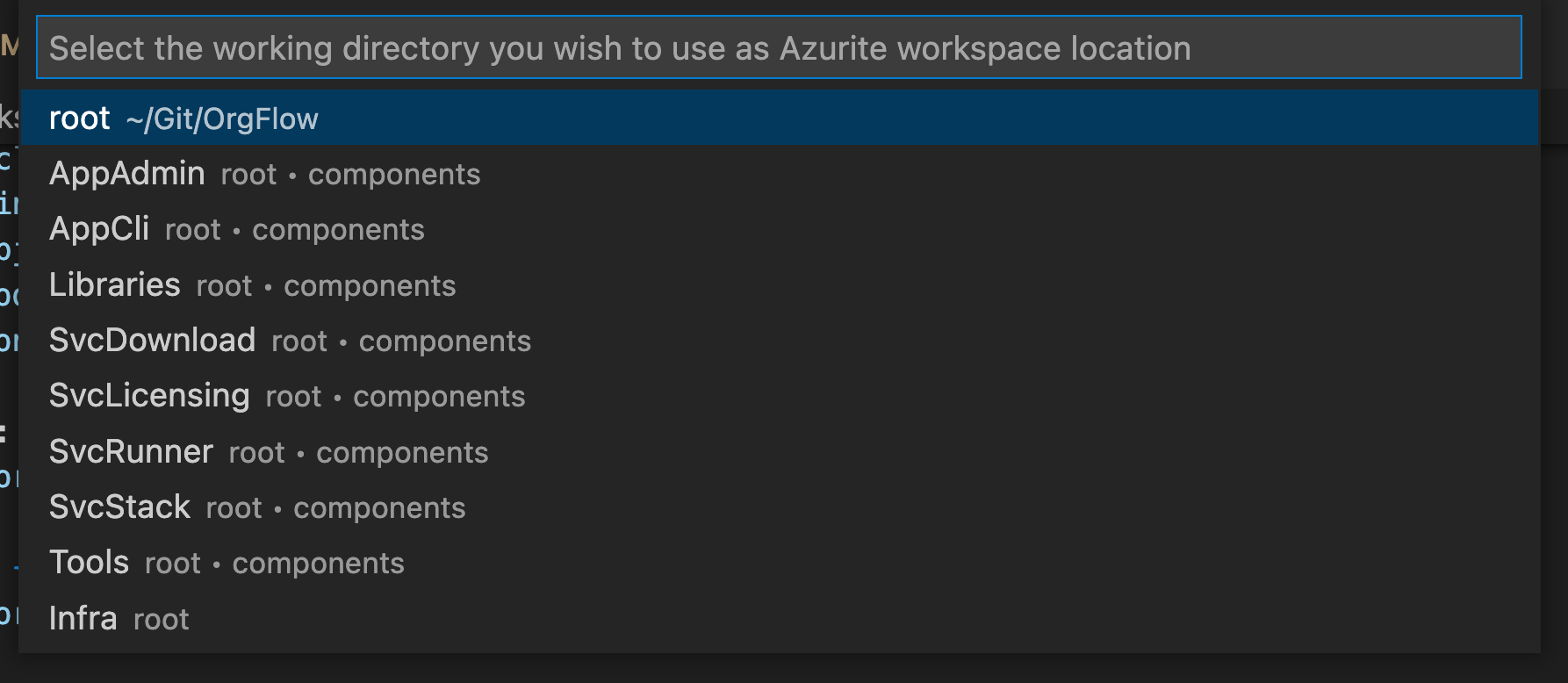
We have a multi-root workspace, and having to select one of them every time Azurite starts is a bit of a pain... any way around it? Like an azurite.workspaceName setting or similar?
OOC though, do you know if there is any way to configure this ⬇️ in workspace settings?
@DaRosenberg If you set an absolute path for the location property, it should bypass the dialog. Otherwise, if it is relative to the workspace or empty, if there are multiple roots, it looks like it always pops that dialog: https://github.com/Azure/Azurite/blob/main/src/common/VSCEnvironment.ts#L51

This is a breaking change. Breaking is only allowed in major release. So we will not take it until the next major release.
Xiaoning has given some suggestion to convert it to a none breaking change. If it's not breaking, we can take it when pass review.
