

 Azure
Azure
Cohesity security
Change(s):
- add cohesity security solution and build related stuffs.
Reason for Change(s):
- add cohesity security solution package
Testing Completed:
- Need Help
Checked that the validations are passing and have addressed any issues that are present:
- Yes

Hey @manishkumar1991 / @rahul0216, can you please review playbooks, thanks.

@v-sabiraj , @manishkumar1991 , @rahul0216 , we understand that you're probably having a busy day. Is there anything we can do to unblock the review?

@v-sabiraj , @manishkumar1991 , @rahul0216 , we understand that you're probably having a busy day. Is there anything we can do to unblock the review?
@yinghuang123 @eerus
Metadata section of all the playbook template is empty , Kindly fill those . and it would be great if you can provide a readme file with both the playbooks, explaining what these playbook does and what are prerequisites

Hey @yinghuang123, can you please provide sample data to test the queries for "HeliosAuditNativePoller_CL" table. Please refer and add the sample data in this folder. Thanks.
Incorrect Json file. File path: Solutions/CohesitySecurity/AlertHttpTrigger/AlertHttpTrigger/host.json. Incorrect Json file. File path: Solutions/CohesitySecurity/AlertHttpTrigger/AlertHttpTrigger/local.settings.json. Please check and update these files, thanks.
Incorrect Json file. File path: Solutions/CohesitySecurity/AlertHttpTrigger/AlertHttpTrigger/host.json. Incorrect Json file. File path: Solutions/CohesitySecurity/AlertHttpTrigger/AlertHttpTrigger/local.settings.json. Please check and update these files, thanks.
just fixed this in my latest commit.
Hey @yinghuang123, can you please provide sample data to test the queries for "HeliosAuditNativePoller_CL" table. Please refer and add the sample data in this folder. Thanks.
just add a sample json file in my latest commit.
@yinghuang123 , Kindly provide the separate readme.md file for each playbook, which specifies what the playbook is doing and how to deploy it, basically post and pre steps .
and kindly change the name of all the playbooks to azuredeploy.json
Kindly refer: https://github.com/Azure/Azure-Sentinel/tree/master/Solutions/ThreatXCloud/Playbooks/ThreatXPlaybooks/ThreatX-BlockIP-URL
for the help
@v-sabiraj , @manishkumar1991 , @rahul0216 , we understand that you're probably having a busy day. Is there anything we can do to unblock the review?
@yinghuang123 @eerus
Metadata section of all the playbook template is empty , Kindly fill those . and it would be great if you can provide a readme file with both the playbooks, explaining what these playbook does and what are prerequisites
@yinghuang123 , Kindly provide the separate readme.md file for each playbook, which specifies what the playbook is doing and how to deploy it, basically post and pre steps .
and kindly change the name of all the playbooks to azuredeploy.json
Kindly refer: https://github.com/Azure/Azure-Sentinel/tree/master/Solutions/ThreatXCloud/Playbooks/ThreatXPlaybooks/ThreatX-BlockIP-URL
for the help
@manishkumar1991 , thanks for the reference. We renamed the playbooks and added readme-files.
@v-sabiraj and @petebryan we made the changes that you requested. Most of the files, in which you requested the changes, are deleted now. What else would you like us to do to complete the review? @aprakash13 and @manishkumar1991 , we didn't hear from you for several days. Did we incorporate the requested changes, or there are more required?
@v-sabiraj and @petebryan we made the changes that you requested. Most of the files, in which you requested the changes, are deleted now. What else would you like us to do to complete the review? @aprakash13 and @manishkumar1991 , we didn't hear from you for several days. Did we incorporate the requested changes, or there are more required?
I am reviewing the playbooks today
@yinghuang123 Update the metadata entries in all playbooks Try using Key vault for API Key , changing api key via going through playbooks each time would not be a good user experience . Note : New key vault resources creation is not supported in our solution packaging, Kindly use existing key vault resource and use the secret key api from there to playbook. And mention about these steps in readme file on how to create key vault resource manually and update the secret key. For reference on how to use key vault. check https://github.com/Azure/Azure-Sentinel/tree/c1f2e8ece5fb3483cf0f414fbf8129c206dfe9c0/Solutions/ThreatXCloud/Playbooks/ThreatXPlaybooks/ThreatX-BlockIP-URL
If possible, please make OutlookConnectionName "ManagedServiceIdentity" if possible.
@yinghuang123 Update the metadata entries in all playbooks Try using Key vault for API Key , changing api key via going through playbooks each time would not be a good user experience . Note : New key vault resources creation is not supported in our solution packaging, Kindly use existing key vault resource and use the secret key api from there to playbook. And mention about these steps in readme file on how to create key vault resource manually and update the secret key. For reference on how to use key vault. check https://github.com/Azure/Azure-Sentinel/tree/c1f2e8ece5fb3483cf0f414fbf8129c206dfe9c0/Solutions/ThreatXCloud/Playbooks/ThreatXPlaybooks/ThreatX-BlockIP-URL
If possible, please make OutlookConnectionName "ManagedServiceIdentity" if possible.
done
@yinghuang123 Update the metadata entries in all playbooks Try using Key vault for API Key , changing api key via going through playbooks each time would not be a good user experience . Note : New key vault resources creation is not supported in our solution packaging, Kindly use existing key vault resource and use the secret key api from there to playbook. And mention about these steps in readme file on how to create key vault resource manually and update the secret key. For reference on how to use key vault. check https://github.com/Azure/Azure-Sentinel/tree/c1f2e8ece5fb3483cf0f414fbf8129c206dfe9c0/Solutions/ThreatXCloud/Playbooks/ThreatXPlaybooks/ThreatX-BlockIP-URL If possible, please make OutlookConnectionName "ManagedServiceIdentity" if possible.
done
Not seeing them done, Check my comments
@manishkumar1991 , I hope that we satisfied the requirements about metadata in playbooks and the keyvault. Is there anything else we need to do? If possible, would you be able to share a complete list of action items for us?
@yinghuang123 Playbook metadata looks fine,
But for key vault integration with logic apps, needs some adjustment, like key vault name and secret key name should be asked in parameters during deployment . And readme file should be update accordingly .
Kindly go through the link provided below for arm template and readme file which will help you to understand the best way to use the keyvault with logic apps .
https://github.com/Azure/Azure-Sentinel/tree/master/Solutions/ThreatXCloud/Playbooks/ThreatXPlaybooks/ThreatX-BlockIP-URL
Still got doubts let us know .
@yinghuang123, There are 2 functions added in the PR under data connector folder, please refer this data connector to add the functions in correct format, thanks.
@manishkumar1991 , we added the keyvault name to to the azuredeploy.json, so now there's no need to ask for it during connection authorization. Now our Azure deployment uses he same approach as in /Solutions/ThreatXCloud/Playbooks/ThreatXPlaybooks/ThreatX-BlockIP-URL
@v-sabiraj , we reviewed data connector but we didn't understand what exactly we had to do because there are differences.
- We have 2 function apps (2 projects combined in one solution) while the example shows only one.
- I assume that directory structure for a 2-project solution should be different.
- We wrote the functions in C# while the example is written in Python.
- Python code has one file and one function that is directly deployed.
- C# code is a whole project with multiple types files (cs, project, solution, json etc) where VS gives them predefined names, and a special utility func builds and deploys a binary package with all dependencies.
That's why we're not sure if you meant that the naming convention for projects wasn't followed, or the location was wrong, or we had to compile both apps and commit the corresponding zip-files, or the azuredeploy.json files had to be renamed. We looked at other C# examples, and it seemed inline. Please clarify how exactly we should change it.
Also, we'd appreciate any tips on how to improve the user experience while deploying our 2 functions. Right now we're asking to deploy the configuration first and then we're asking users to download, compile and deploy the C# functions with the func utility (see https://github.com/cohesity/Azure-Sentinel/tree/CohesitySecurity.internal/Solutions/CohesitySecurity/Data%20Connectors/Helios2Sentinel/IncidentProducer#readme).
@manishkumar1991 , we added the keyvault name to to the azuredeploy.json, so now there's no need to ask for it during connection authorization. Now our Azure deployment uses he same approach as in /Solutions/ThreatXCloud/Playbooks/ThreatXPlaybooks/ThreatX-BlockIP-URL
@yinghuang123 , You have hard coded the secret name "ApiKey" , Due to which its not working and not taking any value from keyvault ,
for this to work i have created the new keyvault as well with name "cohesitypro1991" and provided the proper access as well to logic app .
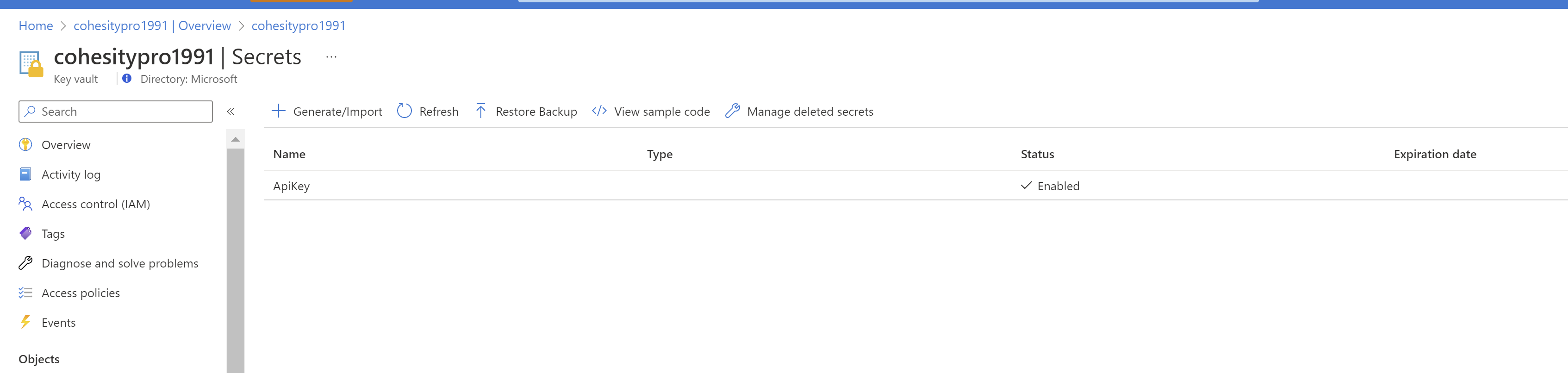
still the app is not able to get the key value from vault .
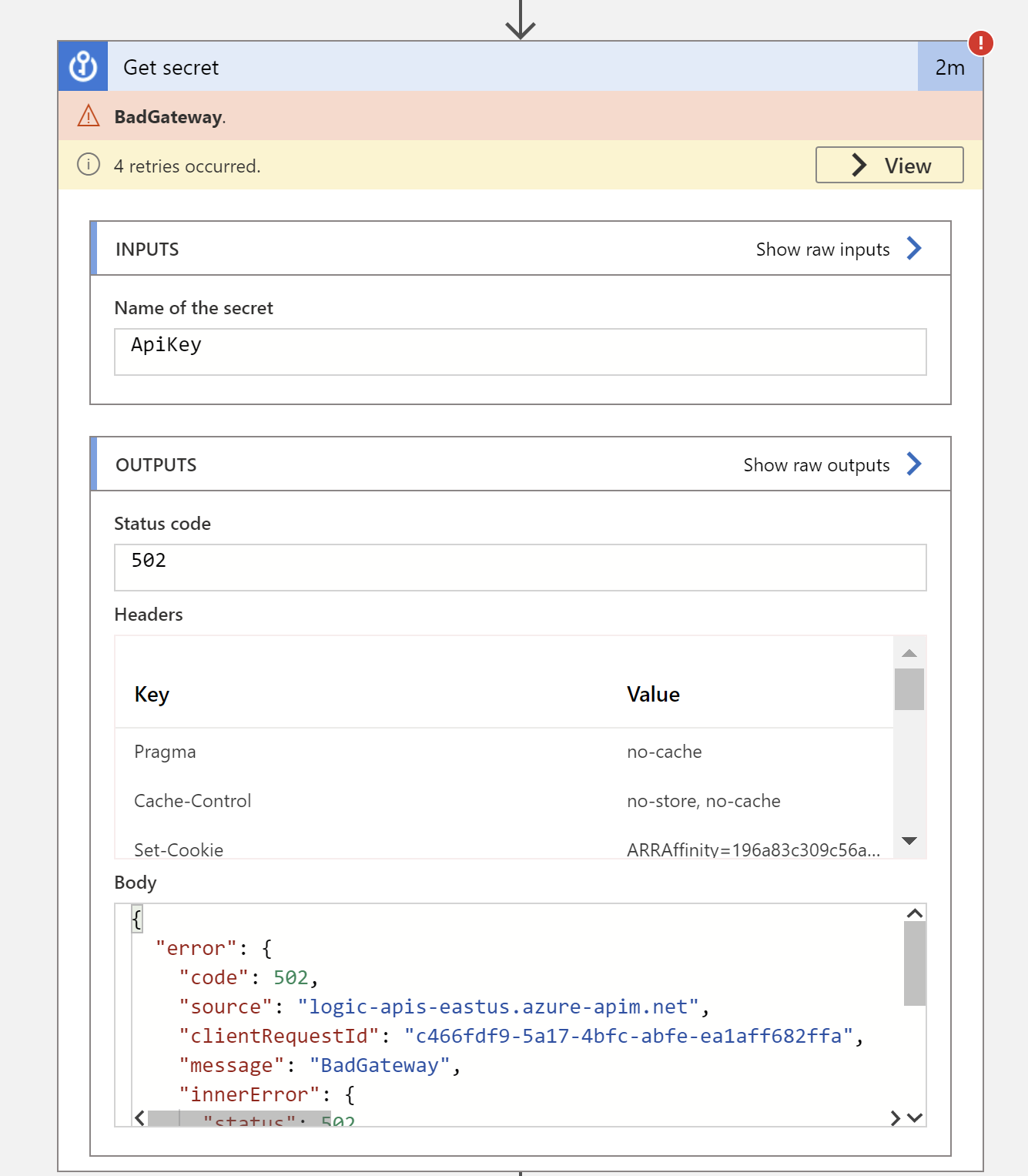
For you to recreate the error , Kindly deploy this in new resource group , where Keyvault is created manually and having name of secret "ApiKey"
and in documentation of readme.md file you written that "Go to Key vaults and choose your keyvault, which starts from cohesitypro and is followed by a sequence of letters and numbers, e.g. cohesityprofnxj32cucakwk."
But you didn't mention that person has to create the keyvault if one doesn't exist, and what if the user who is deploying your playbook, didn't Wana go through the keyvault starting with "cohesitypro" , he has its own named keyvault having cohesity secret id stored there .
Please do consider all the use cases and try to deploy it in fresh environment to recreate the issue,
@manishkumar1991 , we added the keyvault name to to the azuredeploy.json, so now there's no need to ask for it during connection authorization. Now our Azure deployment uses he same approach as in /Solutions/ThreatXCloud/Playbooks/ThreatXPlaybooks/ThreatX-BlockIP-URL
@yinghuang123 , You have hard coded the secret name "ApiKey" , Due to which its not working and not taking any value from keyvault ,
for this to work i have created the new keyvault as well with name "cohesitypro1991" and provided the proper access as well to logic app .
still the app is not able to get the key value from vault .
For you to recreate the error , Kindly deploy this in new resource group , where Keyvault is created manually and having name of secret "ApiKey"
and in documentation of readme.md file you written that "Go to Key vaults and choose your keyvault, which starts from cohesitypro and is followed by a sequence of letters and numbers, e.g. cohesityprofnxj32cucakwk."
But you didn't mention that person has to create the keyvault if one doesn't exist, and what if the user who is deploying your playbook, didn't Wana go through the keyvault starting with "cohesitypro" , he has its own named keyvault having cohesity secret id stored there .
Please do consider all the use cases and try to deploy it in fresh environment to recreate the issue,
@manishkumar1991, it's not an issue. That's how we wanted to do it in the first place to reduce the number of parameters that a user has to enter to make it work. Right now 2 playbooks and 1 function app need this API key. So, we'd need to ask a user to enter the key and the secret name 3 times just to give a way for a user to have it customizable. Alternatively, the deployment wizard can just generate a config with the pre-defined key vault and secret names that the playbooks and the app can use. This step will reduce the number of manual actions that we'll ask a user to do. If you have any other suggestions on how to reduce the number of steps and propagate the same parameters across multiple playbooks and functions, we're open.
To make it work, please follow both the prerequisite and deployment steps in the readme-file at https://github.com/cohesity/Azure-Sentinel/blob/CohesitySecurity.internal/Solutions/CohesitySecurity/Playbooks/Cohesity_CreateOrUpdate_ServiceNow_Incident/readme.md or https://github.com/cohesity/Azure-Sentinel/blob/CohesitySecurity.internal/Solutions/CohesitySecurity/Playbooks/Cohesity_Close_Helios_Incident/readme.md .
I'm going to update the readme-file today to make it clearer that first a user has to deploy the configuration https://github.com/cohesity/Azure-Sentinel/blob/CohesitySecurity.internal/Solutions/CohesitySecurity/Data%20Connectors/Helios2Sentinel/readme.md that will pre-create everything, and then deploy the playbooks. Also, I'll mention that these 2 playbooks make sense only if the 2 Azure functions work properly; otherwise, there will be no sufficient data to run them. Sorry for not making it clear in the first place.
@petebryan , @manishkumar1991 and @v-sabiraj, we appreciate all your comments. I'm happy to confirm that we committed a new code and responded to all your suggestions. As along as we also have deadlines, we'd appreciate your answers, so we can plan our next steps. Please respond. Are we good to merge, or there's something else?
@manishkumar1991 , we added the keyvault name to to the azuredeploy.json, so now there's no need to ask for it during connection authorization. Now our Azure deployment uses he same approach as in /Solutions/ThreatXCloud/Playbooks/ThreatXPlaybooks/ThreatX-BlockIP-URL
@yinghuang123 , You have hard coded the secret name "ApiKey" , Due to which its not working and not taking any value from keyvault , for this to work i have created the new keyvault as well with name "cohesitypro1991" and provided the proper access as well to logic app .
@manishkumar1991, it's not an issue. That's how we wanted to do it in the first place to reduce the number of parameters that a user has to enter to make it work. Right now 2 playbooks and 1 function app need this API key. So, we'd need to ask a user to enter the key and the secret name 3 times just to give a way for a user to have it customizable. Alternatively, the deployment wizard can just generate a config with the pre-defined key vault and secret names that the playbooks and the app can use. This step will reduce the number of manual actions that we'll ask a user to do. If you have any other suggestions on how to reduce the number of steps and propagate the same parameters across multiple playbooks and functions, we're open.
To make it work, please follow both the prerequisite and deployment steps in the readme-file at https://github.com/cohesity/Azure-Sentinel/blob/CohesitySecurity.internal/Solutions/CohesitySecurity/Playbooks/Cohesity_CreateOrUpdate_ServiceNow_Incident/readme.md or https://github.com/cohesity/Azure-Sentinel/blob/CohesitySecurity.internal/Solutions/CohesitySecurity/Playbooks/Cohesity_Close_Helios_Incident/readme.md .
I'm going to update the readme-file today to make it clearer that first a user has to deploy the configuration https://github.com/cohesity/Azure-Sentinel/blob/CohesitySecurity.internal/Solutions/CohesitySecurity/Data%20Connectors/Helios2Sentinel/readme.md that will pre-create everything, and then deploy the playbooks. Also, I'll mention that these 2 playbooks make sense only if the 2 Azure functions work properly; otherwise, there will be no sufficient data to run them. Sorry for not making it clear in the first place.
I will go through the comments and update you , please allow us sometime
@yinghuang123 , what I will recommend you to do is, that ask the customer in readme file to first store the Api key in key vault under secret key name.
then, while deploying the playbook, and enter the key vault name and secret name in parameter and use that inside the logic app, which is easier in case if customer has to change the Api key, customer can simply go through the key vault and change the key there, then current key will automatically be fetched by logic app instead of updating it manually in all playbooks.
and why to pre-create the key vault and store secret in there, because our solution packaging doesn't support key vault resource creation.
@manishkumar1991 , we hear and value your comment but you're suggesting more manual steps while we'd like to make less. Please correct me if I'm wrong. Here's what you suggest.
- Ask user to manually create a KeyVault.
- Ask user to manually create all secrets in the KeyVault
- When user deploys playbooks and function apps (2 playbooks and 2 functions), ask the user for the KeyVault name and secrets every time.
- Reuse the KeyVault and secret names in the playbooks and functions.
Here's what we suggest.
- User deploys functions apps and all configs in one shot via https://github.com/cohesity/Azure-Sentinel/blob/CohesitySecurity.internal/Solutions/CohesitySecurity/Data%20Connectors/Helios2Sentinel/azuredeploy.json
- The script pre-creates KeyValut/Secrets (see lines 111-154 at see https://github.com/cohesity/Azure-Sentinel/blob/CohesitySecurity.internal/Solutions/CohesitySecurity/Data%20Connectors/Helios2Sentinel/azuredeploy.json)
- The script makes sure that KeyVault has a unique value (see "[concat('cohesitypro', uniqueString(resourceGroup().id))]") After that all function names and playbooks can get secrets from the pre-created KeyVaults/Secrets, and users don't have to worry about creating or remembering them.
This way there's less manual steps. If you believe that by reducing the number of manual steps we violated some guidelines, please refer to them. All we're trying to do is to simplify user experience. Does it make sense?
@manishkumar1991 , we hear and value your comment but you're suggesting more manual steps while we'd like to make less. Please correct me if I'm wrong. Here's what you suggest.
- Ask user to manually create a KeyVault.
- Ask user to manually create all secrets in the KeyVault
- When user deploys playbooks and function apps (2 playbooks and 2 functions), ask the user for the KeyVault name and secrets every time.
- Reuse the KeyVault and secret names in the playbooks and functions.
Here's what we suggest.
- User deploys functions apps and all configs in one shot via https://github.com/cohesity/Azure-Sentinel/blob/CohesitySecurity.internal/Solutions/CohesitySecurity/Data%20Connectors/Helios2Sentinel/azuredeploy.json
- The script pre-creates KeyValut/Secrets (see lines 111-154 at see https://github.com/cohesity/Azure-Sentinel/blob/CohesitySecurity.internal/Solutions/CohesitySecurity/Data%20Connectors/Helios2Sentinel/azuredeploy.json)
- The script makes sure that KeyVault has a unique value (see "[concat('cohesitypro', uniqueString(resourceGroup().id))]") After that all function names and playbooks can get secrets from the pre-created KeyVaults/Secrets, and users don't have to worry about creating or remembering them.
This way there's less manual steps. If you believe that by reducing the number of manual steps we violated some guidelines, please refer to them. All we're trying to do is to simplify user experience. Does it make sense?
Suggestion is very good , only problem is that the script/function app which you are talking about is creating key vault resources and many others , which we don't support in solution packaging, that's why in all PR we suggested to go by manual method ,
But still give me some time , Let me double check with other teammates,