

 Azure-Player
Looped object deletion in phase "Deleting objects not in source"
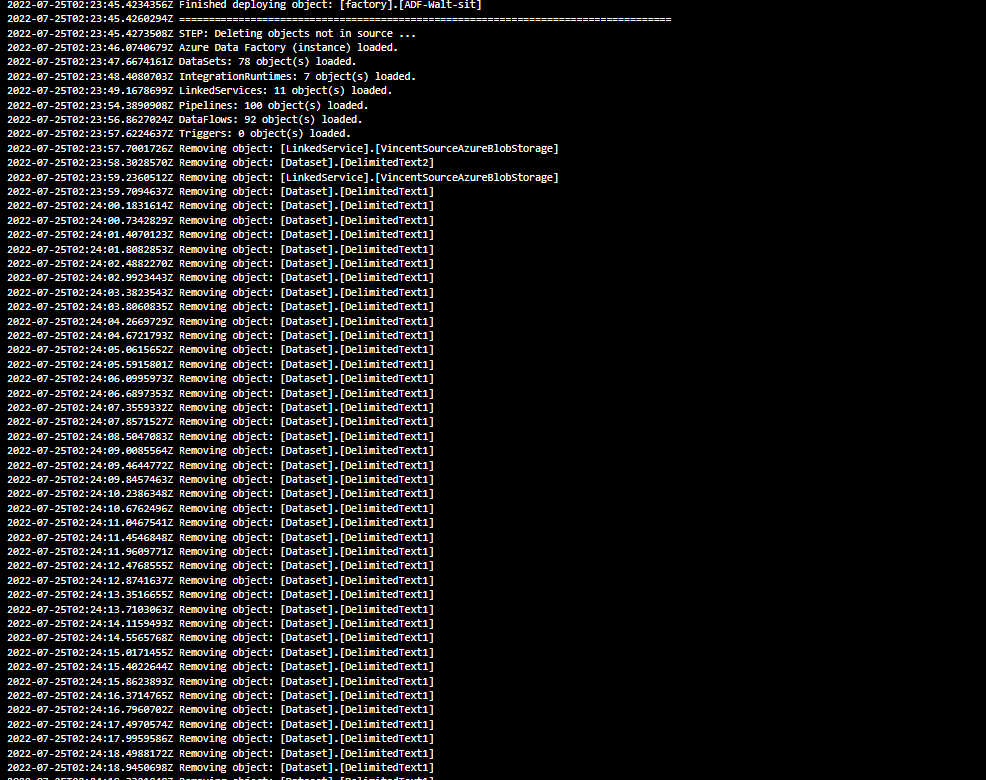
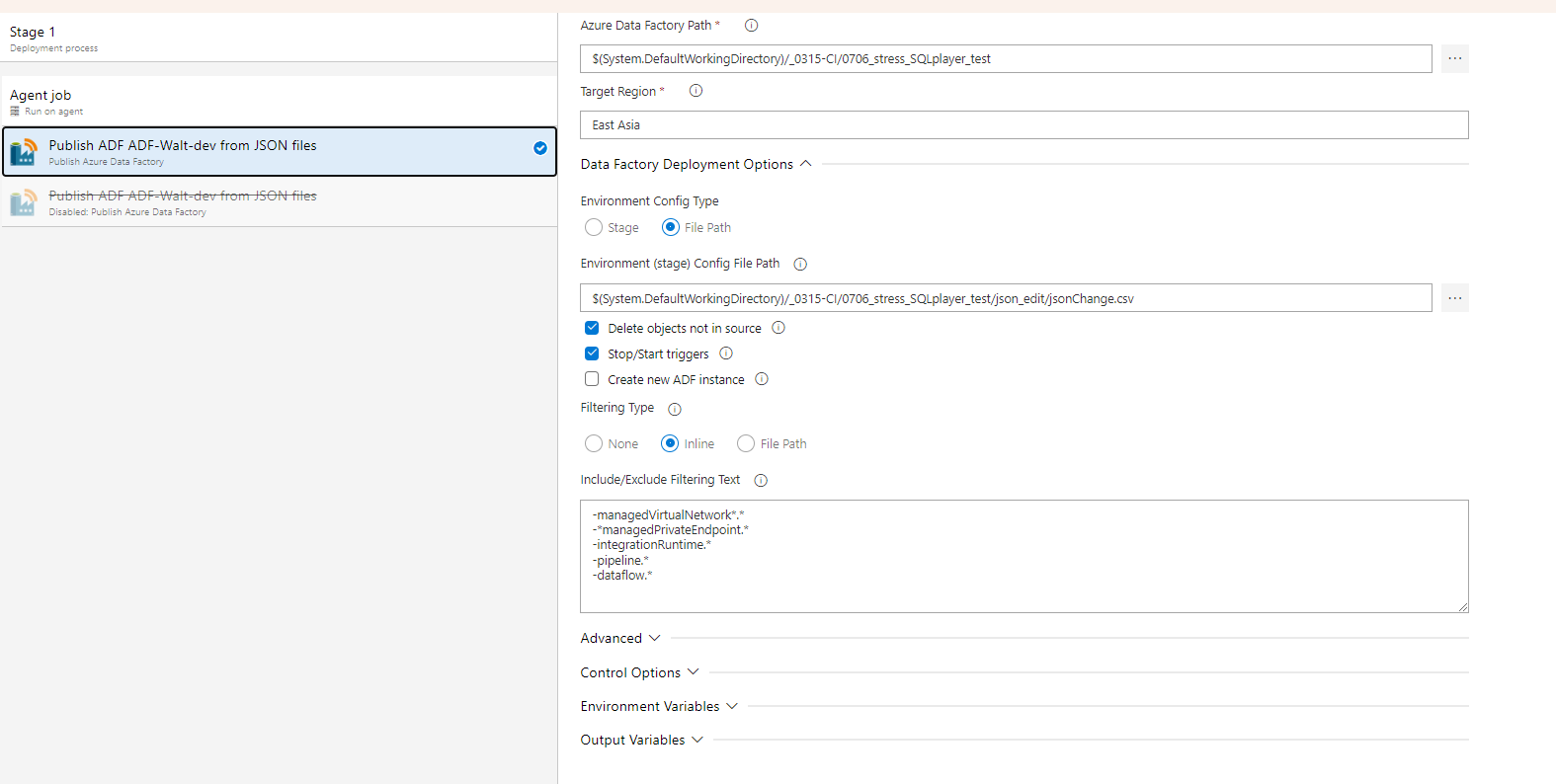
Describe the bug I try to filter some object which in my artifacts and use the 'Delete object not in source' . I did the right grammar of Filtering and when I try to delete a linkedService which has dependent dataset or dataset which has dependent dataflow, the program seems not stop to try to delete it. And the log didn't stop to print it try to delete a Dataset until I cancel it manually. I don't figure it out yet and could you give me some advice about it ?
To Reproduce Your script to reproduce the behaviour:
Your script here
Expected behaviour A clear and concise description of what you expected to happen.
Screenshots
If applicable, add screenshots to help explain your problem.
Version of PowerShell module of:
- ver.........
Provide all files to reproduce the issue
- Attach at least log file (you can wipe out any potentially sensitive info)
- Attach files of objects which are involved in the process

There is not enough information/files to reproduce the issue, however make sure you don't have duplicate names for objects.

Hi Kamil, I’m so glad to receive your reply. Base on my understanding I’m try to use ‘Publish Azure Data Factory’ to deploy ADF code from A to B. On condition that: 1.I use artifact tool to get the code from A. 2.There’re LinkedService and Dataset and pipeline in B (the dataset depend on LinkedService and the pipeline has a copy data activity used dataset and there are dataflows rely on the dataset) So I tick the ‘Delete object not in source’ and I hope the function works. But I forgot to change the code I wrote in ‘Filtering Type’ like below: @.*** Then there was a problem with the program like below: @.*** Actually I try the delete in ADF manually and realized it a logic mistake that I can’t delete a linkedService which has related dataset neither a dataset which related pipeline. But the program seems without an exception handing mechanism to this wrong operation, the log shows that it keeps trying to do the wrong Removing operation because the ADF don’t allow it.
Best Regards, Henry
From: Kamil Nowinski @.> Sent: Monday, July 25, 2022 8:17 PM To: SQLPlayer/azure.datafactory.tools @.> Cc: Long, Henry-H @.>; Author @.> Subject: Re: [SQLPlayer/azure.datafactory.tools] I got a bug when I using the 'Publish Azure Data Factory' (Issue #220)
Please be aware. This email originated from outside AIA. Do not click on links or open attachments unless you recognize the sender and know the content is safe.
There is not enough information/files to reproduce the issue, however make sure you don't have duplicate names for objects.
— Reply to this email directly, view it on GitHubhttps://urldefense.com/v3/__https:/github.com/SQLPlayer/azure.datafactory.tools/issues/220*issuecomment-1193974414__;Iw!!G1i-!MWrAXKGWyBUrDBUPGfJLZkjJzfdx4HtVB86OxhkVH1ub4tYsv6dmES5K9_qwwL1CQsk5fu16EtRaarl-ujtEHUAogg$, or unsubscribehttps://urldefense.com/v3/__https:/github.com/notifications/unsubscribe-auth/A2G3RVIAMYPPMCQ4WLLNZODVV2ASRANCNFSM54RO3BXQ__;!!G1i-!MWrAXKGWyBUrDBUPGfJLZkjJzfdx4HtVB86OxhkVH1ub4tYsv6dmES5K9_qwwL1CQsk5fu16EtRaarl-ujv3_M5sFg$. You are receiving this because you authored the thread.Message ID: @.***>
IMPORTANT NOTICE: The information in this email (and any attachments) is confidential. If you are not the intended recipient, you must not use or disseminate the information. If you have received this email in error, please immediately notify me by "Reply" command and permanently delete the original and any copies or printouts thereof. Although this email and any attachments are believed to be free of any virus or other defect that might affect any computer system into which it is received and opened, it is the responsibility of the recipient to ensure that it is virus free and no responsibility is accepted by AIA Group Limited or its subsidiaries or affiliates either jointly or severally, for any loss or damage arising in any way from its use.
Before DS1 is removed - it should try to remove all objects which refer to it. Can you share a diagram of dependencies and share the body of your Data Flow that refers to DS1 (DelimitedText1)?