

 Autodesk
Ifc Custom Property set: Double Psets / Property not written to Ifc
Hi @AngelVelezSosa ,
With 20.2.1 I have 2 issues with a custom property set.
-
The Revit parameter 'Classification Code' isn't exported to the custom property 'NL-SfB code'. With IfcBuildingElements this property is filled in the Revit type parameter Assembly code, while with IfcDistributionElements, this property is filled in the Revit instance parameter Classification code. With earlier versions this didn't matter because the IFC exporter checked wich one was filled in, and used that one for the IFC export.
-
The custom property set is shown 2x times in Solibri, while shown 1x time in BIMcollab Zoom but with double propertys. This happens when I'm defining differen custom propertys for different Ifc entitys.

For both issues, see attached files for review.
Regards, Willem Custom Pset file.zip


Let me comment about this a little. The Pset definitions are based on undocumented behavior (and potentially a bug) as a feature.
PropertySet: Pset_BAMCommon I IfcBuildingElement NL-SfB code Text Assembly Code NL-SfB code Text Classification Code
PropertySet: Pset_BAMCommon I IfcDistributionElement NL-SfB code Text Assembly Code NL-SfB code Text Classification Code
PropertySet: Pset_BAMCommon I IfcElement Fase Text Phase Create
Here Pset_BAMCommon are defined 3 times, where two of them with the same property name assigned to a different parameter, and then the definition is assigned to different entities. While this might work previously, some code fixes changed this behavior. I think the best practice should be to define Pset in an unambiguous way similar with how IFC defines the standard Pset, for example:
PropertySet: Pset_BuildingElementBAMCommon I IfcBuildingElement NL-SfB code A Text Assembly Code NL-SfB code C Text Classification Code
PropertySet: Pset_DistributionElementBAMCommon I IfcDistributionElement NL-SfB code A Text Assembly Code NL-SfB code C Text Classification Code
PropertySet: Pset_ElementBAMCommon I IfcElement Fase Text Phase Create

We want to make 1 or more Psets in which we can display the data in a structured manner. Previously, it was possible to create multiple Pset mapping for different entities, these were then displayed in the ifc as 1 Pset if the name was the same.
Assembly Code or Classification Code are used for the NL-SfB coding. This code applies to all IfcElement objects. You would expect the last value in the User Defineproperty set to be the value that is visible in the IFC.
The same goes for IfcBeam.
Property Set: Pset_Dimmensions I IfcBeam Height Length Height Width Length Width Length Length Length Length Length Cut Length Volume Volume Volume
This used to work and now it no longer works. Different entities within an IFC can have different parameters within revit. If all parameters between System Families and Loadable Families were interchangeable, this problem would not be there.
We would like the User Defineproperty set to be used as in the previous exporters.
Regards, Henk

We will look into it. There may be a different way to achieve this requirement.
Hi @WawanSolihin @AngelVelezSosa ,
Is there any progress on this issue? Please let us know.
A related problem to this issue is, if we define propertys which only can be read from a certain IfcEntiy, we define this in the CustomPset file. In this example I used this file: Pset_BAMCommon.txt
In this example you can read:
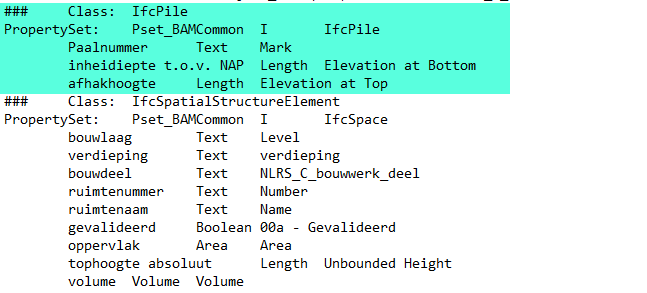 So these property's I only want them to get from certain IfcEntities, in this case IfcPile.
But in the Ifc file. these 3 propertys will be also written to a 2nd Property Set which has the same name (image from solibri):
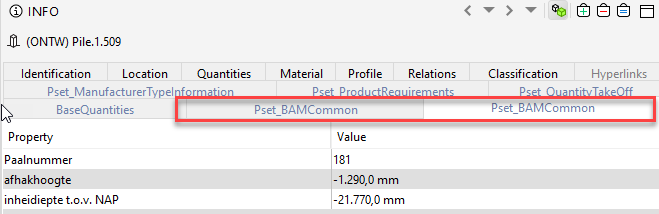
Is there a easy way to just merge Psets which has the same name, so this issue can be fixed?
Thanks in advance for looking into it.
Regards, Willem
Hi @WawanSolihin @AngelVelezSosa
We have run into the same problem: two Psets with identical names are visible in Solibri. Bimcollab merges them into one.
That causes a lot of confusion, can we expect this to be fixed any time soon? Its been quite a while since this was first mentioned...
Thanks!

@WillemdBr : Dont know if its still relevant, but if you change the parameter type to "type" (T) in the custom pset file, the value gets exported:

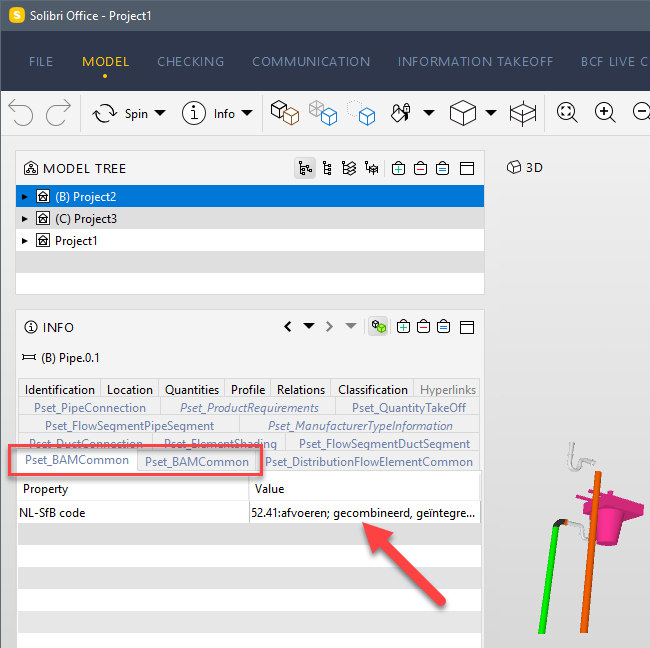
but the Pset still shows twice in Solibri...
We upgraded the model from R22 to R24 this month and, suddenly, started to experiment these issues. Does anybody have a solution or an idea about what might be changed to correct this behaviour?
