

 Autodesk
Allow me to set Start and Stop Time Codes on stages created with new layer
Is your feature request related to a problem? Please describe. It seems that when I create a stage with a new layer, my start/stop time codes are always 0,0 (whereas if i export a scene, I can specify a frame range)
Describe the solution you'd like I'd like to set my time range either in attributes or on saving of the stage when Maya pops up the 'would you like to save your maya file and usd layers?'
Describe alternatives you've considered
- Attribute editor of start/stop timecode/frame
- Ask on save
- UFE integration/dialog
Additional context
 whatever this is^ seems to have no effect on the saving of the stage/layers

Hey @ansuter, I would love to understand more how you are leveraging USD start and end timecode in your pipeline. That would definitely help us in designing the proper solution.
Start and End time is encoded as metadata on a layer (more specifically, metadata on the root layer). We have not yet exposed a method for editing metadata that lives on a layer. We would want any solution to be one that generalizes out to this use case.

Hey @ansuter, I would love to understand more how you are leveraging USD start and end timecode in your pipeline. That would definitely help us in designing the proper solution.
Start and End time is encoded as metadata on a layer (more specifically, metadata on the root layer). We have not yet exposed a method for editing metadata that lives on a layer. We would want any solution to be one that generalizes out to this use case.
Hey Will, sure, so our team cares quite a bit about timecodes, we do a lot of animation. We ended up writing a shelf button so our artists could inject the timecodes on an exported usd.
We do a lot of things with variations, animation and time. While USDView, itself, doesn't seem to care much about start/stop time, other tools are a bit more rigid in that anything outside of the specified time domain is invalid.
The TimeCode API says it contains "methods for managing the Stage's active timeSample range, time units, and intended rate of playback". The key bit here for us is the timeSample range. We want to clamp and render the valid timeSample range. Anything outside of that is considered invalid to us. You can imagine, that intended rate of playback is also important.
Hey @ansuter, I think there are two potential parts to this.
- How is start and end time authored to a layer?
- If a stage has a start and end time how does it affect Maya?
The first one is described in more detail in my last comment.
The second one is something we do want to extend. You can see a very similar implementation here in our alembic plugin.
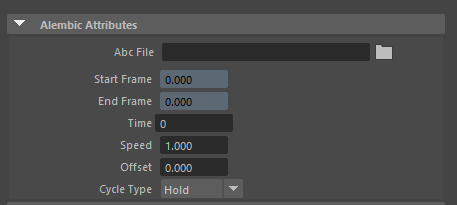 The goal would be to provide an easy way to intercept Maya's current frame and choose how we index that in to the USD with start, end, scale, offset, and out of bounds options (hold, cycle, swing, extrapolate, etc.)
Does that encompass your request? Are you looking to solve both parts 1 and 2 ?
In the meantime you could modify the incoming time connections to the proxyShape Time attribute with nodes in the DG.
I think both parts are important. First and foremost is part 1 for us though, part 2 is of great interest as well, but of lower priority than the first. And yeah I think the above would encompass that, having a start/end frame, timecodes/fps settings would be fantastic.