

 Autodesk
Incorrect drawing if prim is partially transparent / semi transparent
Describe the bug A clear and concise description of what the bug is.
Hi, We found a drawing issue in VP2 render delegate mode if the prim has some of the faces transparent, attached USD file (partially_transparent_prim.usda) is the super simplified version of one of our production assets.
The geometry's first face (index 0) has been rotated to x+ and has the opacity value set to 0; the inner faces are in red color and the outer faces are in blue color.
When viewing in usdview, the result is displaying as expected:

but in mayaUsd-0.9.0, the result is inccorect:

Steps to reproduce Steps to reproduce the behavior:
- Launch Maya and load the attached USD file;
- Rotate and see the result
Expected behavior Expect to match usdview / have the prim drawing correctly.
Attachments partially_transparent_prim.zip
Specs (if applicable):
- OS & version Centos 7.4
- Compiler & version gcc 6.3.1
- Maya version Maya 2020
- Maya USD official 0.9.0 release
- Pixar USD official USD-20.11 release

Hi @csyshing,
Wow that looks bad! Unfortunately Maya's default transparency algorithm, object sorting, doesn't handle this case well. The whole object gets flagged as transparent and you can see the results for yourself!
You should have better luck using object sorting transparency + geom subsets. Use one geom subset for the opaque part of the object and a separate subset for the transparent part. Vp2RenderDelegate will create separate render items for each geom subset. The opaque parts of the object will be flagged as opaque, and that causes object sorting to work much better.
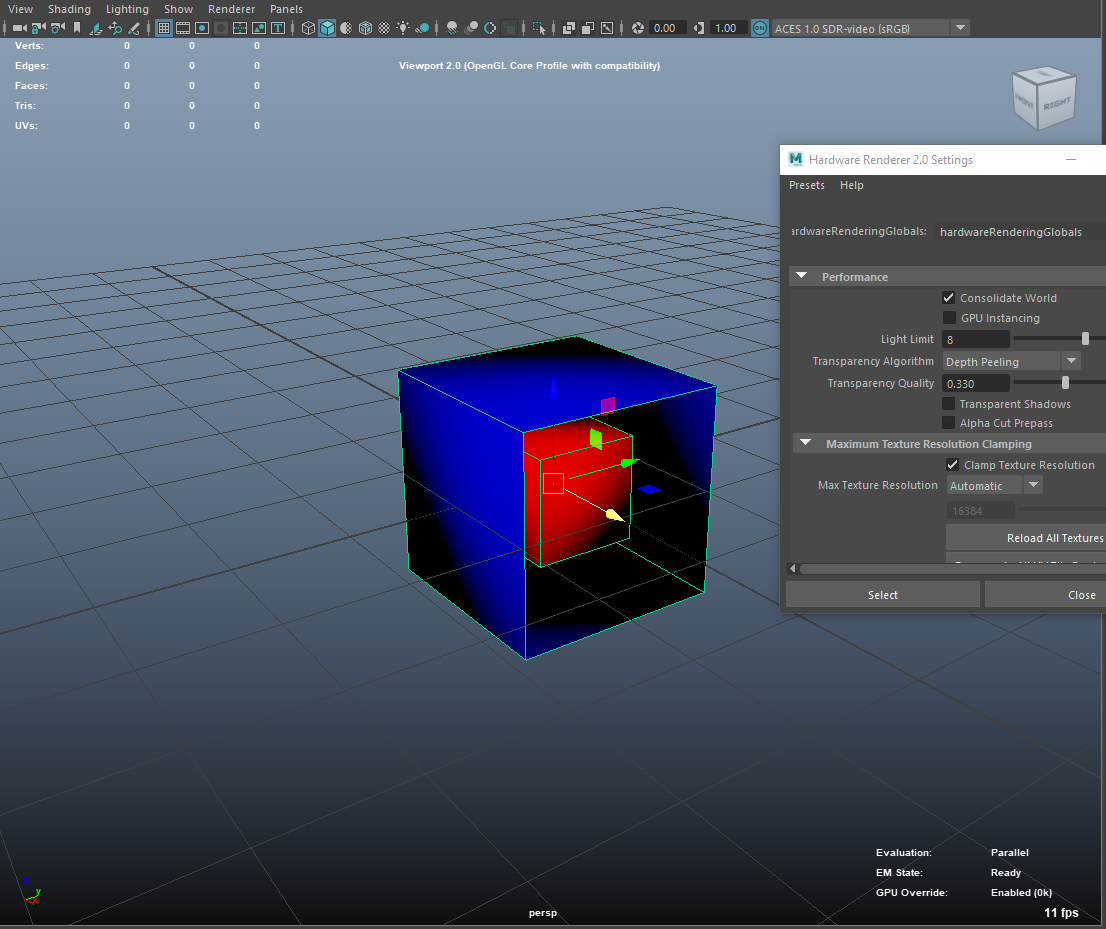
Another possible solution would be to change the transparency algorithm VP2 is using under Renderer -> Hardware Renderer 2.0 Settings, the box beside Viewport 2.0. Weighted average doesn't work great with overlapping transparent objects or overlapping transparency within a single object, but depth peeling looks good, as does alpha cut. Which of these algorithms is appropriate depends on the real use case of the transparency in your scene.
There is a bit more information on the transparency algorithms in the help: https://help.autodesk.com/view/MAYAUL/2022/ENU/?guid=GUID-9BBB6035-2A02-41BB-AF2D-99D9BEE580F1
Here is what I see when using Depth Peeling:

Hi @williamkrick , we have received feedback from production that neither "Alpha Cut" nor "Depth Peeling" would be suitable for us, we do need "Object Sorting" to display some semi transparent geometries on viewport.
Here is the updated the USD example if that helps, slightly changed the opacity primvar to be semi transparent outside and solid inside:
    float[] primvars:displayOpacity = [1, 1, 1, 1, 1, 1, 1, 1, 1, 1, 1, 1, 1, 1, 1, 1, 1, 1, 1, 1, 1, 1, 1, 1, 0.5, 0.5, 0.5, 0.5, 0.5, 0.5, 0.5, 0.5, 0.5, 0.5, 0.5, 0.5, 0.5, 0.5, 0.5, 0.5, 0.5, 0.5, 0.5, 0.5, 0.5, 0.5, 0.5, 0.5] (
        interpolation = "faceVarying"
    )
Full USD content:
#usda 1.0
(
    defaultPrim = "pCube3"
)

def Mesh "pCube3"
{
    float3[] extent = [(-1, -1, -1), (1, 1, 1)]
    int[] faceVertexCounts = [4, 4, 4, 4, 4, 4, 4, 4, 4, 4, 4, 4]
    int[] faceVertexIndices = [0, 1, 3, 2, 2, 3, 5, 4, 4, 5, 7, 6, 6, 7, 1, 0, 1, 7, 5, 3, 6, 0, 2, 4, 8, 9, 11, 10, 10, 11, 13, 12, 12, 13, 15, 14, 14, 15, 9, 8, 9, 15, 13, 11, 14, 8, 10, 12]
    normal3f[] normals = [(1, 0, 0), (1, 0, 0), (1, 0, 0), (1, 0, 0), (0, 1, 0), (0, 1, 0), (0, 1, 0), (0, 1, 0), (-1, 0, 0), (-1, 0, 0), (-1, 0, 0), (-1, 0, 0), (0, -1, 0), (0, -1, 0), (0, -1, 0), (0, -1, 0), (0, 0, -1), (0, 0, -1), (0, 0, -1), (0, 0, -1), (0, 0, 1), (0, 0, 1), (0, 0, 1), (0, 0, 1), (0, 0, 1), (0, 0, 1), (0, 0, 1), (0, 0, 1), (0, 1, 0), (0, 1, 0), (0, 1, 0), (0, 1, 0), (0, 0, -1), (0, 0, -1), (0, 0, -1), (0, 0, -1), (0, -1, 0), (0, -1, 0), (0, -1, 0), (0, -1, 0), (1, 0, 0), (1, 0, 0), (1, 0, 0), (1, 0, 0), (-1, 0, 0), (-1, 0, 0), (-1, 0, 0), (-1, 0, 0)] (
        interpolation = "faceVarying"
    )
    point3f[] points = [(1, -1, 1), (1, -1, -1), (1, 1, 1), (1, 1, -1), (-1, 1, 1), (-1, 1, -1), (-1, -1, 1), (-1, -1, -1), (-0.5, -0.5, 0.5), (0.5, -0.5, 0.5), (-0.5, 0.5, 0.5), (0.5, 0.5, 0.5), (-0.5, 0.5, -0.5), (0.5, 0.5, -0.5), (-0.5, -0.5, -0.5), (0.5, -0.5, -0.5)]
    color3f[] primvars:displayColor = [(0, 0, 1), (0, 0, 1), (0, 0, 1), (0, 0, 1), (0, 0, 1), (0, 0, 1), (0, 0, 1), (0, 0, 1), (0, 0, 1), (0, 0, 1), (0, 0, 1), (0, 0, 1), (0, 0, 1), (0, 0, 1), (0, 0, 1), (0, 0, 1), (0, 0, 1), (0, 0, 1), (0, 0, 1), (0, 0, 1), (0, 0, 1), (0, 0, 1), (0, 0, 1), (0, 0, 1), (1, 0, 0), (1, 0, 0), (1, 0, 0), (1, 0, 0), (1, 0, 0), (1, 0, 0), (1, 0, 0), (1, 0, 0), (1, 0, 0), (1, 0, 0), (1, 0, 0), (1, 0, 0), (1, 0, 0), (1, 0, 0), (1, 0, 0), (1, 0, 0), (1, 0, 0), (1, 0, 0), (1, 0, 0), (1, 0, 0), (1, 0, 0), (1, 0, 0), (1, 0, 0), (1, 0, 0)] (
        interpolation = "faceVarying"
    )
    float[] primvars:displayOpacity = [1, 1, 1, 1, 1, 1, 1, 1, 1, 1, 1, 1, 1, 1, 1, 1, 1, 1, 1, 1, 1, 1, 1, 1, 0.5, 0.5, 0.5, 0.5, 0.5, 0.5, 0.5, 0.5, 0.5, 0.5, 0.5, 0.5, 0.5, 0.5, 0.5, 0.5, 0.5, 0.5, 0.5, 0.5, 0.5, 0.5, 0.5, 0.5] (
        interpolation = "faceVarying"
    )
    float2[] primvars:st = [(0.375, 0), (0.625, 0), (0.375, 0.25), (0.625, 0.25), (0.375, 0.5), (0.625, 0.5), (0.375, 0.75), (0.625, 0.75), (0.375, 1), (0.625, 1), (0.875, 0), (0.875, 0.25), (0.125, 0), (0.125, 0.25), (0.375, 0), (0.625, 0), (0.625, 0.25), (0.375, 0.25), (0.625, 0.5), (0.375, 0.5), (0.625, 0.75), (0.375, 0.75), (0.625, 1), (0.375, 1), (0.875, 0), (0.875, 0.25), (0.125, 0), (0.125, 0.25)] (
        interpolation = "faceVarying"
    )
    int[] primvars:st:indices = [0, 1, 3, 2, 2, 3, 5, 4, 4, 5, 7, 6, 6, 7, 9, 8, 1, 10, 11, 3, 12, 0, 2, 13, 14, 15, 16, 17, 17, 16, 18, 19, 19, 18, 20, 21, 21, 20, 22, 23, 15, 24, 25, 16, 26, 14, 17, 27]
    uniform token[] xformOpOrder = []
}
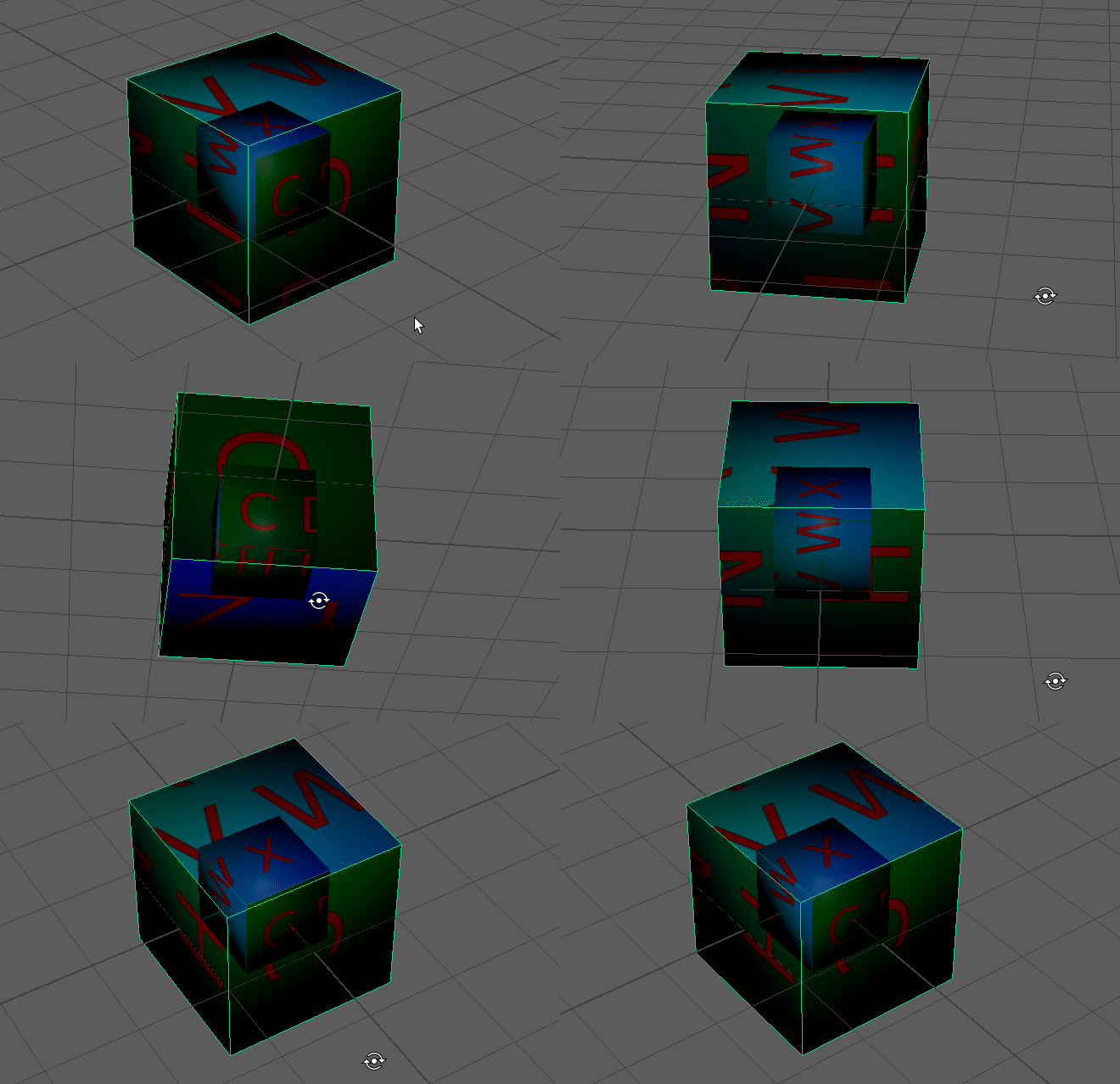
To add another data point, we're seeing similar behavior with the vp2 render delegate when using UsdPreviewSurface with a texture driving opacity, even when the texture is fully opaque. I suspect it's the same underlying problem.
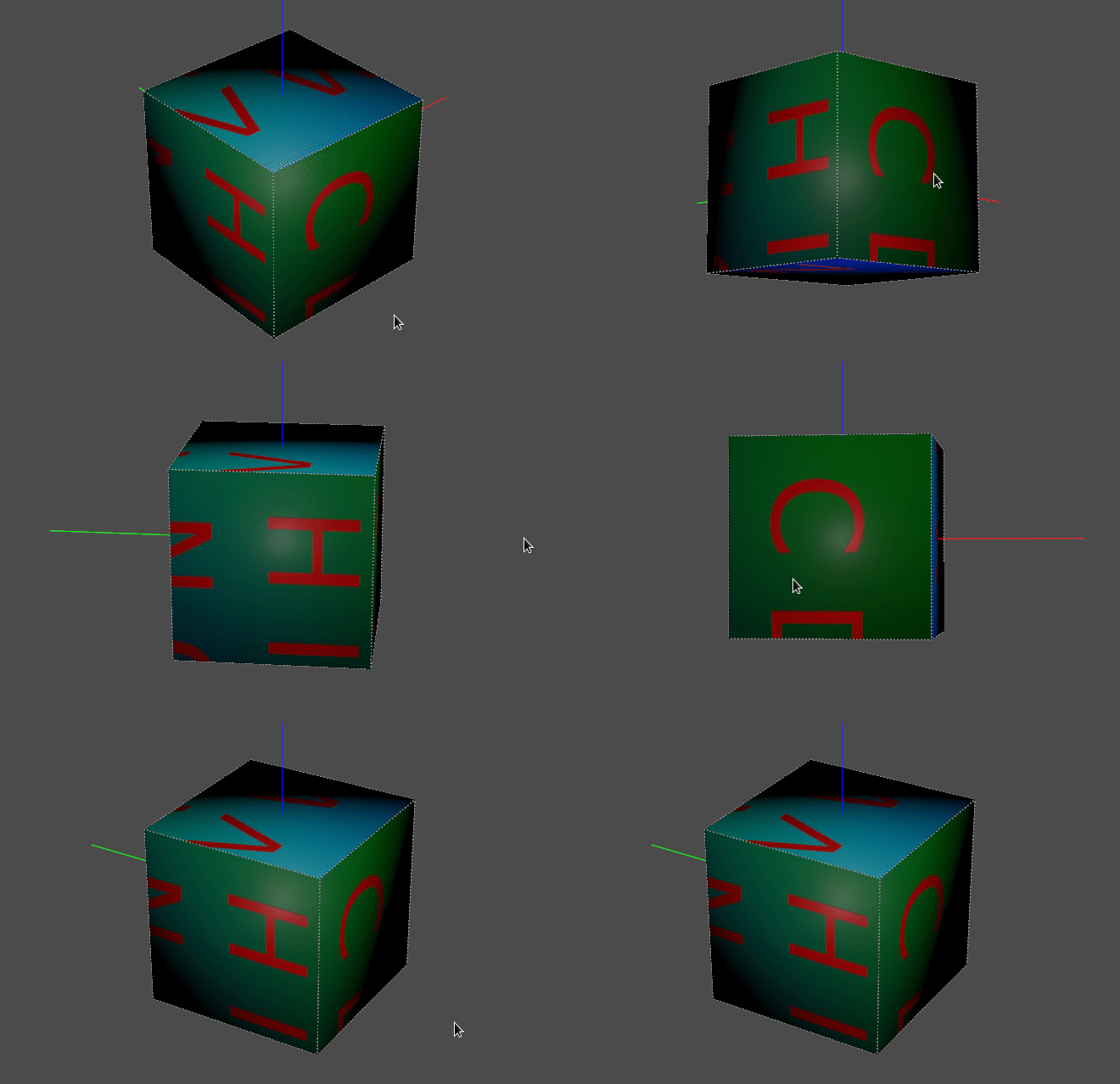
This is @csyshing 's repro with no authored displayOpacity, and instead a fully-opaque texture driving UsdPreviewSurface's diffuseColor and opacity: usdPreviewSurface_texture_opacity.zip
in usdview:
and in maya:
I can confirm that Alpha Cut and Depth Peeling fix the problem, but it's not yet clear if that's a viable workaround for us. Using geom subsets is not a viable strategy for us.
