

 AutoDarkMode
More user-friendly Hotkeys assignment User interface
Currently, assigning one of several hotkeys requires an unusual process that needs to be done in this order :
- Turning off 'Enable system-wide hotkeys'
- Entering the hotkeys you want in the user interface
- Then turning on 'Enable system-wide hotkeys'
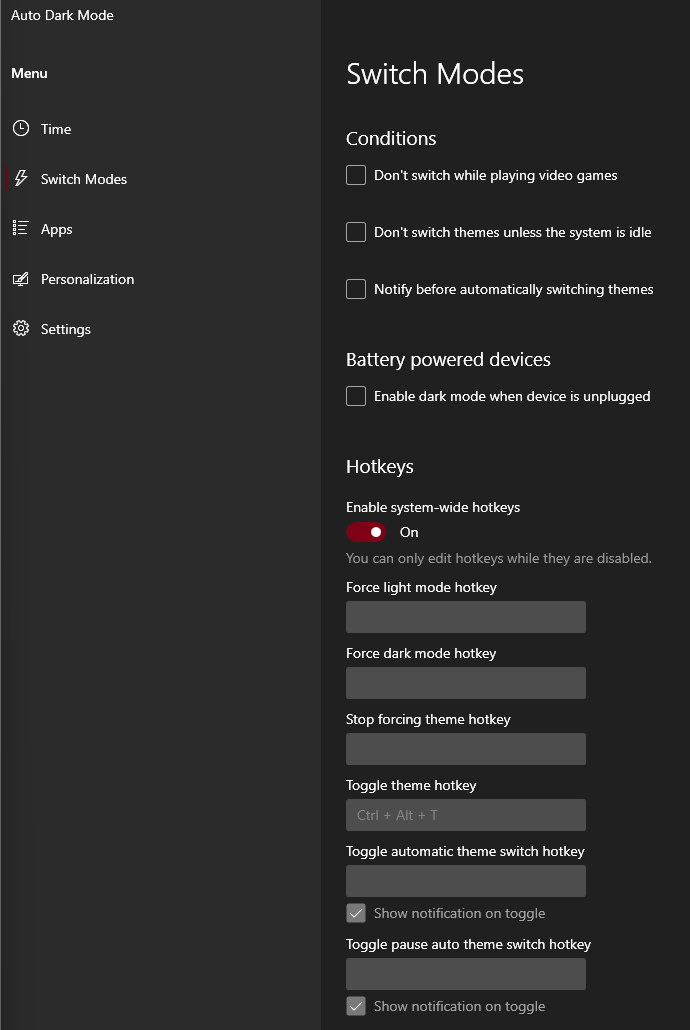
The problem is for any none Auto Dark Mode advanced user, it is not an usual way to specify hotkeys. In most apps (ex: Ditto, Flow Launcher), you just have to enter the hotkey, without having to fiddle with an on/off writing switch.
Here is are examples of user friendly hotkey setting interface:
 This is taken from Flow Launcher, an other opensource application for Windows. As you can see there is no on/off writing switch to enter the hotkeys.
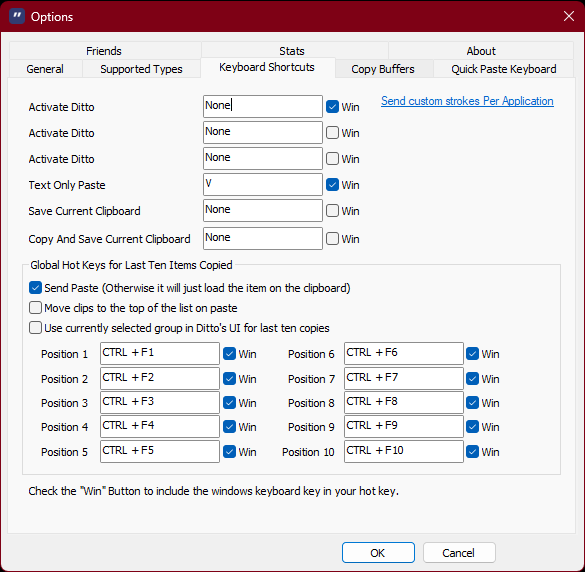 This is taken from Ditto, an other opensource application for Windows. There is a lot hotkeys that can be entered, and there is no on/off switch for entering these hotkeys.

Copilot's recommendation: https://github.com/copilot/share/882a028c-4bc0-8471-8800-024a80fd60e4

Now we have finished the design of the new hotkey interface. It will appear in Version 11 soon.

The problem is for any none Auto Dark Mode advanced user, it is not an usual way to specify hotkeys. In most apps (ex: Ditto, Flow Launcher), you just have to enter the hotkey, without having to fiddle with an on/off writing switch.
@Armin2208 @Jay-o-Way We need to discuss this. Do we need to disable hotkey editing when hotkeys are enabled? I am about to submit a PR on HotkeysPage, in which we will make a decision on this point. My personal opinion does not need to be disabled, because first of all, the back end supports modifying the hotkey function when it is enabled, and I added the forced save button to make an extra guarantee for this function.