

 Authenticator-Extension
Some printable characters appear urlencoded or double-urlencoded
Describe the bug: <Describe the issue with Authenticator>
1
When I click on the Authenticator icon on the Google Chrome toolbar, and look at various entries, some of them show some printable characters in urlencoded form.
@ becomes %40
space becomes %20
+ becomes %2B
An email address like [email protected] might appear as user%40example.com.
This type of urlencoding seems to be happening in both the upper and lower lines that identify each entry.
The reason I think this is a bug is because, even when urlencoding is needed, the urlencoded string would normally be urldecoded before it is displayed to the user.
The above has been happening for quite some time, at least since a year ago. Surprisingly, I don't find any existing issue that mentions this.
More surprisingly, sometimes urlencoding appears to have been done twice in the lower line.
@ becomes %2540
space becomes %2520
An email address like [email protected] might appear as user%2540example.com. Here, the % in %40 was urlencoded into %25.
If I edit any of these urlencoded or double-urlencoded these entries, they then appear normal. So I can edit user%40example.com to correct it to [email protected] and it will then appear as [email protected].
Note: A previous issue #63 mentions non-standard characters but I can't tell if it has any relevance here.
2
A second related issue is that it's not possible to use the / operator to search for a string like %40 and then edit all the matching entries to correct them to show @ instead. The reason being that as soon as one begins editing %40, the match fails and that particular entry disappears from view. Please see a previously reported issue #289.
3
Platform: Ubuntu Linux 16.04.6 LTS (Xenial Xerus)
- Browser: Google Chrome
- Browser Version: 79.0.3945.88 (Official Build) (64-bit)


Almost all entries were added by scanning the typical QR code presented by each website when TOTP is enabled. A very few were added manually. At the time that an entry is added, it looks normal, i.e., not urlencoded. The urlencoded and double-urlencoded format appeared spontaneously at various times, not all at once.
After I reported this issue I exported all entries into the one-entry-per-line format, edited that file with global search/replace to fix all the urlencodings, then removed and re-installed the extension, then imported the entire file. Now all the urlencodings are gone.
I now have a pretty good idea when the urlencoding happens.
I have Google Chrome, with the Authenticator extension installed, on machines A and B. Machine A runs Ubuntu and machine B runs Chrome OS. Both instances of Google Chrome are fully sync'd via Google's sync mechanism ("Sync everything" is enabled).
I usually add/remove Authenticator entries only on machine A. Changes are then automatically reflected also on machine B and no urlencoding is seen.
However, yesterday I added several entries on both machine A and machine B within a few minutes of one another. (Different entries added on each, not the same entry.) And now all the entries on both have become urlencoded.
So propagation of entries via Chrome Sync under certain conditions is somehow causing an extra level of urlencoding.
Note that the urlencoding does not affect the actual generation of TOTP codes. Nor does it hinder any search, as almost all the time the search is for a domain. and dots in domains are left undisturbed and not urlencoded.
It's only a visual distraction.
That does make it seem like sync or some other component is doing something weird. Especially since the extension never uriencodes that data where it has a chance of getting stored.
I don't really know if there's anything I can do about this. I've looked through the Chromium & Ubuntu bug tracker and can't really find anything related. Can you try and reproduce this with another extension that syncs text data?
I have not noticed any similar problems with any other extension. Will look further.
Here is a bug that might be related. When a one-entry-per-line backup is exported, single colons in each entry's top and bottom labels disappear, and double colons become single colons. To reproduce:
-
Installed the Authenticator extension afresh from the Chrome web store, so it begins with no entries.
-
Manually added a a random TOTP secret:
account name = testing
secret = GIZDKNRTG44TSMRVHE4DI
- The resulting entry in the extension has an empty top label (the Issuer), and the bottom label (the Account Name) reads "testing". Edited to change each into: testing:testing
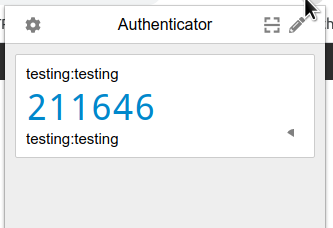
- Downloaded a backup. This is now observed to contain a single line that in which the labels do not include the colons that were added above.
otpauth://totp/testingtesting:testingtestingsecret=GIZDKNRTG44TSMRVHE4DI&issuer=testingtesting
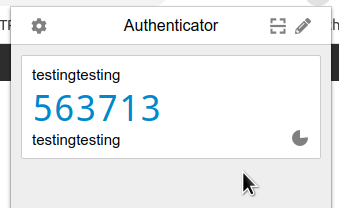
- When this file is imported into the extension, as expected, both labels now read “testingtesting” instead of “testing:testing”.
Note: Current versions are Chrome 80.0.3987.106, Authenticator extension 5.3.2.