

 Assistant
Wine bug, says UserInteractive is off
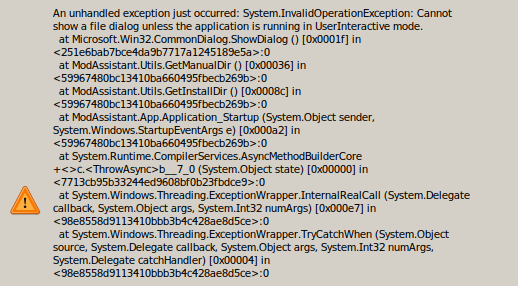
Hey, trying to set up my beat saber setup on linux (mint 20.02), and I'm running into an issue with the installer on wine; it will run, and it throws the 'beat saber install folder not found' error. When I click ok, it pulls up a wine error that says 'Cannot show a file dialog unless the application is running in UserInteractve mode.' As far as I can tell, it's an environment variable, but I don't have enough experience with wine to try and hack it together. If there are build instructions (I couldn't find any), I could try and get it working native on linux; otherwise I'll probably have to wait for a fix. Thank you!
Here is the console output when running:
0034:fixme:font:get_name_record_codepage encoding 20 not handled, platform 1.
0034:fixme:font:get_name_record_codepage encoding 20 not handled, platform 1.
005c:fixme:font:get_name_record_codepage encoding 20 not handled, platform 1.
005c:fixme:font:get_name_record_codepage encoding 20 not handled, platform 1.
0064:fixme:font:get_name_record_codepage encoding 20 not handled, platform 1.
0064:fixme:font:get_name_record_codepage encoding 20 not handled, platform 1.
006c:fixme:font:get_name_record_codepage encoding 20 not handled, platform 1.
006c:fixme:font:get_name_record_codepage encoding 20 not handled, platform 1.
002c:fixme:font:get_name_record_codepage encoding 20 not handled, platform 1.
002c:fixme:font:get_name_record_codepage encoding 20 not handled, platform 1.
0024:fixme:font:get_name_record_codepage encoding 20 not handled, platform 1.
0024:fixme:font:get_name_record_codepage encoding 20 not handled, platform 1.
00fc:fixme:font:get_name_record_codepage encoding 20 not handled, platform 1.
00fc:fixme:font:get_name_record_codepage encoding 20 not handled, platform 1.
0024:fixme:ntdll:NtQuerySystemInformation info_class SYSTEM_PERFORMANCE_INFORMATION
0024:fixme:ntdll:EtwEventRegister ({e13b77a8-14b6-11de-8069-001b212b5009}, 0C280448, 00000000, 0031F558) stub.
0024:fixme:ntdll:EtwEventRegister ({e13b77a8-14b6-11de-8069-001b212b5009}, 0C597060, 0CA9F018, 0CAA4C08) stub.
0024:fixme:msg:ChangeWindowMessageFilter c03c 00000001
0024:fixme:dwmapi:DwmAttachMilContent (0001004C) stub
0108:fixme:driver:GdiEntry13 stub
0108:fixme:dwrite:dwritefactory_CreateMonitorRenderingParams (0x1): monitor setting ignored
0108:fixme:d3d:wined3d_check_device_format_conversion output 0x1cf440, device_type WINED3D_DEVICE_TYPE_HAL, src_format WINED3DFMT_B8G8R8X8_UNORM, dst_format WINED3DFMT_B8G8R8X8_UNORM stub!
and here is the wine error:

Build instructions: Download visual studio 2019,and import this git repository from https://github.com/Assistant/ModAssistant.git.
Then click 'run',that's it.
In fact this application is build for windows.I search this error it seems can be solved just simpliy.
Here is the answers by microsoft: https://docs.microsoft.com/zh-cn/dotnet/api/system.environment.userinteractive?view=net-6.0 (Chinese version)
That means you have incorrect wine settings.In one word is:Your wine dosen't provide a screen,so this Apllication can't dispaly anything.I know poor about Wine so i can't help you more.
