
t3-stack-tutorial-and-resources
 t3-stack-tutorial-and-resources copied to clipboard
 AshSimmonds
Personal repo for documenting stuff as I go about T3, Typescript, tRPC, Tailwind, Postgres, Railway, Vercel, etc
T3-Stack inspired resources and tutorial | NextJS, TypeScript, tRPC, Postgres, Prisma, TailwindCSS, nextAuth, Railway, Vercel
- About
- Video
- What's in it?
- Tech stack
- Products used
- Services used
- Pricing
- Instructions
- Initialise project
- Setup database
- Seed data and test app
- Deploy
About
Personal repo for documenting stuff as I go about learning and devving in the initial stack recommended by t3-oss/create-t3-app / init.tips, as of July 2022.
This is not educational material on any of the tech involved, just instructions on how to get them all from nothing to deployed and ready to go as quick and frictionless as possible.
They all work well together, it's intuitive to pick up, and really efficient to get going on actually creating useful stuff rather than spending hours boilerplating and trying to get disparate things playing nice. As time goes by I'll add other stack resources.
Initially a compression of a proposed tutorial which has more details for a newcomer. The following is more a quick refresher of just the hit points when you don't need explanations but just to follow the bouncing ball.
This is not exhaustive nor definitive, just the way I've honed my routine for setting up a full-stack deployed environment within 15 mins and no major headscratching, which includes a front-end, styling, a database, an API, server routing, ~authentication~ (soon), and deployment to public.
What's in it
In here is everything you need to quickly spin up and deploy a full-stack starter environment with most of the stuff any average app needs for quickly getting to work on your MVP.
Time required:
- first time: 45-90mins
- 2nd time: 20-40mins
- subsequent: 10-15mins
Tech stack
All free and open source.
| Technology | Description |
|---|---|
NextJS |
framework |
Typescript |
language |
tRPC |
API |
TailwindCSS |
UI styling and UX fernagling |
Postgres |
database |
Prisma |
querying and stuff of data |
~nextAuth~ |
authentication / authorisation (coming soon) |
Products
These are all free and mostly open source.
Will only include stuff which fits my efficiency paradigm and which I've tested personally, so if you want Yarn or Linux or Vim or all-CLI etc seek elsewhere. But if you're just a regular schmoe dev this is all the stuff you need:
- Windows
- PowerShell
- NPM
- VSCode
- GitHub Desktop
Services
These have forever free "hobby" levels, and very cheap entry-level offers once you go into production and need more resources.
Pricing
Free.
In case you missed it, everything here is free and nearly all open source.
It's only the online deployed services which you'll have to pay for if you need a ton of resources (good problem to have), but they all have forever free very generous allocations for messing around.
Also there's no vendor-lock-in, you can even self-host any of the services, these just represent the easiest for me to use on a whim without costing anything.
Instructions
There's very little explanation from here on, it's just steps to get the environment up and running and deployed as quick as possible.
Video
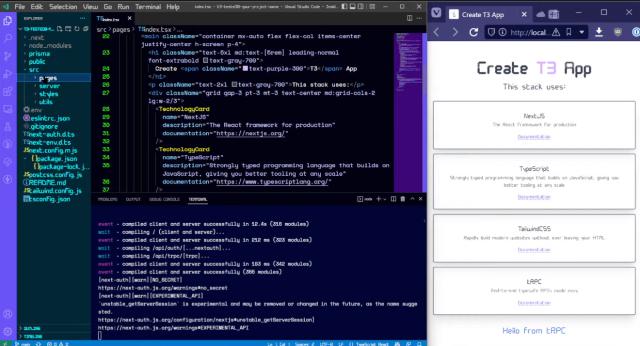
Setup and initial dry run on YouTube
I'm hardly a pro YouTuber, this is just my first dry-run following my own tutorial, with minimal explanation.
Total time: 31mins
Hands-on time: ~15mins
Initialise project
Powershell:
cd \your-repo-parent-folder
npx create-t3-app@latest
Name project
What will your project be called?
(my-t3-app)
Illusion of choice
Will you be using JavaScript or TypeScript?
Select dev stack
Which packages would you like to enable?
( ) nextAuth
( ) Prisma
( ) TailwindCSS
( ) tRPC
I'll take them all thanks.
Git gud
Initialize new git repo?
Yup.
Setup project structure
Run NPM install?
Sure.
- scaffold: ~30 secs
- install packages: ~60 secs
- Git init: ~1 sec
Publish repo
GitHub Desktop:
Add existing repository
Select new repo folder that was just set up (already has git stuff in it).
Test project works
Open in VSCode.
Terminal:
run npm dev
Navigate to http://localhost:3000, should see the landing page.
Setup database
Terminal:
railway login
Hit enter and it should open a browser and log you into your Railway account. Can close that window when done.
Terminal:
railway init
Starting point:
Select Empty Project. (I haven't tried other options yet)
Enter project name:
Just use same name as current project, unless reasons.
Import (.env) environment variables?
No need right now.
It should auto-open a browser window to the Railway project.
Terminal:
railway add
Select database (postgresql).
It should populate the Railway project browser window with new empty database.
Populate db credentials
Railway browser:
- select the database
- click
Connect - copy
Postgres Connection URL
VSCode:
/.env
DATABASE_URL=postgresql://postgres:{password}@containers-blah-69.railway.app:7594/railway
/prisma/schema.prisma
generator client {
    provider = "prisma-client-js"
}

datasource db {
    provider = "postgresql"
    url      = env("DATABASE_URL")
}
Create database tables/schema/client
Terminal:
npx prisma migrate dev --name init
Migration takes about 30secs.
Railway:
- check tables have been generated
Terminal:
npx prisma generate

npx prisma studio
Prisma Studio (http://localhost:5555) can now be used as a direct interface to the database.
Seed data and test app
- open
Exampletable - click
add record - click
save 1 record
New row with a GUID entry in id field is created.
Railway:
- open in browser and check the
exampletable has a record in it
VSCode terminal:
npm run dev- nav to
http://localhost:3000/api/examples - check the API is running, should just return same record in JSON, eg.
[{"id":"cl5yxzjn70013ogxkndjskxr8"}]
Deploy
Terminal:
npm add -D vercel
- git push changes
- open Vercel dashboard
- click
+ New Project
Import Git Repository
- select your repo
Configure Project
Add environment variables - these need to be populated in a standard install:
| Name | Value |
|---|---|
DATABASE_URL |
postgresql://postgres:{password}@containers-blah-69.railway.app:7594/railway |
NEXTAUTH_SECRET |
JustAnythingForNow |
NEXTAUTH_URL |
http://doesnotmatter:3000 |
DISCORD_CLIENT_ID |
WhateverForNow |
DISCORD_CLIENT_SECRET |
DealWithItLater |
Click Deploy.
Takes 1-2 mins.
Should now be deployed at https://your-project-name.vercel.app.
Metadata
Owner
 AshSimmonds
Metadata
Personal repo for documenting stuff as I go about T3, Typescript, tRPC, Tailwind, Postgres, Railway, Vercel, etc