

 Aris-t2
Private mode window is broken, address bar is behind tab bar, tab bar is halfway up to the address bar.
-
Issue description: On classic FF setting, private mode window is broken, address bar is behind tab bar, tab bar is halfway up to the address bar.
-
Does the issue occur with latest CustomCSSforFx release? (Check here: https://github.com/Aris-t2/CustomCSSforFx/releases) Yes (commit e04ad08)
-
Steps to reproduce the issue:
- Use those settings: https://github.com/Aris-t2/CustomCSSforFx/compare/e04ad08...VcSaJen:CustomCSSforFx:bd17541
- Open Private Window
- See that private mode window is broken, address bar is behind tab bar, tab bar is halfway up to the address bar.
-
SCREENSHOT(S) of the issue (drag & drop images into this post):
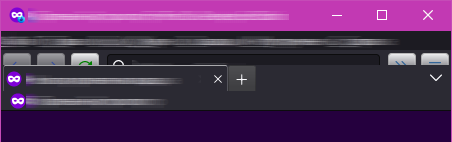
-
Is 'about:config > toolkit.legacyUserProfileCustomizations.stylesheets' set to 'true'? Yes
-
System information
- OS & OS version: Windows 10 21H1 19043.2006 Windows Feature Experience Pack 120.2212.4180.0
- DPI / HiDPI (e.g. 100%, 125%...): 100%
- Firefox version: 106.0b6
- Firefox theme: light
- This projects userChrome.css/userContent.css 'settings' the issue occurs with: https://github.com/Aris-t2/CustomCSSforFx/compare/e04ad08...VcSaJen:CustomCSSforFx:bd17541

Add this to your custom code:
#private-browsing-indicator-with-label {
  display: none !important;
}

Hi @Aris-t2 Not sure if this is intentional but the mentioned piece of the code is not added to the default
./css/generalui/private_mode_indicator_hidden.css
