
AppImageUpdate

AppImageUpdate copied to clipboard
 AppImageCommunity
Show more useful information in case things go wrong
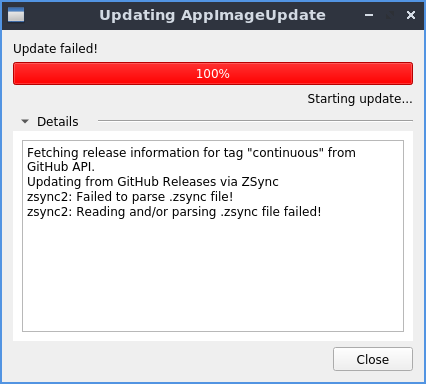
I know that there are some command line tool commands but it would be nice if in case of an error the user would get more information.

By the way, in this case the text is entirely misleading.
The reason here is that the AppImage is on a read-only partition!
$ /isodevice/Applications/AppImageUpdate-x86_64.AppImage /isodevice/Applications/AppImageUpdate-x86_64.AppImage
AppImageUpdate version 1-alpha (commit e17e350), build 422 built on 2019-10-13 13:17:11 UTC
Fetching release information for tag "continuous" from GitHub API.
Updating from GitHub Releases via ZSync
open: Permission denied
zsync2: Failed to parse .zsync file!
zsync2: Reading and/or parsing .zsync file failed!
https://github.com/AppImage/AppImageUpdate/issues/1 describes what should happen when the AppImage is on a read-only partition - AppImageUpdate should try to become root. As a fallback, write the new file to $HOME/Downloads. But not fail!