

 ApolloAuto
.sh file to set Apollo route
Good morning, I made a sh file located on my desktop to double click on it and run the mock_routing_request.py script to set up the route automatically without the need to set the points manually in Dreamview.
This is basically the code of the sh file, named Give_Route_to_Apollo.sh : #!/bin/bash cd apollo-5.0_Original ./docker/scripts/dev_into.sh python modules/tools/mock_routing/mock_routing_request.py
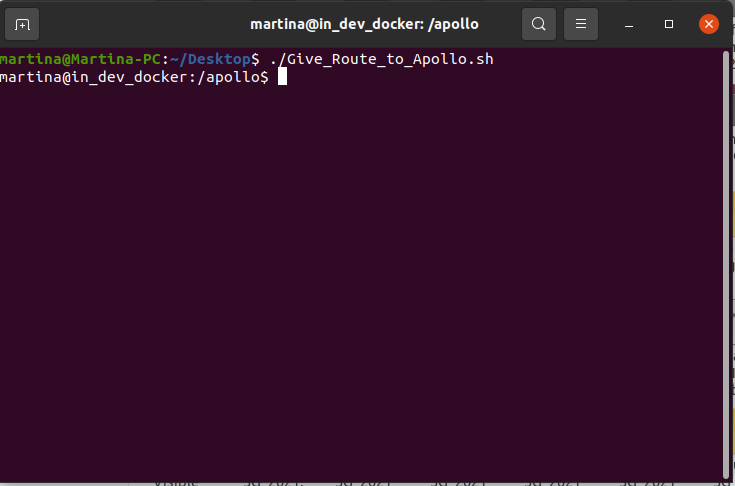
If I double click on it, or I run it from the desktop, it works but it stops after entering the docker container without executing python modules/tools/mock_routing/mock_routing_request.py (as you can see from the pic in attached). If I open a terminal from apollo-5.0_Original folder and execute the other commands in the order it works. But from the desktop it doesn't run the last command inside the container. I have tried as well with -- docker exec -it apollo_dev_martina python modules/tools/mock_routing/mock_routing_request.py but it doesn't run either.
Which command should I use in the sh file to run the mock_routing_request.py, after entering the container?
Many thanks,
Martina
System information
- OS Platform and Distribution (e.g., Linux Ubuntu 18.04): Ubuntu 20.04.3 LTS
- Apollo version (3.5, 5.0, 5.5, 6.0): Apollo 5.0

Maybe you can switch to apollo 7.0 so that more developers will be able to help...

so let's take a look:
- in docker: you run
mock_routing_request.pyand nothing print out? - out docker: you run
mock_routing_request.pyand nothing print out too ?
I suggest you first solve the situation in docker first. Before executing the command, initialize the environment use
source /apollo/scripts/apollo_base.sh
source cyber/setup.bash
