

 ApolloAuto
Driving at higher speeds
We appreciate you go through Apollo documentations and search previous issues before creating an new one. If neither of the sources helped you with your issues, please report the issue using the following form. Please note missing info can delay the response time.
System information
- OS Platform and Distribution (e.g., Linux Ubuntu 18.04): Ubunut 20.04
- Apollo installed from (source or binary):
- Apollo version (3.5, 5.0, 5.5, 6.0): master
-
Output of
apollo.sh configif onmasterbranch:
[INFO] Apollo Environment Settings: [INFO] APOLLO_ROOT_DIR: /home/kleer/apollo [INFO] APOLLO_CACHE_DIR: /home/kleer/apollo/.cache [INFO] APOLLO_IN_DOCKER: false [INFO] APOLLO_VERSION: master-2021-04-26-70ad8303e8 [INFO] APOLLO_ENV: STAGE=dev USE_ESD_CAN=false [INFO] USE_GPU: USE_GPU_HOST= USE_GPU_TARGET=1 [INFO] Usage: /home/kleer/apollo/scripts/apollo_config.sh [Options] [INFO] Options: [INFO] -i|--interactive Run in interactive mode [INFO] -n|--noninteractive Run in non-interactive mode [INFO] -h|--help Show this message and exit
Steps to reproduce the issue:
I tried to run simulations on a highway with speeds around 130klm/h. For that i changed the default cruise speed in the planning algorithm. The car only accelerates to about 50km/h and keeps 10% throttle paddle position. I tried to increase the P parameter in the longitudinal controller but it didn't work. In the attached screenshot you can see the higher target velocity and the car not reaching it. Can someone tell me how to get to higher speeds?
Supporting materials (screenshots, command lines, code/script snippets):
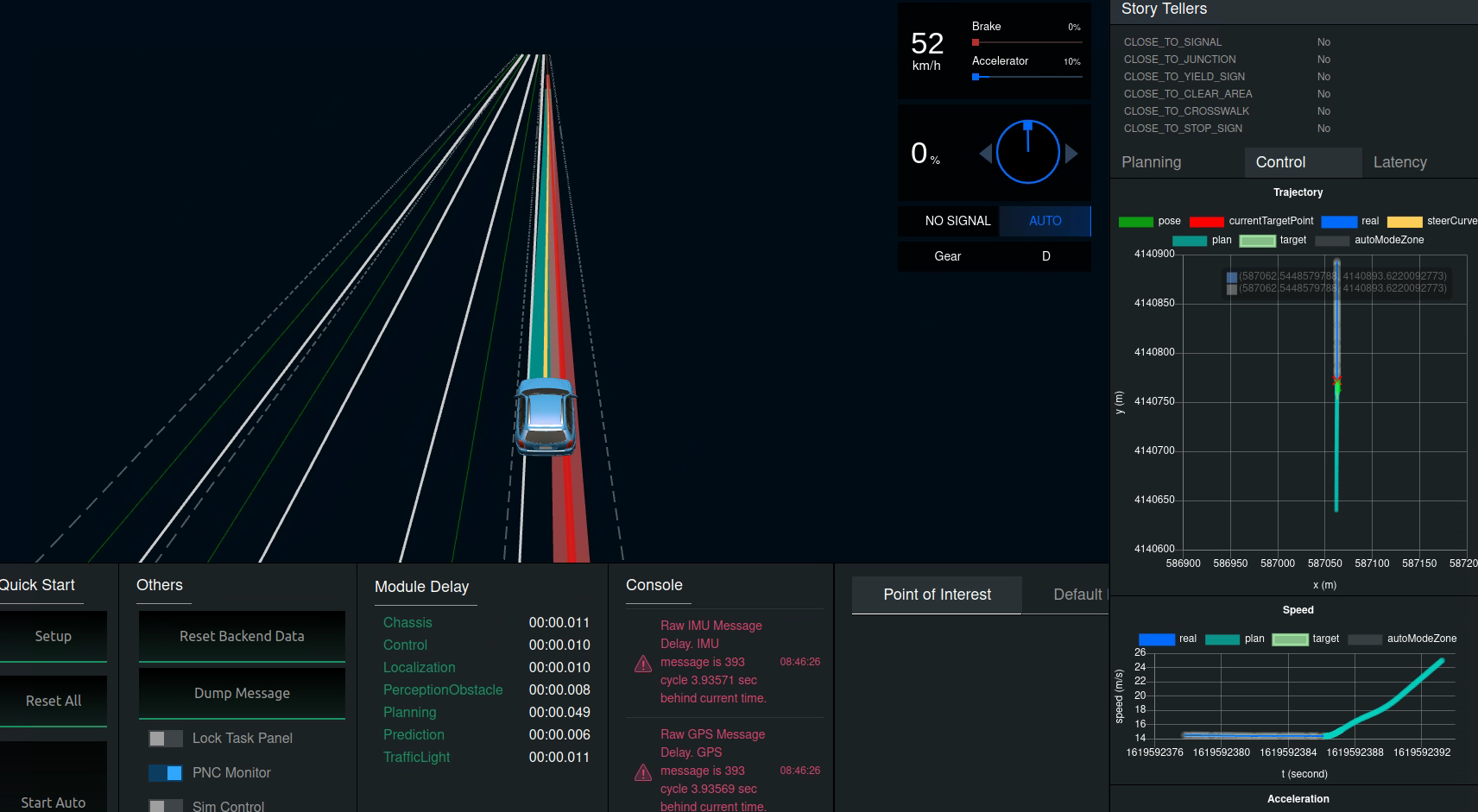

Could you use 'bash scripts/control_info.sh' to see the error of position speed and accerelation Have to say,you are really brave to drive the car to 130km/h with apollo

if i run it i get the following error
in-dev-docker:/apollo/scripts]$ bash control_info.sh
`Traceback (most recent call last):
File "/apollo/bazel-bin/modules/tools/control_info/control_info.runfiles/apollo/modules/tools/control_info/control_info.py", line 30, in
` I just want to see how far we can go. But the ideal goal would be 130km/h if I end up with 80-100 that would be also okay.
@storypku It seems lost tkinter in image.
in-dev-docker:/apollo/scripts]$ bash control_info.sh
`Traceback (most recent call last):
File "/apollo/bazel-bin/modules/tools/control_info/control_info.runfiles/apollo/modules/tools/control_info/control_info.py", line 30, in
import tkinter.filedialog
ModuleNotFoundError: No module named 'tkinter'
@BBlumi97 you can install it in docker: sudo apt-get install tcl-dev tk-dev python3-tk then run control_info.sh
the target speed is always 14m/s. Maybe you should check planning
I don't understand that because the graph with to target goes up to ~25m/s
When i try to install tcl-dec tk-dev and python-tk the following error shows up:
in-dev-docker:/apollo]$ sudo apt-get install tcl-dev tk-dev python3-tk
Reading package lists... Done
Building dependency tree
Reading state information... Done
Package python3-tk is not available, but is referred to by another package.
This may mean that the package is missing, has been obsoleted, or is only available from another source
E: Unable to locate package tcl-dev
E: Unable to locate package tk-dev
E: Package 'python3-tk' has no installation candidate
after updating i got the script running. But only one plot has graphs on it. But maybe it helps you anyway.
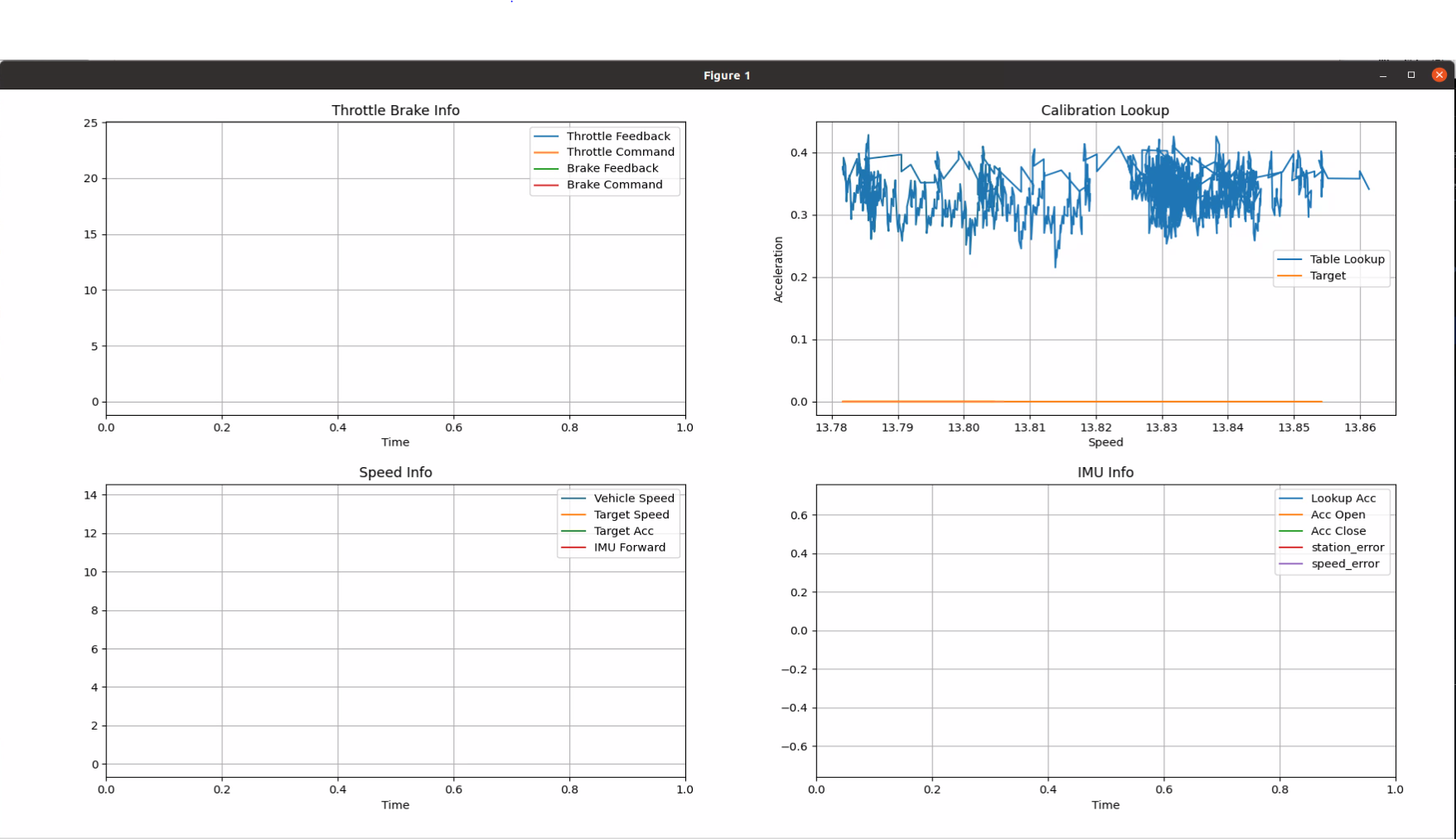
after updating i got the script running. But only one plot has graphs on it. But maybe it helps you anyway.
use cyber_monitor to see control message debug?
We appreciate you go through Apollo documentations and search previous issues before creating an new one. If neither of the sources helped you with your issues, please report the issue using the following form. Please note missing info can delay the response time.
System information
- OS Platform and Distribution (e.g., Linux Ubuntu 18.04): Ubunut 20.04
- Apollo installed from (source or binary):
- Apollo version (3.5, 5.0, 5.5, 6.0): master
- Output of
apollo.sh configif onmasterbranch:[INFO] Apollo Environment Settings: [INFO] APOLLO_ROOT_DIR: /home/kleer/apollo [INFO] APOLLO_CACHE_DIR: /home/kleer/apollo/.cache [INFO] APOLLO_IN_DOCKER: false [INFO] APOLLO_VERSION: master-2021-04-26-70ad8303e8 [INFO] APOLLO_ENV: STAGE=dev USE_ESD_CAN=false [INFO] USE_GPU: USE_GPU_HOST= USE_GPU_TARGET=1 [INFO] Usage: /home/kleer/apollo/scripts/apollo_config.sh [Options] [INFO] Options: [INFO] -i|--interactive Run in interactive mode [INFO] -n|--noninteractive Run in non-interactive mode [INFO] -h|--help Show this message and exit
Steps to reproduce the issue:
I tried to run simulations on a highway with speeds around 130klm/h. For that i changed the default cruise speed in the planning algorithm. The car only accelerates to about 50km/h and keeps 10% throttle paddle position. I tried to increase the P parameter in the longitudinal controller but it didn't work. In the attached screenshot you can see the higher target velocity and the car not reaching it. Can someone tell me how to get to higher speeds?
Supporting materials (screenshots, command lines, code/script snippets):
Brother, have you solved the speed problem? What should I do to make it report faster? Thank you in advance

Closed due to inactivity. If the problem persists, pls feel free to reopen it or create a new one and refer to it.
