

 AnyChart
Line chart not showing (Kotlin)
I tried to load line chart using simple lines of code. Language : Kotlin
   APIlib.getInstance().setActiveAnyChartView(chart)
    var lineChart = AnyChart.line()
    val list = ArrayList<DataEntry>()
    list.add(ValueDataEntry("1", 1))
    list.add(ValueDataEntry("2", 3))
    list.add(ValueDataEntry("3", 63))
    list.add(ValueDataEntry("4", 1326))
    list.add(ValueDataEntry("5", 2059))
    list.add(ValueDataEntry("6", 7598))

    lineChart.data(list)

    chart.setChart(lineChart)
chart -> It is the id of AnyChartView
On running the app chart doesnt appear (Just a blank screen).
Any help would be appreciated.

@aayum
Unfortunately, I'm not familiar with Kotlin, but your code works well in plain Java.
Here is the sample based on your code:

Please, check that your xml layout is correct and there are no errors while building.

@Shestac92 xml :
<com.anychart.AnyChartView
        android:id="@+id/chart"
        android:layout_width="match_parent"
        android:layout_height="wrap_content"/>
@aayum Did you try to launch the chart with plain Java? We didn't test with Kotlin.
Actually my project is in Kotlin s didn't try in Java Need help to use this in Kotlin.
@aayum I've been trying using kotlin, I just convert all of the code from the source to kotlin, and its work...
class TestActivityOne : AppCompatActivity() {

    override fun onCreate(savedInstanceState: Bundle?) {
        super.onCreate(savedInstanceState)
        setContentView(R.layout.activity_test_one)

        val anyChartView = findViewById<AnyChartView>(R.id.any_chart_view)
        anyChartView.setProgressBar(findViewById(R.id.progress_bar))

        val cartesian: Cartesian = AnyChart.line()

        cartesian.animation(true)

        cartesian.padding(10.0, 20.0, 5.0, 20.0)

        cartesian.crosshair().enabled(true)
        cartesian.crosshair()
            .yLabel(true) // TODO ystroke
            .yStroke(null as Stroke?, null, null, null as String?, null as String?)

        cartesian.tooltip().positionMode(TooltipPositionMode.POINT)

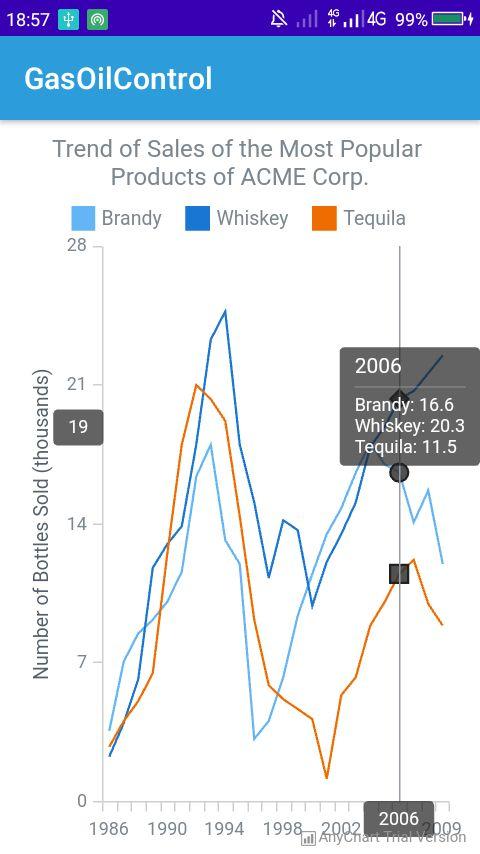
        cartesian.title("Trend of Sales of the Most Popular Products of ACME Corp.")

        cartesian.yAxis(0).title("Number of Bottles Sold (thousands)")
        cartesian.xAxis(0).labels().padding(5.0, 5.0, 5.0, 5.0)

        val seriesData: MutableList<DataEntry> = ArrayList()
        seriesData.add(CustomDataEntry("1986", 3.6, 2.3, 2.8))
        seriesData.add(CustomDataEntry("1987", 7.1, 4.0, 4.1))
        seriesData.add(CustomDataEntry("1988", 8.5, 6.2, 5.1))
        seriesData.add(CustomDataEntry("1989", 9.2, 11.8, 6.5))
        seriesData.add(CustomDataEntry("1990", 10.1, 13.0, 12.5))
        seriesData.add(CustomDataEntry("1991", 11.6, 13.9, 18.0))
        seriesData.add(CustomDataEntry("1992", 16.4, 18.0, 21.0))
        seriesData.add(CustomDataEntry("1993", 18.0, 23.3, 20.3))
        seriesData.add(CustomDataEntry("1994", 13.2, 24.7, 19.2))
        seriesData.add(CustomDataEntry("1995", 12.0, 18.0, 14.4))
        seriesData.add(CustomDataEntry("1996", 3.2, 15.1, 9.2))
        seriesData.add(CustomDataEntry("1997", 4.1, 11.3, 5.9))
        seriesData.add(CustomDataEntry("1998", 6.3, 14.2, 5.2))
        seriesData.add(CustomDataEntry("1999", 9.4, 13.7, 4.7))
        seriesData.add(CustomDataEntry("2000", 11.5, 9.9, 4.2))
        seriesData.add(CustomDataEntry("2001", 13.5, 12.1, 1.2))
        seriesData.add(CustomDataEntry("2002", 14.8, 13.5, 5.4))
        seriesData.add(CustomDataEntry("2003", 16.6, 15.1, 6.3))
        seriesData.add(CustomDataEntry("2004", 18.1, 17.9, 8.9))
        seriesData.add(CustomDataEntry("2005", 17.0, 18.9, 10.1))
        seriesData.add(CustomDataEntry("2006", 16.6, 20.3, 11.5))
        seriesData.add(CustomDataEntry("2007", 14.1, 20.7, 12.2))
        seriesData.add(CustomDataEntry("2008", 15.7, 21.6, 10))
        seriesData.add(CustomDataEntry("2009", 12.0, 22.5, 8.9))

        val set = Set.instantiate()
        set.data(seriesData)
        val series1Mapping: Mapping = set.mapAs("{ x: 'x', value: 'value' }")
        val series2Mapping: Mapping = set.mapAs("{ x: 'x', value: 'value2' }")
        val series3Mapping: Mapping = set.mapAs("{ x: 'x', value: 'value3' }")

        val series1: Line = cartesian.line(series1Mapping)
        series1.name("Brandy")
        series1.hovered().markers().enabled(true)
        series1.hovered().markers()
            .type(MarkerType.CIRCLE)
            .size(4.0)
        series1.tooltip()
            .position("right")
            .anchor(Anchor.LEFT_CENTER)
            .offsetX(5.0)
            .offsetY(5.0)

        val series2: Line = cartesian.line(series2Mapping)
        series2.name("Whiskey")
        series2.hovered().markers().enabled(true)
        series2.hovered().markers()
            .type(MarkerType.CIRCLE)
            .size(4.0)
        series2.tooltip()
            .position("right")
            .anchor(Anchor.LEFT_CENTER)
            .offsetX(5.0)
            .offsetY(5.0)

        val series3: Line = cartesian.line(series3Mapping)
        series3.name("Tequila")
        series3.hovered().markers().enabled(true)
        series3.hovered().markers()
            .type(MarkerType.CIRCLE)
            .size(4.0)
        series3.tooltip()
            .position("right")
            .anchor(Anchor.LEFT_CENTER)
            .offsetX(5.0)
            .offsetY(5.0)

        cartesian.legend().enabled(true)
        cartesian.legend().fontSize(13.0)
        cartesian.legend().padding(0.0, 0.0, 10.0, 0.0)

        anyChartView.setChart(cartesian)

    }

    private class CustomDataEntry internal constructor(
        x: String?,
        value: Number?,
        value2: Number?,
        value3: Number?
    ) :
        ValueDataEntry(x, value) {
        init {
            setValue("value2", value2)
            setValue("value3", value3)
        }
    }
}

@nick2905 Is there any minimum api or minimum version Tried your code but it still doesn't show up
@nick2905 Is there any minimum api or minimum version Tried your code but it still doesn't show up
No, I just make dependency like readme.MD from this library...
android {
    compileSdkVersion 29
    buildToolsVersion "29.0.2"
    viewBinding { enabled = true }
    dataBinding { enabled true }
    defaultConfig {
        applicationId "com.example.blabla"
        minSdkVersion 21
        targetSdkVersion 29
        versionCode 1
        versionName "1.0"

        testInstrumentationRunner "androidx.test.runner.AndroidJUnitRunner"
    }
    lintOptions {
        disable 'MissingTranslation'
    }
    buildTypes {
        release {
            minifyEnabled false
            proguardFiles getDefaultProguardFile('proguard-android-optimize.txt'), 'proguard-rules.pro'
        }
    }

    compileOptions {
        sourceCompatibility JavaVersion.VERSION_1_8
        targetCompatibility JavaVersion.VERSION_1_8
    }

    androidExtensions {
        experimental = true
    }
}
dependencies {
    implementation fileTree(dir: 'libs', include: ['*.jar'])
    implementation "org.jetbrains.kotlin:kotlin-stdlib-jdk7:1.3.70"
    implementation 'androidx.appcompat:appcompat:1.1.0'
    implementation 'androidx.core:core-ktx:1.2.0'
    implementation 'androidx.constraintlayout:constraintlayout:1.1.3'
    testImplementation 'junit:junit:4.13'
    androidTestImplementation 'androidx.test.ext:junit:1.1.1'
    androidTestImplementation 'androidx.test.espresso:espresso-core:3.2.0'
    //Chart from AnyChart
    implementation 'com.github.AnyChart:AnyChart-Android:1.1.2'
}