

 Altinity
Yandex Cloud S3 - "acquire semaphore during Download table data: context canceled" error during download
Hi guys We are using 1.4.7 version (also tried 1.5.2) and downloading remote backup from S3 compatible storage (Yandex Cloud Object Storage). Last lines before failure:
2022/08/13 10:31:11.600603 debug start download from remote_backup_2022-08-12T08-37-45/shadow/default/position_in_category/default_20220618_0_27_2.tar
2022/08/13 10:31:11.688835 debug finish download from remote_backup_2022-08-12T08-37-45/shadow/default/position_in_category/default_20220609_0_27_2_29.tar
2022/08/13 10:31:11.688891 debug start download from remote_backup_2022-08-12T08-37-45/shadow/default/position_in_category/default_20220619_0_27_2.tar
2022/08/13 10:31:16.352004 debug finish download from remote_backup_2022-08-12T08-37-45/shadow/default/keyword_requests_info/default_20220722_0_16_2_25.tar
2022/08/13 10:31:16.947857 debug finish download from remote_backup_2022-08-12T08-37-45/shadow/default/keyword_requests_info/default_20220722_17_24_1_25.tar
2022/08/13 10:31:16.947891 debug start                     operation=downloadDiffParts table=default.keyword_requests_info
2022/08/13 10:31:16.948076  info done                      diff_parts=0 duration=0s operation=downloadDiffParts
2022/08/13 10:31:16.948105  info done                      backup=remote_backup_2022-08-12T08-37-45 duration=6m36.567s operation=download_data size=9.88GiB table=default.keyword_requests_info
2022/08/13 10:31:17.204457 debug finish download from remote_backup_2022-08-12T08-37-45/shadow/default/position_in_category/default_20220612_0_23_2_25.tar
2022/08/13 10:31:17.204532 debug start download from remote_backup_2022-08-12T08-37-45/shadow/default/position_in_category/default_20220620_0_27_2.tar
2022/08/13 10:31:17.210954 debug finish download from remote_backup_2022-08-12T08-37-45/shadow/default/position_in_category/default_20220613_0_27_2_29.tar
2022/08/13 10:31:17.210995 debug start download from remote_backup_2022-08-12T08-37-45/shadow/default/position_in_category/default_20220621_0_27_2.tar
2022/08/13 10:31:24.095454 debug finish download from remote_backup_2022-08-12T08-37-45/shadow/default/position_in_category/default_20220620_0_27_2.tar
2022/08/13 10:31:24.095513 debug start download from remote_backup_2022-08-12T08-37-45/shadow/default/position_in_category/default_20220622_0_27_2.tar
2022/08/13 10:31:24.272009 error can't acquire semaphore during downloadTableData: context canceled
2022/08/13 10:31:24.272031 debug start download from remote_backup_2022-08-12T08-37-45/shadow/default/position_in_category/default_20220623_0_27_2.tar
2022/08/13 10:31:37.739236 error one of Download go-routine return error: one of downloadTableData go-routine return error: handling file: /20220714_0_42464_395/views.bin: http2: server sent GOAWAY and closed the connection; LastStreamID=1657, ErrCode=NO_ERROR, debug=""
Config:
general:
  remote_storage: s3
  max_file_size: 0
  disable_progress_bar: true
  backups_to_keep_local: 4
  backups_to_keep_remote: 2
  log_level: warning
  allow_empty_backups: false
  download_concurrency: 10
  upload_concurrency: 30
  restore_schema_on_cluster: ""
  upload_by_part: true
  download_by_part: true
clickhouse:
  username:
  password:
  host: localhost
  port: 9000
  disk_mapping: {}
  skip_tables:
  - system.*
  - INFORMATION_SCHEMA.*
  - information_schema.*
  timeout: 5m
  freeze_by_part: false
  freeze_by_part_where: ""
  secure: false
  skip_verify: false
  sync_replicated_tables: false
  log_sql_queries: true
  config_dir: /etc/clickhouse-server/
  restart_command: systemctl restart clickhouse-server
  ignore_not_exists_error_during_freeze: true
  tls_key: ""
  tls_cert: ""
  tls_ca: ""
  debug: false
s3:
  access_key:
  secret_key:
  bucket:
  endpoint: storage.yandexcloud.net
  region: us-east-1
  acl: private
  assume_role_arn: ""
  force_path_style: false
  path: ""
  disable_ssl: false
  compression_level: 1
  compression_format: tar
  sse: ""
  disable_cert_verification: false
  storage_class: STANDARD_IA
  concurrency: 1
  part_size: 0
  max_parts_count: 5000
  allow_multipart_download: false
  debug: false
Can we do something with that: "server sent GOAWAY and closed the connection"? Maybe tune some clickhouse-backup parameters?

yes, you can restrict your upload and download concurrency
general:
  download_concurrency: 4
  upload_concurrency: 4
to avoid storm of HTTP S3 requests

@Slach please reopen I've tested ver 1.5.2 with general: download_concurrency: 1 upload_concurrency: 1 And got the same error: 2022/08/21 15:26:45.254616 error can't acquire semaphore during downloadTableData: context canceled 2022/08/21 15:26:45.539502 error can't acquire semaphore during Download table data: context canceled backup=remote_backup_2022-08-20T14-22-04 operation=download 2022/08/21 15:27:10.610328 error one of Download go-routine return error: one of downloadTableData go-routine return error: handling file: /20220722_281595_326713_175/views.bin: http2: server sent GOAWAY and closed the connection; LastStreamID=3999, ErrCode=NO_ERROR, debug=""
As a workaround I found that I can download remote backup using rclone and restore after using clickhouse-backup. But sure it's not so convenient.
Thank you for reopening. Please let me know if I can give more additional information.
The Yandex Cloud support service reported that they don't see any problems on their side
could you share full debug log
S3_DEBUG=true clickhouse-backup download remote_backup_2022-08-12T08-37-45
S3_DEBUG=true Doesn't produce any additional logs with version 1.5.2. Maybe I should set logging level to debug too?
-----------------------------------------------------
2022/08/21 18:06:41.716918  info DEBUG: Request s3/GetObject Details:
---[ REQUEST POST-SIGN ]-----------------------------
GET /remote_backup_2022-08-20T14-22-04/shadow/default/adv_full_keyword_stat/default_20220723_0_323058_236.tar HTTP/1.1
Host: clickhouse-1-1-backup.storage.yandexcloud.net
User-Agent: aws-sdk-go/1.43.0 (go1.19; linux; amd64)
Authorization: AWS4-HMAC-SHA256 Credential=removed/20220821/us-east-1/s3/aws4_request, SignedHeaders=host;x-amz-content-sha256;x-amz-date, Signature=008b46310f446ccbc5a4729d0e7732b823370463364c22f15e6a149644046741
X-Amz-Content-Sha256: removed
X-Amz-Date: 20220821T160641Z
Accept-Encoding: gzip


-----------------------------------------------------
2022/08/21 18:06:41.886213  info DEBUG: Response s3/GetObject Details:
---[ RESPONSE ]--------------------------------------
HTTP/2.0 200 OK
Content-Length: 3676548608
Accept-Ranges: bytes
Content-Type: application/octet-stream
Date: Sun, 21 Aug 2022 16:06:41 GMT
Etag: "633383347f884a0e9be19fb3920553bb-702"
Last-Modified: Sat, 20 Aug 2022 15:41:57 GMT
Server: nginx
X-Amz-Request-Id: baa1ed77799c6d93
X-Amz-Storage-Class: COLD
X-Amz-Version-Id: null
2022/08/21 18:08:44.410944 error one of Download go-routine return error: one of downloadTableData go-routine return error: handling file: /20220723_0_323058_236/views.null.bin: http2: server sent GOAWAY and closed the connection; LastStreamID=4007, ErrCode=NO_ERROR, debug=""
means sucessfull download started, but break from yandex server during streaming decompression i don't see we break any yandex cloud limits
could you try share
DOWNLOAD_CONCURRENCY=1 S3_DEBUG=true LOG_LEVEL=debug clickhouse-backup download remote_backup_2022-08-12T08-37-45
moreover, little bit weird, why http2: in error message if aws sdk sent HTTP/1.1 in GetObject request ;(
are you sure you apply environment variable properly?
could you share
DOWNLOAD_CONCURRENCY=1 S3_DEBUG=true LOG_LEVEL=debug clickhouse-backup print-config
let's check your .tar file is not corrupted?
/remote_backup_2022-08-20T14-22-04/shadow/default/adv_full_keyword_stat/default_20220720_97433_99970_102.tar
could you use s5cmd or rclone or aws s3 and try to copy tar file and extract it manually?
It looks good:
rclone copy yandex:/clickhouse-1-1-backup/remote_backup_2022-08-20T14-22-04/shadow/default/adv_full_keyword_stat/default_20220720_97433_99970_102.tar .
tar -tf default_20220720_97433_99970_102.tar
tar: Removing leading `/' from member names
/20220720_97433_99970_102/checksums.txt
/20220720_97433_99970_102/clicks.bin
/20220720_97433_99970_102/clicks.mrk2
/20220720_97433_99970_102/clicks.null.bin
/20220720_97433_99970_102/clicks.null.mrk2
/20220720_97433_99970_102/columns.txt
/20220720_97433_99970_102/company_id.bin
/20220720_97433_99970_102/company_id.mrk2
/20220720_97433_99970_102/count.txt
/20220720_97433_99970_102/cpc.bin
/20220720_97433_99970_102/cpc.mrk2
/20220720_97433_99970_102/cpc.null.bin
/20220720_97433_99970_102/cpc.null.mrk2
/20220720_97433_99970_102/ctr.bin
/20220720_97433_99970_102/ctr.mrk2
/20220720_97433_99970_102/ctr.null.bin
/20220720_97433_99970_102/ctr.null.mrk2
/20220720_97433_99970_102/date.bin
/20220720_97433_99970_102/date.mrk2
/20220720_97433_99970_102/default_compression_codec.txt
/20220720_97433_99970_102/frq.bin
/20220720_97433_99970_102/frq.mrk2
/20220720_97433_99970_102/frq.null.bin
/20220720_97433_99970_102/frq.null.mrk2
/20220720_97433_99970_102/keyword.bin
/20220720_97433_99970_102/keyword.mrk2
/20220720_97433_99970_102/minmax_date.idx
/20220720_97433_99970_102/partition.dat
/20220720_97433_99970_102/primary.idx
/20220720_97433_99970_102/sum.bin
/20220720_97433_99970_102/sum.mrk2
/20220720_97433_99970_102/sum.null.bin
/20220720_97433_99970_102/sum.null.mrk2
/20220720_97433_99970_102/views.bin
/20220720_97433_99970_102/views.mrk2
/20220720_97433_99970_102/views.null.bin
/20220720_97433_99970_102/views.null.mrk2
I tried to reproduce with my yandex.cloud account, our test suite pass
I tried with storage_class: STANDARD and storage_class: STANDARD_IA, everything works fine
Do you really use region: us-east-1 for Yandex Cloud?
They recommend to use: region: ru-central1 by default.
Could you try again with following debug command:
DOWNLOAD_CONCURRENCY=1 GODEBUG=http2debug=2 clickhouse-backup download remote_backup_2022-08-12T08-37-45
according to https://go.dev/src/net/http/h2_bundle.go
// 6.9.1 The Flow Control Window
// "If a sender receives a WINDOW_UPDATE that causes a flow control
// window to exceed this maximum it MUST terminate either the stream
// or the connection, as appropriate. For streams, [...]; for the
// connection, a GOAWAY frame with a FLOW_CONTROL_ERROR code."
looks like aws-sdk try read too fast
where you run your clickhouse-backup instance?
We use DE-AX101 Hetzner servers (AMD Ryzen™ 9 5950X / 128 GB DDR4 ECC / 2 x 3.84 TB NVMe SSD / 1 GBit/s port). What do you think - should I run more tests (with GODEBUG=http2debug=2)?
yes, please
could you test and share download with GODEBUG=http2debug=2
Moreover, would you kindly try to share traffic statistic from your Hetzner server when you try to download?
and share
S3_STORAGE_CLASS=STANDARD clickhouse-backup create_remote backup_standard --table=default.adv_keyword_stat
clickhouse-backup delete local backup_standard
GODEBUG=http2debug=2 S3_STORAGE_CLASS=STANDARD clickhouse-backup download backup_standard --table=default.adv_keyword_stat
A test server doesn't have any monitoring agents installed, but here are the graphs from Yandex bucket monitoring:
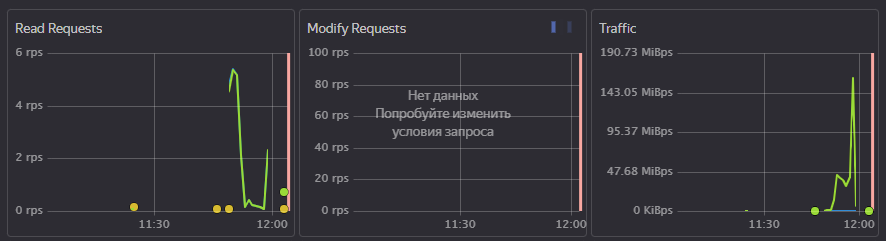 A full download log with GODEBUG=http2debug=2 is more than 3GB. These are the last 1000 lines (let me know if you need the full log):
s3debug003_tail.log
Second test:
I did this on a prod server (clickhouse-backup version 1.4.9)
S3_STORAGE_CLASS=STANDARD clickhouse-backup create_remote backup_standard --table=default.adv_keyword_stat
And this on the test server (clickhouse-backup version 1.5.2):
GODEBUG=http2debug=2 S3_STORAGE_CLASS=STANDARD clickhouse-backup152 download backup_standard --table=default.adv_keyword_stat >s3debug004.log 2>&1
The resulting log file:
s3debug004.log.zip
A full download log with GODEBUG=http2debug=2 is more than 3GB. These are the last 1000 lines (let me know if you need the full log):
s3debug003_tail.log
Second test:
I did this on a prod server (clickhouse-backup version 1.4.9)
S3_STORAGE_CLASS=STANDARD clickhouse-backup create_remote backup_standard --table=default.adv_keyword_stat
And this on the test server (clickhouse-backup version 1.5.2):
GODEBUG=http2debug=2 S3_STORAGE_CLASS=STANDARD clickhouse-backup152 download backup_standard --table=default.adv_keyword_stat >s3debug004.log 2>&1
The resulting log file:
s3debug004.log.zip
was S3_STORAGE_CLASS=STANDARD clickhouse-backup152 download backup_standard --table=default.adv_keyword_stat second test sucessful or not?
s3debug004.log.zip contains only http2 debug but doesn't contains any info message from clickhouse-backup, and it looks weird
Yep, it was successful download. Should I add LOG_LEVEL=debug and/or other flags to it and do it again?
So, could you please change S3_STORAGE_CLASS from STANDARD_IA to STANDARD
and once run upload + download, and share if will it successful?
I need to know the root reason for debug and try to reproduce on my side 200Mbit\s from your screenshot doesn't look like "high" speed
moreover, you could install trickle (look details https://github.com/AlexAkulov/clickhouse-backup/issues/418#issuecomment-1075170193) to try to restrict bandwidth and check download with STANDARD_IA class
Do you mean: upload full 2TB backup with STANDARD storage class and try to download it with and without bandwidth limiter?
We can try only one table, for begin
root reason yandex.cloud close connection when decide TCP congestion window is too high (https://github.com/AlexAkulov/clickhouse-backup/issues/494#issuecomment-1227277460)
we need to check it depends on storage class or not
it did not reproduce on my side (I tried 5-10Gb backups for our testflows test suite)
I will try implementation of retries in v2
and continue to figure out why download didn't break after first error with DOWNLOAD_CONCURRENCY=1
but it not related to this issue
I uploaded one table with storage class STANDARD and reproduced download error with the following command: LOG_LEVEL=debug GODEBUG=http2debug=2 clickhouse-backup152 download backup_standard --table=default.position_in_category Here is the log (last 1000 lines): s3debug007_tail.log But it's not 100% reproducible - fails from time to time.
shared log is not enough could you share a full log? need to see full sequence
Great, we clear about error circumstances it doesn't depend on storageClass and depends solely on TCP congestion window increasing
Could you check 1.6.1 version, where I upgraded aws-sdk to latest version?
Here is the full log (too big to attach): https://www.dropbox.com/s/4xmpzsnlpaw9ssu/s3debug007.log.zip?dl=0 Thank you, I will try 1.6.1 and return to you with feedback.