

 Altinity
Code: 1000. DB::Exception: Received from chi-datalake-ck-cluster-0-0:9000. DB::Exception: Timeout. (POCO_EXCEPTION)
Error info: Received exception from server (version 22.2.3): Code: 1000. DB::Exception: Received from chi-datalake-ck-cluster-0-0:9000. DB::Exception: Timeout. (POCO_EXCEPTION) (query: SELECT name FROM system.backup_list WHERE location='remote' AND name LIKE '20220722-%-shard_0-business-asset_log_local' ORDER BY created DESC LIMIT 1)
Received exception from server (version 22.2.3): Code: 1000. DB::Exception: Received from chi-datalake-ck-cluster-0-0:9000. DB::Exception: Timeout. (POCO_EXCEPTION) (query: INSERT INTO system.backup_actions(command) VALUES('delete remote 20220627-20220714-shard_1-business-asset_log_local')) Error on processing query: Code: 75. DB::ErrnoException: Cannot write to file (fd = 1), errno: 32, strerror: Broken pipe. (CANNOT_WRITE_TO_FILE_DESCRIPTOR) (version 22.1.3.7 (official build)) (query: SELECT name, location FROM system.backup_list)
Question: Query system.backup_list always takes a long time and sometimes timeout. And I cant delete my history backup at the same time. There are only 2k rows data in system.backup_list

Are you sure clickhouse-backup server still running?
Could you share results for the following query?
SHOW CREATE TABLE system.backup_list;
SELECT * FROM system.backup_actions;
could you also share
clickhouse-backup version
clickhouse-backup print-config

Are you sure
clickhouse-backup serverstill running?
Yes, pretty sure.
Could you share results for the following query?
SHOW CREATE TABLE system.backup_list;
SELECT * FROM system.backup_actions;
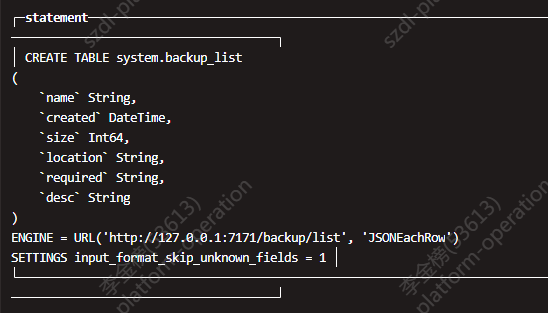
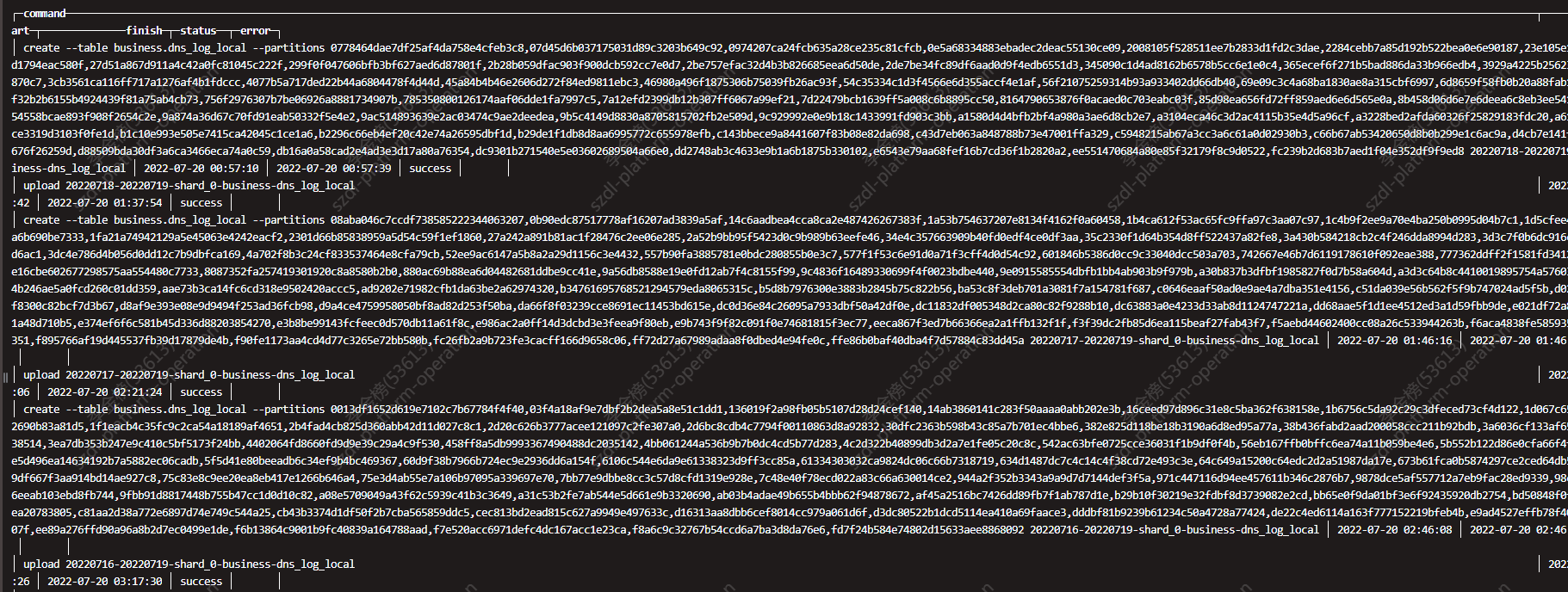
could you also share
clickhouse-backup version
clickhouse-backup print-config
bash-5.1$ clickhouse-backup --version Version: 1.4.3 Git Commit: 5f267bd8a2d409951e30203337270e5b187d0f17 Build Date: 2022-06-20
general:
  remote_storage: s3
  max_file_size: 0
  disable_progress_bar: true
  backups_to_keep_local: 1
  backups_to_keep_remote: 0
  log_level: info
  allow_empty_backups: false
  download_concurrency: 30
  upload_concurrency: 30
  restore_schema_on_cluster: cluster
  upload_by_part: true
  download_by_part: true
clickhouse:
  username: ****
  password: ********
  host: localhost
  port: 9000
  disk_mapping: {}
  skip_tables:
  - system.*
  - INFORMATION_SCHEMA.*
  - information_schema.*
  - default.*
  timeout: 5m
  freeze_by_part: false
  secure: false
  skip_verify: false
  sync_replicated_tables: false
  log_sql_queries: true
  config_dir: /etc/clickhouse-server/
  restart_command: systemctl restart clickhouse-server
  ignore_not_exists_error_during_freeze: true
  tls_key: ""
  tls_cert: ""
  tls_ca: ""
  debug: false
s3:
  access_key: ******
  secret_key: ******
  bucket: ******
  endpoint: ******
  region: ******
  acl: private
  assume_role_arn: ""
  force_path_style: true
  path: ""
  disable_ssl: true
  compression_level: 6
  compression_format: tar
  sse: ""
  disable_cert_verification: false
  storage_class: STANDARD
  concurrency: 1
  part_size: 10485760
  max_parts_count: 10000
  allow_multipart_download: false
  debug: false
gcs:
  credentials_file: ""
  credentials_json: ""
  bucket: ""
  path: ""
  compression_level: 1
  compression_format: tar
  debug: false
  endpoint: ""
cos:
  url: ""
  timeout: 2m
  secret_id: ""
  secret_key: ""
  path: ""
  compression_format: tar
  compression_level: 1
  debug: false
api:
  listen: 0.0.0.0:7171
  enable_metrics: true
  enable_pprof: false
  username: ""
  password: ""
  secure: false
  certificate_file: ""
  private_key_file: ""
  create_integration_tables: true
  integration_tables_host: ""
  allow_parallel: true
ftp:
  address: ""
  timeout: 2m
  username: ""
  password: ""
  tls: false
  path: ""
  compression_format: tar
  compression_level: 1
  concurrency: 28
  debug: false
sftp:
  address: ""
  port: 22
  username: ""
  password: ""
  key: ""
  path: ""
  compression_format: tar
  compression_level: 1
  concurrency: 1
  debug: false
azblob:
  endpoint_suffix: core.windows.net
  account_name: ""
  account_key: ""
  sas: ""
  use_managed_identity: false
  container: ""
  path: ""
  compression_level: 1
  compression_format: tar
  sse_key: ""
  buffer_size: 0
  buffer_count: 3
  max_parts_count: 10000
Anything useful? @Slach
Could you share result of the following command
LOG_LEVEL=debug S3_DEBUG=true clichouse-backup list remote
Which s3 backend do you use AWS S3 or something else?
There are only 2k rows data in system.backup_list
system.backup_list depends on local cache in /tmp/ folder
could you share ls -la /tmp/?
2k rows mean you need fetch 2000 backup_name/metadata.json if it not exists in local cache
how do you run clickhouse-backup server?
is it a kubernetes or docker or just standalone systemd service on the same instance with clickhouse-server
Could you share result of the following command
LOG_LEVEL=debug S3_DEBUG=true clichouse-backup list remote
debug.log It takes a long time to request some backup's metadata.json (about 2 mins). Can it be optimized? When i use regex sql to query with clickhouse-client, it will be highly probably timeout.
Which s3 backend do you use AWS S3 or something else?
Sangfor EDS, one product based on S3.
There are only 2k rows data in system.backup_list
system.backup_list depends on local cache in /tmp/ folder could you share
ls -la /tmp/?2k rows mean you need fetch 2000 backup_name/metadata.json if it not exists in local cache
According to the debug.log, the service has read /tmp/.clickhouse-backup-metadata.cache.S3 already. But I will backup one by one and also query list one time by one time, how do it refresh cache?
how do you run
clickhouse-backup server? is it a kubernetes or docker or just standalone systemd service on the same instance withclickhouse-server
kubernetes.
By the way, when I insert 'delete remote ***' command into system.backup_actions, the command certainly will be failed with the error info as follow. What can I do for this issue?
Received exception from server (version 22.2.3): Code: 1000. DB::Exception: Received from chi-datalake-ck-cluster-0-0:9000. DB::Exception: Timeout. (POCO_EXCEPTION) (query: INSERT INTO system.backup_actions(command) VALUES('delete remote 20220703-20220714-shard_3-business-asset_log_local')) Error on processing query: Code: 75. DB::ErrnoException: Cannot write to file (fd = 1), errno: 32, strerror: Broken pipe. (CANNOT_WRITE_TO_FILE_DESCRIPTOR) (version 22.1.3.7 (official build)) (query: SELECT name, location FROM system.backup_list)
Received exception from server (version 22.2.3): Code: 1000. DB::Exception: Received from chi-datalake-ck-cluster-0-0:9000. DB::Exception: Timeout. (POCO_EXCEPTION) (query: INSERT INTO system.backup_actions(command) VALUES('delete remote 20220703-20220714-shard_3-business-asset_log_local')) Error on processing query: Code: 75. DB::ErrnoException: Cannot write to file (fd = 1), errno: 32, strerror: Broken pipe. (CANNOT_WRITE_TO_FILE_DESCRIPTOR) (version 22.1.3.7 (official build)) (query: SELECT name, location FROM system.backup_list)
it just means you reach clickhouse timeout 300sec during execution
could you share logs inside clickhouse-backup container for this operation?
could you share logs inside clickhouse-backup container for this operation?
I can not find the related log in clickhouse-backup container and the related row in system.backup_action. What should I do next?
according to
HEAD /***bucket***/20220712-20220716-shard_0-business-dns_log_local/metadata.json HTTP/1.1
returns
HTTP/1.1 404 Not Found
Are you sure your backup 20220712-20220716-shard_0-business-dns_log_local upload was complete?
looks like you have lot of broken backups in your bucket
i propose change
s3:
  path: ""
to
s3:
  path: "{cluster}/{shard}"
be carefull, your backup list will empty after this change
moreover, why you try create each table backup separatelly instead of create backup for whole database? do you try Point-in-time recovery?
I only need to backup hot data instead of all of them. Actually it will works well if I can get result quickly for my query.
Why did I get these broken backups? If I retry upload the same backup, will the problem solved? And why broken backups affect my query process?
Why did I get these broken backups?
looks like your upload operation not finished, backup_name/metadata.json create only when upload data +table metadata complete) don't know reason (container restart maybe?), look to your clickhouse-backup container logs for related period
If I retry upload the same backup, will the problem solved?
you need delete remote backup before upload overwrite is not implemented now
And why broken backups affect my query process?
because you have a lot of backups in one directory (all shards use the same path: "") and clickhouse-backup try to process metadata.json for each backup which metadata.json not stored on local cache
moreover your S3 backend works slow and list of 1000 objects from bucket got 30+ seconds for each iteration look to recommendation here https://github.com/AlexAkulov/clickhouse-backup/issues/482#issuecomment-1204915392
2022/08/01 03:46:49.413952  info DEBUG: Request s3/ListObjectsV2 Details:
---[ REQUEST POST-SIGN ]-----------------------------
GET /***bucket***?delimiter=%2F&list-type=2&max-keys=1000&prefix= HTTP/1.1

-----------------------------------------------------
2022/08/01 03:47:21.703610  info DEBUG: Response s3/ListObjectsV2 Details:
---[ RESPONSE ]--------------------------------------
HTTP/1.1 200 OK

-----------------------------------------------------
2022/08/01 03:47:21.707584  info DEBUG: Request s3/ListObjectsV2 Details:
---[ REQUEST POST-SIGN ]-----------------------------
GET /***bucket***?continuation-token=20220704-20220714-shard_0-business-http_log_local%2F&delimiter=%2F&list-type=2&max-keys=1000&prefix= HTTP/1.1

-----------------------------------------------------
2022/08/01 03:47:52.638506  info DEBUG: Response s3/ListObjectsV2 Details:
---[ RESPONSE ]--------------------------------------
HTTP/1.1 200 OK

-----------------------------------------------------
2022/08/01 03:47:52.648256  info DEBUG: Request s3/ListObjectsV2 Details:
---[ REQUEST POST-SIGN ]-----------------------------
GET /***bucket***?continuation-token=20220713-20220715-shard_1-business-ioa_log_local%2F&delimiter=%2F&list-type=2&max-keys=1000&prefix= HTTP/1.1

-----------------------------------------------------
2022/08/01 03:48:10.420113  info DEBUG: Response s3/ListObjectsV2 Details:
---[ RESPONSE ]--------------------------------------
HTTP/1.1 200 OK