

 AllAboutCode
Artificial Intelligence / Machine Learning projects
I'd love to try and get EduBlocks working with Machine Learning for Kids. I've got custom blocks for Scratch and App Inventor, so it'd be great to try and do something similar with EduBlocks.
If you're interested/supportive of this sort of thing, please let me know. And if so, I'm happy to do the coding if you could give me a general pointer as the best way to approach it (e.g. new mode? new blocks for the Python mode? something else?)

Hey Dale,
So sorry for the late reply on this, I had been meaning to get back.
I actually saw a demo of ML for Kids by Nic Hughes and instantly thought about getting this into EduBlocks.
Currently the only way to get this in EduBlocks is on the Raspberry Pi for now as the web mode runs off Trinket which I can't add libraries too. I'm looking into way around this to allow me to add more libraries to the Python mode though so stay tuned on that.
I started work on a guide on how to add libraries into EduBlocks and i'll be sure to finish it and send it your way.

Hiya @JoshuaLowe1002 - just a reminder that I'm still interested in helping make this happen. If there is anything I can do to help, please let me know.
This issue has been automatically marked as stale because it has not had recent activity. It will be closed if no further activity occurs. Thank you for your contributions.
![stale[bot] avatar](https://avatars.githubusercontent.com/in/1724?v=4 "Published by a pub.dev verified publisher")
Hey @dalelane, progress update!
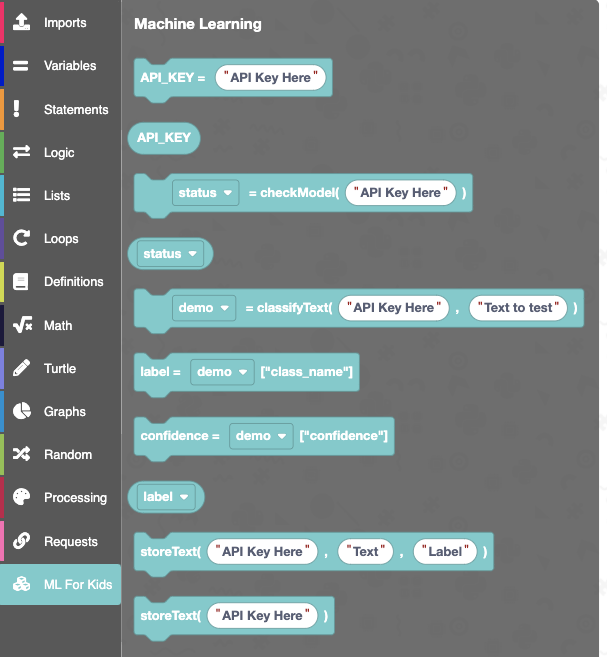
First thing that i've implemented is an ML For Kids Category in the EduBlocks toolbar.
This contains all the blocks you will need to use the "MLModel" and "MLText" libraries which are also implemented into EduBlocks and can be imported via the imports tab.
All of this runs on the online python 3 mode so no need to install anything, completely cross platform and browser based.
Here's the ML For Kids category:
I've tried to make it as easy as possible to get started with this and i've built it around the idea you implement EduBlocks as an option under "make" on your website.
It's really simple to get some starter code.
Basically navigate to the editor with "#mlstarter?" at the end of the URL and then have an API key that will be used to populate an API Key block. Here's an example:
http://beta.app.edublocks.org/#mlstarter?95024ad0-c2c6-11ea-9410-d7ee1efeb4dd78d394c4-b25a-43ca-9188-6988e72a7714
This should hopefully be really easy for you to then implement into your website. Navigating to that will give you the following starter code.
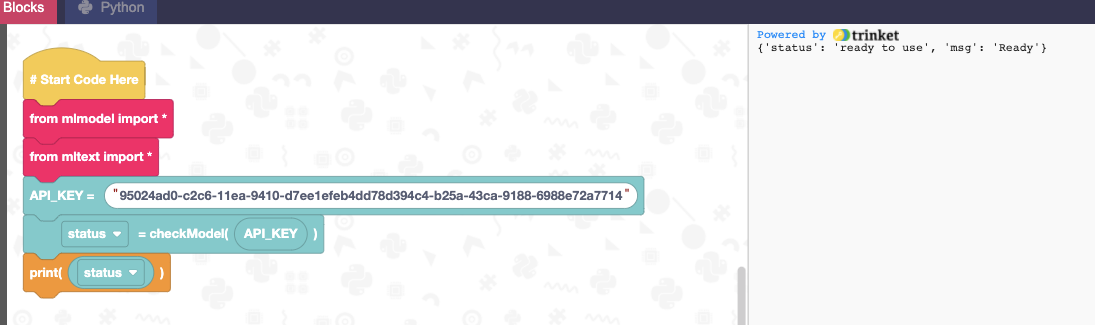
Please let me know what you think and what you'd add/change. Hope you like it! This will open up possibilities for lots of cool EduBlocks projects!
This looks fantastic, thanks!
A nice extension would be to be able to access the properties of the status object. That would let you do things like an if test for status["msg"] == "Ready". But that's just an idea, and not essential.
I've got a PR ready to add this to the 'Make' section of the ML for Kids site, so it can link to the mlstarter URL. I'm assuming I'll need to remove the "beta" bit from the URL once you're ready to launch, but otherwise I think it's ready to go.
No worries, thanks for adding that PR!
Yeah, the site will be live at the end of August. I've got to still add the images and number libraries in and will add that block too!
Hi @dalelane,
Sorry for not ever releasing this, I started a new job in August so had to focus on that, however, with the launch of micro:bit V2 I've picked this new release back up which I'll have to get out by November for the launch of V2. Hopefully that gives you a better timescale.
No problem - I totally understand what it's like to have the day-job get in the way :-)
Congrats on the new job!